


If you run a small business or work as a solo founder, chances are your documents don’t live in one place due to bad document management. A client agreement is sitting in your email, invoices are saved somewhere in a drive folder you barely remember creating, onboarding files arrive through forms or WhatsApp, and a few important files still sit on your desktop. When you actually need a document, you end up searching everywhere except the right place.
It usually doesn’t feel like a serious problem at first. You manage things as they come. But as clients grow and work picks up, finding files starts taking longer than it should. You pause during client calls to look for attachments, approvals go missing in long email threads, and sometimes you end up asking, “Can you resend that file?” even though you know it was shared before.
For most small teams, there isn’t a separate admin department handling this work. Founders and team members manage documents themselves, which includes downloading files, organizing folders, and following up manually just to keep work moving. Over time, these small interruptions add up and slow down daily operations.
This is why many businesses eventually start looking for document management software. The real issue isn’t where files are stored. It’s that documents, conversations, and customer information live in different places that don’t talk to each other. In other words, document management is more than a storage problem, it’s a workflow problem.
Why Document Management Becomes a Daily Struggle for Small Businesses

For many small businesses, document issues don’t appear overnight. They build slowly as the business grows. What starts as a few files shared over email or saved in a folder eventually turns into dozens of client documents spread across different tools. Without a clear system for managing business documents, even simple tasks begin to take longer than they should.
Large companies often solve this with dedicated operations or admin teams. Small businesses don’t have that luxury. That’s where document management problems begin, not because teams are careless, but because their workflow was never designed to handle growing document volume.
Common Reality for Solo Founders & Small Teams
Solo founders and small teams operate differently from larger organizations. Every process is hands-on, and document management is usually handled alongside everything else.
There’s rarely a dedicated admin person responsible for organizing small business documents. Files arrive from everywhere:
- Email attachments
- Shared drive uploads
- Online forms
- Customer messages
- Quick file shares through chat apps
Each source creates another place where documents need to be saved and tracked.
What once took seconds, locating a contract or checking an approval, now requires searching through multiple folders and conversations. For small teams trying to stay productive, organizing business files manually simply doesn’t scale.
Documents Are Connected to Customers, But Stored Separately
The biggest reason document management for small businesses becomes frustrating is that documents are closely tied to customers, yet they are stored far away from customer information.
Client files may sit inside shared drives. Conversations live in email threads. Agreements and approvals are stored somewhere else entirely. When a team member needs a complete picture of a client, they have to jump between tools just to piece things together.
This separation creates constant friction. During onboarding, teams search for missing forms. On follow-ups, they dig through emails for attachments. During ongoing work, they try to confirm which version of a document is the latest one. There’s no single place where all client documents and interactions come together.
The result is – disorganization, slow communication, delays in decisions, and an increase in the chances of mistakes. Small businesses struggle because their documents exist without context. And when documents aren’t connected to customers or workflows, managing them becomes harder with every new client added.
The Most Common Document Management Problems Small Businesses Face

Most small businesses don’t realize they have a document management issue until it starts affecting daily work. Missed files, repeated follow-ups, and time wasted searching for information slowly become part of the routine. These challenges happen because managing client documents without a proper system becomes harder as work grows.
Below are some of the most common document management problems small teams face while trying to keep business documents organized using multiple tools.
1. Documents Coming from Different Places
In a small business, documents rarely arrive in one consistent way. A contract may come through email, onboarding documents through an online form, identity proofs through WhatsApp, and additional files directly from clients during conversations. Each channel creates another storage location.
Without structured document management software, teams end up saving files wherever it feels convenient at the moment, such as drives, downloads folders, or shared links. Over time, this leads to scattered data where no one is completely sure where the latest version lives.
Managing business documents across multiple platforms makes even simple tasks frustrating. Instead of focusing on clients, teams spend time tracking where files were originally received.
2. Constant Follow-Ups for Missing Documents
One of the biggest hidden time drains for small businesses is chasing documents that should have already been submitted. Teams repeatedly follow up for signed agreements, onboarding forms, identification documents, or approvals needed to move work forward.
These repeated reminders slow down onboarding and delay projects. Payments may also get pushed back simply because required paperwork hasn’t been collected on time. For solo founders especially, document collection becomes an ongoing task rather than a one-time process.
Without a structured way of managing client documents, follow-ups become manual, inconsistent, and easy to forget, creating unnecessary friction for both businesses and customers.
3. Manual Uploading and File Sorting
Many small teams still rely on a fully manual process to organize business files. A document is downloaded from email, renamed for clarity, uploaded into a folder, and sometimes shared again with another team member. This repetitive workflow consumes more time than most people realize.
Manual file handling also increases the chances of human error. Files get saved in the wrong folders, duplicate versions appear, or important documents are accidentally overwritten. As the number of clients grows, maintaining consistency becomes nearly impossible.
What feels manageable with a few customers quickly turns into a confusing system that no one fully trusts.

4. Searching for Files During Important Moments
Document problems become most visible when timing matters. During a sales call, a team member may struggle to locate a proposal. On client onboarding, someone searches for submitted forms. During compliance checks or internal reviews, files need to be verified quickly but they aren’t easy to find.
These moments create unnecessary stress because information exists, but accessing it takes too long. Poor document organization doesn’t just waste time; it interrupts conversations, slows decisions, and affects how professional a business appears to clients.
Efficient document organization for small businesses doesn’t mean creating neat folders; it means having the right file available exactly when it’s needed.
5. Email Attachments Create Security and Version Confusion
Email often becomes the default way to share documents, but it introduces new challenges. Multiple versions of the same file circulate across threads, making it difficult to know which one is final. Team members may accidentally work on outdated copies, leading to confusion and rework.
There’s also limited control over who can access sensitive files once attachments are forwarded. Without proper access management, documents can be shared beyond intended recipients without visibility.
Over time, relying on email attachments for document sharing creates both security concerns and workflow confusion, 2 issues that small businesses rarely notice until a mistake happens.
What Small Businesses Should Look for in Document Management Software

Once document problems start affecting daily work, most businesses begin searching for a solution. But choosing the right document management software isn’t really about finding more storage space, you need a system that removes manual work and fits naturally into how small teams already operate.
Below are the features that actually make a difference when managing business documents day to day.
1. Automatic Document Collection Instead of Manual Uploads
One of the biggest time drains for small teams is collecting documents manually. Files arrive through emails, forms, or client messages, and someone has to download and organize everything one by one.
Good document management software should automatically collect documents from multiple sources and store them in the right place without constant intervention. When documents flow directly into the system, teams spend less time managing files and more time focusing on clients and work that matters.
2. Easy Document Requests Without Repeated Follow-Ups
Chasing clients for missing paperwork is frustrating for both sides. Whether it’s onboarding documents, agreements, or verification files, manual reminders slow down projects and create unnecessary back-and-forth communication.
A well-designed system should allow businesses to request documents in a structured way, making it easier for clients to upload what’s needed while keeping everything organized automatically. This reduces repeated follow-ups and keeps processes moving without constant reminders.
3. Documents Organized Automatically Around Each Client
Folders work when there are only a few files. As businesses grow, manual organization becomes unreliable. Files get misplaced, duplicated, or saved under inconsistent names.
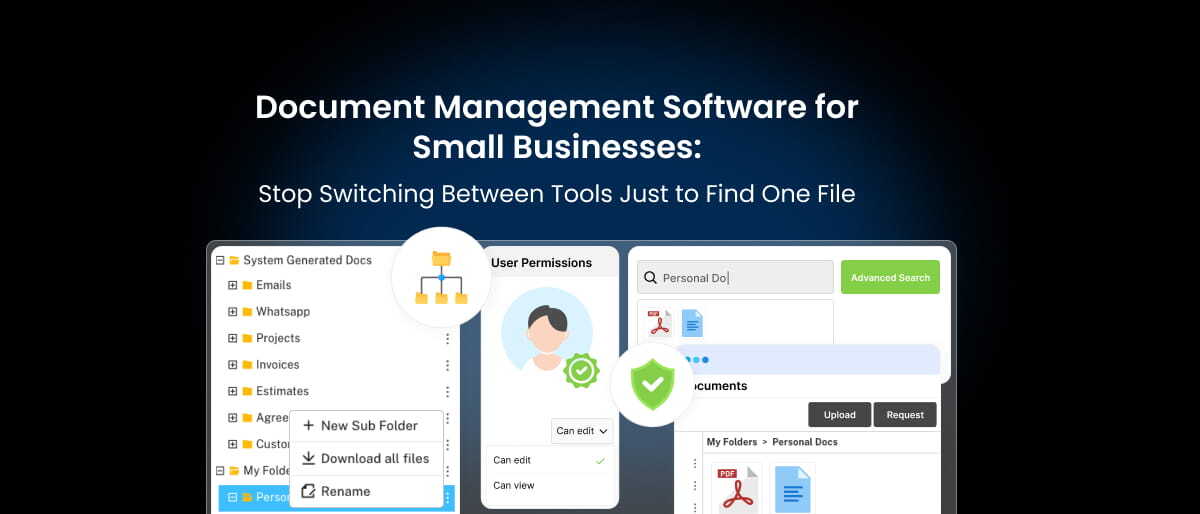
Modern document management for small businesses works differently. Documents should automatically stay linked to the right customer or project, creating a clear and organized view of all related files in one place. When client documents are connected contextually instead of stored randomly, finding information becomes effortless.
4. Secure Sharing Without Depending on Email Attachments
Email attachments often cause confusion, with multiple versions, accidental forwarding, and limited visibility into who has access to sensitive files.
A better approach is secure document sharing that allows businesses to send or receive files through controlled access rather than attachments. This keeps documents centralized while giving clients a simple way to view or upload files safely.
5. Controlled Access to Sensitive Documents
Not every document should be visible to everyone. Contracts, financial records, or internal approvals often require restricted access.
The right document management software should allow businesses to control who can view, upload, or manage specific files. Clear access control reduces risk while keeping collaboration smooth for small teams.
6. Built for Simplicity, Not Complexity
Many tools are designed with enterprise workflows in mind, which makes them overwhelming for smaller businesses. Solo founders and lean teams need something practical, a system that works without long setup processes or complicated training.
The best solutions simplify document workflows instead of adding another tool to manage. When documents are collected, organized, and shared automatically, teams spend less time handling admin work and more time running their business.
When Document Management Becomes Part of a Complete Business System
At some point, many small businesses realize that document problems aren’t isolated. Files get misplaced not because storage is missing, but because documents are disconnected from everything else, such as conversations, deals, approvals, and customer interactions all live in different tools. Fixing document organization alone helps, but the real improvement happens when documents become part of a larger, connected workflow.
This is the gap between many growing teams’ experience. They either use a lightweight CRM that tracks contacts but doesn’t support real operational work, or they look at enterprise platforms that feel overly complex, expensive, and difficult to adopt. What most small businesses actually need sits somewhere in between, i.e. one CRM for small businesses that connects daily work without adding more tools to manage.
That’s where platforms like Saleoid come in. Instead of treating document management software as a separate solution, Saleoid brings documents into the same space where customer relationships, sales activities, and ongoing work already happen. Every interaction, from the first inquiry to agreements, follow-ups, and payments, stays connected to the same customer record.
Rather than files being scattered across computers, email threads, shared drives, or chat apps, documents remain organized under each client. Teams can clearly see what has been received, what is still pending, and what action needs to happen next. Document requests can be sent directly through email, and reminders can be automated, reducing the constant back-and-forth that usually slows onboarding and approvals.
The Everyday Problems This Connected Approach Solves
- Tool overload and messy handoffs
In many small businesses, sales, marketing, billing, and documents exist in separate systems. Information gets duplicated, updates are missed, and teams spend time confirming details instead of moving work forward. A connected platform reduces these gaps by keeping everything tied to the same data.
- CRMs that stop at contact management
Traditional CRMs often focus only on contacts and pipelines. But real workflows involve documents, approvals, automation, and ongoing communication. A system that grows alongside operational needs prevents businesses from constantly switching tools as they scale.
- Pricing that becomes expensive as teams grow
Many platforms charge per user or require costly add-ons, making them difficult for startups and small teams to sustain. When comparing CRM pricing, it’s clear that some solutions quickly become expensive as you scale. Saleoid follows a simpler model, starting at $5 a month (2-year plan), so that businesses can begin affordably and expand only when needed.
- Email deliverability challenges during outreach
Marketing efforts often suffer when contact lists contain invalid or outdated entries. Saleoid supports one-time contact validation through credit-based checks, helping teams maintain cleaner lists and improve email deliverability over time.
- Managing multiple businesses or brands
Agencies and founders running more than one company often struggle with switching between accounts. Saleoid allows multiple companies to be managed under a single subscription, reducing operational complexity.
How Solo Founder and Small Teams Typically Start Using It
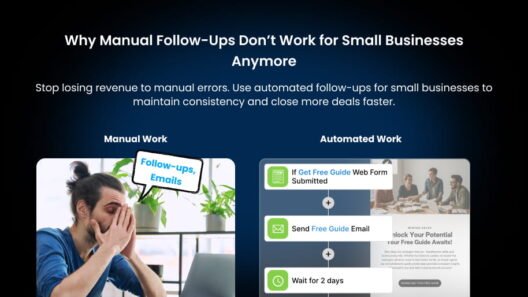
Most teams begin by centralizing contacts, deals, and client documents in one place. Once everything is organized, they gradually introduce workflows like lead capture forms, automated follow-ups, marketing campaigns, or billing, without needing to migrate to a different platform later.
Because Saleoid offers both Custom Plans and Bundled Plans, businesses can start lean and expand as their processes evolve. Every plan includes a 15-day risk-free trial, and onboarding support is available depending on the plan or as a one-time add-on.
For small businesses looking for a simpler way to manage documents while keeping sales, communication, and operations connected, the real advantage is having one system where work finally flows together instead of being spread across multiple tools.