
TD;LR
HubSpot is the right call if you want a mature, scalable platform and can budget for premium tiers. Saleoid is the right call if you want a modular, affordable CRM that starts at $5/month and scales only when you need it without forced upgrades or surprise billing.
Not sure which CRM category fits your stage? See our full guide: Best CRM for Small Businesses in 2026 →
If you run a small business, you’re probably choosing between 2 very different CRM experiences:
- HubSpot: powerful, well-known, and packed with features, but many users feel the costs and complexity rise quickly as they grow.
- Saleoid: a modular setup where you start small and add only what you need, so you’re not forced into expensive bundles.
This review-style comparison is written for people who want a CRM for small business that stays simple, affordable, and actually usable day-to-day.
We’ll use the most common real-world complaints about HubSpot and show where and how Saleoid is positioned as a practical HubSpot alternative.
But here is our quick verdict:
Choose HubSpot if you want a mature ecosystem, deep features across marketing, sales and service. Also, if you’re comfortable budgeting for premium plans and add-ons as you scale.
Choose Saleoid if you want a small business CRM that starts lean, keeps costs predictable, and lets you build your CRM like a menu. Pay for what you want and add more when needed.
Pricing and Cost Structure Comparison (2026)
Understanding the true cost of each platform requires looking beyond the headline price. Both HubSpot and Saleoid have very different billing models; here’s how they actually compare.
HubSpot Pricing: What You’ll Really Pay
HubSpot’s pricing is hub-based and scales across three dimensions: seats, marketing contacts, and plan tier. The free CRM is genuinely useful, but most small businesses hit its limits within 3–6 months.
| Plan | Price | What’s Included |
| Free CRM | $0 | Unlimited users, basic pipeline, email tools, live chat. No automation. |
| Starter (per hub) | $20/seat/mo | 1 seat, basic automation, removes HubSpot branding |
| Starter Customer Platform | $20/seat/mo | All 5 hubs at Starter level |
| Sales Hub Professional | $100/seat/mo | Advanced sequences, custom reporting, forecasting |
| Marketing Hub Professional | $890/mo | 3 seats, 2,000 contacts, multichannel automation, A/B testing |
| Full Professional Platform | $1,300/mo | 5 seats across all hubs |
| Marketing Hub Enterprise | $3,600/mo | 5 seats, 10,000 contacts, advanced AI and permissions |
| Full Enterprise Platform | $4,300/mo | 7 seats across all hubs |
One-time onboarding fees (non-negotiable):
- Sales/Marketing Hub Professional: $1,500
- CRM Suite Professional: $4,500
- Enterprise: $12,000
Additional costs that catch small teams off guard:
- Extra marketing contacts: $40–$250 per additional 1,000 depending on tier
- Contact tier lock-in: if your contact count crosses a higher tier mid-billing period, you’re charged at the higher rate until renewal, even if it drops back down
- Extra seats: $20–$150/seat/month depending on hub and tier
- Breeze AI credits: $45/month for 5,000 credits (consumed fast by AI features)
For a typical 5-person small business using Sales Hub Professional + basic Marketing Hub, realistic monthly spend lands between $1,200–$2,500/month once seats, contacts, and onboarding are factored in.
Saleoid Pricing: What You’ll Really Pay
Saleoid uses a modular pricing model, you start with the core CRM and activate additional apps as your business needs them. There are no forced bundles and no tier-based feature locks.
| Plan | Price | What’s Included |
| Custom Plan (2-year billing) | $5/mo | Core CRM, 2,500 contacts, 1 user, 5 automations, lead scoring, custom dashboards |
| Custom Plan (annual billing) | $9/mo | Same as above |
| Custom Plan (monthly billing) | $15/mo | Same as above |
| Business Suite (2-year billing) | From $19/mo | Pre-built bundle with core apps included |
| Additional users | $6/user/mo | All features, no restricted seat types |
| Additional apps | ~$1/app/mo | Email marketing, SMS, WhatsApp, projects, billing, e-sign, etc. |
One-time fees: None. No mandatory onboarding or implementation charge.
Free trial: 15 days.
Side-by-Side: True Cost for a Small Business
| HubSpot | Saleoid | |
| Starting price | $0 (free CRM) / $20/seat (Starter) | $5/mo (2-year) / $15/mo (monthly) |
| Free plan | ✅ Yes, no expiry | ❌ No (15-day trial) |
| Marketing automation | From $890/mo (Marketing Hub Pro) | Included as add-on app |
| Users (base plan) | 1 seat | 1 user |
| Contacts (base plan) | Unlimited (CRM) / 1,000–2,000 (Marketing Hub) | 2,500 |
| Extra users | $20–$150/seat/mo | $6/user/mo |
| Extra contacts | $40–$250 per 1,000 (Marketing Hub) | Included in plan tiers |
| Onboarding fee | $1,500–$12,000 (one-time) | None |
| Cost predictability | Low, multiple scaling triggers | High, add only what you need |
| Typical SMB monthly cost | $500–$2,500/mo | $15–$80/mo |
Note: Pricing based on publicly available data, May 2026. Verify current figures at saleoid.com/crm-pricing and hubspot.com/pricing.
Why small businesses often get frustrated with HubSpot
HubSpot is popular for a reason. But the complaints you shared are real themes you’ll find across review platforms and user feedback:
1. Costs don’t stay “small business friendly” for long
HubSpot’s free entry point is attractive, but many teams hit paywalls when they need automation, advanced reporting, or scale. Users frequently mention the price rising as requirements grow. A specific example: Sales Hub paid tiers are seat-based, and certain tiers include one-time onboarding fees depending on plan level.
2. “We got upgraded and now we’re stuck paying until renewal”
A less obvious cost trigger is contact-based billing, especially on Marketing Hub. HubSpot explains that when your marketing contacts push you into a higher tier:
- The upgrade can take effect immediately, and
- You can be billed at the higher tier until renewal, even if the contact count later drops.
For a small business, that can feel like a surprise cost jump, especially if you’re importing lists or running campaigns.
3. Essential features can sit behind expensive tiers
If your sales team needs automation and reporting depth, users often say they end up upgrading sooner than expected. That’s a common point in G2 “dislikes” too, which says capabilities may require “an expensive plan.”
4. Learning curve for teams that just want to sell
HubSpot can be clean and polished, but users still mention the learning curve, especially around CRM concepts, workflows, and reporting. For a small team, the real cost is the time spent learning, configuring, and maintaining.
Where Saleoid positions itself differently
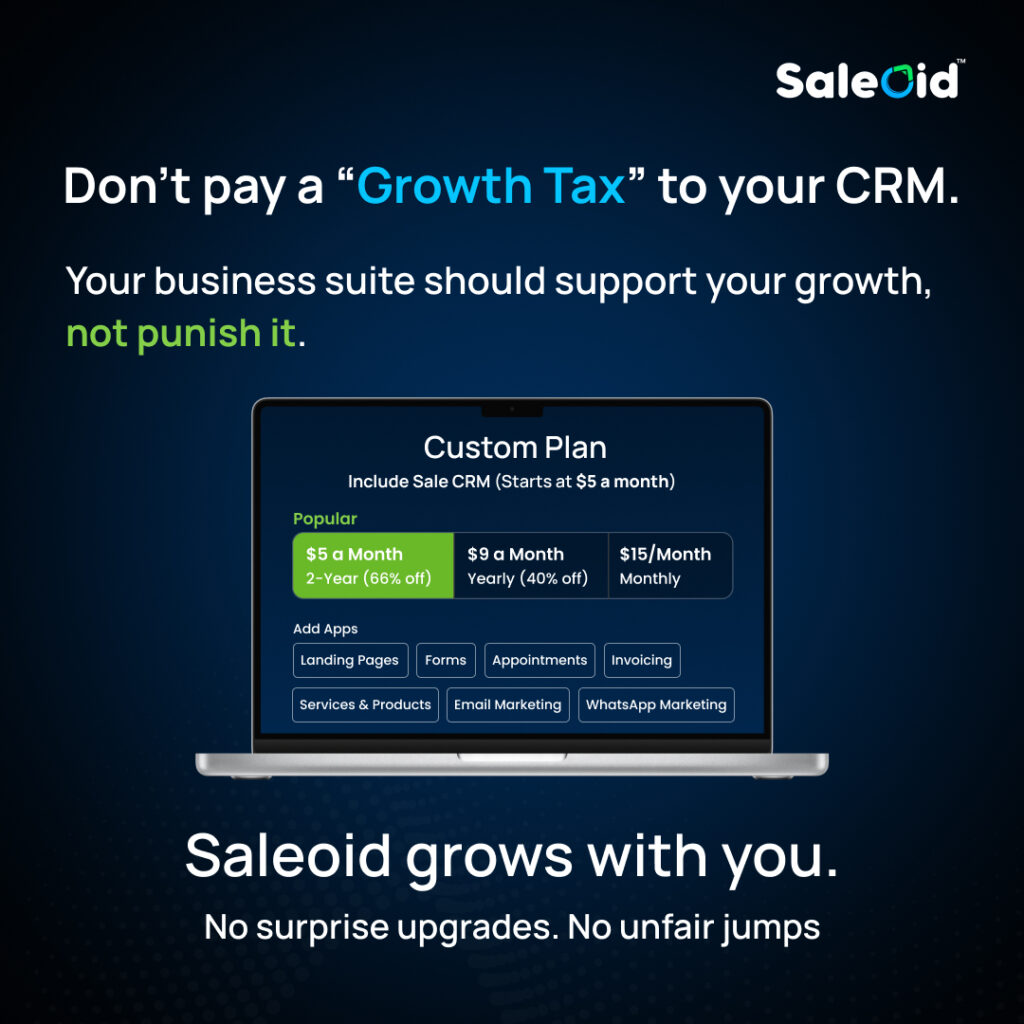
Saleoid’s pitch is straightforward: start cheap, stay flexible, and don’t pay for bundles you don’t need.
- Saleoid’s pricing pages describe a “custom plan” that starts at $5/month (with longer billing terms) and is built around paying for only the apps/features you choose.
- Saleoid also markets “20+ apps” and a modular approach where you customize as you grow.
So the comparison becomes less about “who has more features?” and more about –
Which CRM helps a small business stay organized without getting priced out?
The “hidden cost” checklist: HubSpot pain points vs Saleoid approach
Below, we’ve discussed how your “negative review themes” typically show up in real life, and what the Saleoid approach is trying to solve.
1. Rapid cost increases as you scale
What small businesses experience with HubSpot: You start with the basics. Then you need automation, reporting, more seats – then your marketing contact tiers rise. And suddenly, the monthly spend doesn’t feel like “small business” anymore. How Saleoid tries to solve it: Saleoid’s model is “build your own CRM” with a low starting plan, adding apps/modules as needed.
2. Paying for bundles you don’t use
HubSpot reality for many teams: A lot of capability is spread across hubs and tiers. You may end up paying for a tier to unlock one or two needed features.
Saleoid angle: Modular! You don’t have to “buy the whole package” to get started.
3. Contact billing surprises
HubSpot reality: HubSpot’s own documentation states you can be bumped into a higher marketing contact tier and billed at that tier until renewal (no mid-term downgrade).
Small teams import lists, run experiments, and often don’t have time to micromanage contact status. One mistake can affect the cost for months.Saleoid’s positioning: Because it pushes modular pricing (pay for features/apps), the messaging is designed to avoid these “surprise jumps.”
4. Mandatory onboarding fees/implementation costs
HubSpot reality: HubSpot’s own tier guidance content references onboarding fees for certain plans (for example, Sales Hub Professional onboarding fee details are described in HubSpot’s pricing guide content).
Saleoid angle: Saleoid highlights low entry pricing and a custom plan approach, which typically appeals to teams trying to avoid high initial commitments.
Pricing and Cost Structure Comparison
Instead of quoting every number (they change), here’s a practical way to compare costs:
HubSpot cost drivers (common in small business setups)
- Seats/users (Sales Hub tiers are seat-based)
- Onboarding fees on certain tiers
- Marketing contact tiers that can lock in higher billing until renewal
- Feature paywalls (automation/reporting depth often requires higher plans)
Saleoid cost drivers (based on how it presents pricing)
- Start with a low base “custom plan” and add apps/features as needed
- Different billing terms (monthly/yearly/2-year) affect the effective starting price
Pricing Structure Overview
Saleoid’s Pricing Model
Saleoid follows a simple structure:
- $5/month (2-year plan)
- $9/month (yearly plan)
- $15/month (monthly plan)
You start with the core CRM and add apps as your business grows. This makes it easier to control spending and avoids paying for tools you don’t use.
HubSpot’s Cost Reality for Small Teams
HubSpot’s free tools are helpful at the start. But most growing teams quickly need:
- Automation
- Advanced reporting
- Better integrations
- Larger contact limits
These usually require upgrades and sometimes onboarding fees.
Over time, many small businesses report that their CRM becomes one of their highest recurring software expenses.
| Pricing Factor | HubSpot | Saleoid |
|---|---|---|
| Starting Cost | Free tier, paid plans scale quickly | Starts from $5/month (2-year plan) |
| Billing Model | Seats + hubs + contact tiers | Modular apps |
| Onboarding Fees | Common on higher plans | Not positioned as mandatory |
| Upgrade Pressure | Frequent | Optional |
| Cost Predictability | Medium to Low | High |
How Saleoid’s Feature Set Solves Common HubSpot Complaints for Small Businesses
When small businesses start comparing CRM platforms, the goal is rarely to find the “most advanced” system. Most founders are simply looking for a CRM for small business that is affordable, easy to use, and reliable in daily operations.
Many companies choose HubSpot expecting simplicity, but over time, common issues begin to appear. Rising costs, locked features, and increasing complexity often become barriers to growth. This is why many business owners actively search for a practical HubSpot alternative.

Saleoid’s feature structure is designed to address these exact concerns.
1. Solving the Problem of Paying for Unused Features
One of the most frequent complaints in any CRM comparison involving HubSpot is paying for bundled plans that include tools a business does not use.
With HubSpot, small teams often upgrade to access one required feature and end up paying for multiple others that remain unused. This leads to higher monthly expenses without proportional value.
Saleoid follows a modular model. Businesses can activate only the features they need, such as sales CRM, email marketing, invoicing, or appointment scheduling. This allows teams to build a customized CRM for small businesses without wasting money on unnecessary tools.
2. Reducing Dependency on Multiple Third-Party Tools
Many HubSpot users still rely on additional software for billing, document storage, project management, and subscriptions. This creates software overload and increases operational complexity.
Saleoid integrates these functions within one platform:
- Invoicing and Billing
- Subscription Management
- Document Management
- Project Management
- Estimates and Pricing
By offering these tools in one system, Saleoid reduces the need for external applications. This improves CRM workflow efficiency and makes it easier for small teams to manage daily operations.
3. Preventing Unexpected Cost Increases
Another major concern for small businesses using HubSpot is unpredictable pricing. Costs often rise due to contact limits, required upgrades, and onboarding fees.
This makes long-term budgeting difficult, especially for growing teams.
Saleoid’s pricing focuses on feature usage rather than aggressive tier upgrades. Businesses start with a low base plan and add apps as required. This model helps maintain financial control and makes Saleoid a strong candidate for those looking for the best HubSpot alternative CRM.
4. Simplifying Setup and Daily Usage
HubSpot offers a wide range of tools, but many users report that setting up pipelines, automation, and reporting can take time and technical effort. For small businesses without dedicated CRM specialists, this can slow adoption.
Saleoid is designed to be easier to configure and use. Features such as sales pipeline management, meeting scheduling, email campaigns, and lead tracking are structured to work together from the start.” to “Saleoid is designed to be easier to configure and use. As a sales pipeline CRM, it brings sales pipeline management, Appointment Scheduling Software, Email Marketing Software, meeting scheduling, email campaigns, and lead tracking into one connected system. Instead of stitching together multiple tools, everything is structured to work together from the start, helping teams move leads through the pipeline faster and more efficiently.
This reduces training time and improves team adoption, making it a practical sales CRM for small teams.
5. Improving Lead and Customer Management
Effective lead and customer tracking is essential for any CRM for small business.
HubSpot users sometimes struggle with scattered data across different hubs and tools. Important customer history may not always be visible in one place.
Saleoid centralizes customer information, engagement history, documents, and communication within one system. Tools like AI chatbot, form builder, and landing page builder also support lead generation and nurturing inside the same platform.
This integrated approach helps teams maintain better relationships and close deals more efficiently.
6. Supporting Business Growth Without Forcing Upgrades
As businesses grow, CRM needs naturally change. The challenge is finding a platform that can scale without constant forced upgrades.
HubSpot often requires moving to higher plans to unlock advanced features. This can create financial pressure for small businesses.
Saleoid allows gradual expansion. New apps and functions can be added when needed, without restructuring the entire system. This flexibility makes switching from multiple tools to CRM smoother and less disruptive.
Why This Matters in a Saleoid vs HubSpot Comparison
features. It is about which platform delivers better value, usability, and cost control. Saleoid’s feature structure focuses on:
- Affordable entry pricing
- Modular expansion
- Unified operations
- Lower long-term risk
- Better CRM workflow efficiency
For small businesses seeking a reliable HubSpot alternative that balances functionality with simplicity, this approach often proves more practical than complex bundled systems.
Saleoid vs HubSpot: Which Should You Choose?
Choose HubSpot if…
- You have a dedicated marketing team that will actually use multi-hub features
- You need campaign attribution, connecting ad spend directly to closed revenue
- You’re planning to scale past 20+ users and want enterprise-grade reporting
- You’re comfortable with a $1,000–$3,000+/month budget once you’re past the Starter tier
- You already use tools like Salesforce, Slack, or LinkedIn Sales Navigator and need certified integrations
- A free CRM starting point matters to you before committing to paid plans
Choose Saleoid if…
- Budget is a real constraint, HubSpot’s Pro pricing is out of reach right now
- You want automation, email marketing, WhatsApp, invoicing, and a client portal without paying for separate hubs
- You’re a solo operator, small agency, or service business that doesn’t need enterprise analytics
- You want to start lean at $5/month and activate features only when your business actually needs them
- You manage multiple client accounts and need sub-accounts under one subscription
- Predictable, flat-rate pricing matters more than access to the largest feature ecosystem
FAQs: Saleoid vs HubSpot for Small Businesses
Yes, significantly at every comparable tier. Saleoid’s base plan starts at $5/month (2-year billing) or $15/month on a monthly plan, with additional features added as modular apps at roughly $1 each. HubSpot’s free CRM is available at no cost, but the paid features most small businesses actually need, automation, advanced reporting, A/B testing, start at $890/month for Marketing Hub Professional. For a fully loaded small business setup, Saleoid typically costs $20–$80/month versus $800–$2,500/month for equivalent HubSpot functionality.
Saleoid does not have a permanently free tier, but it offers a 15-day free trial with no credit card required. After the trial, the lowest paid plan starts at $5/month on a 2-year billing cycle or $15/month on a monthly plan. HubSpot, by contrast, has a genuinely free CRM with no time limit, making it the better starting point if you need $0/month indefinitely.
For most small businesses with under 20 employees, yes, Saleoid covers the core needs: CRM, pipeline management, email marketing, automation, invoicing, appointment scheduling, and client portals, all in one system. The gap shows for businesses that need enterprise-grade analytics, multi-hub campaign attribution, or deep integrations with tools like Salesforce or LinkedIn Sales Navigator. If those aren’t requirements yet, Saleoid delivers more usable functionality per dollar at the small business stage.
HubSpot’s free CRM works well for solopreneurs who only need contact management, basic email tools, and a simple pipeline. However, a solo operator who wants automation, landing pages, and appointment scheduling will quickly need paid hubs, pushing costs to $50–$200+/month. Saleoid is often a better fit for solopreneurs because it bundles these features from its base plan at a much lower price point, without requiring separate hub subscriptions.
Yes, the process involves exporting your HubSpot contacts, deals, and notes as a CSV file, then importing them into Saleoid. Saleoid’s one-click onboarding tool is designed to simplify this process. You’ll need to rebuild any automation sequences and pipeline stages in Saleoid’s workflow builder, which typically takes 1–2 days depending on complexity. Saleoid does not charge a migration fee.
HubSpot’s Marketing Hub is more powerful for large-scale campaigns, with advanced segmentation, smart content, multichannel workflows, and campaign attribution, but these features require the Professional tier at $890/month. Saleoid includes email marketing as a modular add-on at a fraction of that cost, covering campaign creation, automation, and list management. For a small business sending regular newsletters and automated follow-up sequences, Saleoid’s email tools handle the job well. HubSpot is the better choice only if sophisticated attribution and multi-channel campaign management are genuine requirements.
HubSpot is a trademark of HubSpot, Inc. Saleoid is not affiliated with or endorsed by HubSpot. Details may change—verify on HubSpot’s site.