
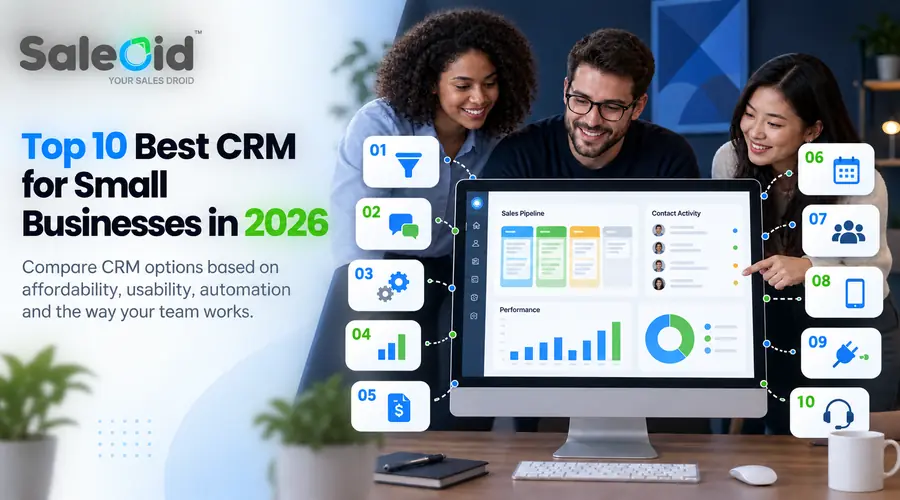

Quick Answer: Best CRM for Small Businesses in 2026
| If You Need | Best CRM Option |
|---|---|
| Best affordable all in one CRM | Saleoid |
| Best free CRM | HubSpot CRM |
| Best visual sales pipeline | Pipedrive |
| Best CRM for customization | Zoho CRM |
| Best CRM with built in communication tools | Freshsales |
| Best CRM for flexible workflows | monday CRM |
| Best lightweight CRM | Bigin by Zoho |
| Best straightforward CRM for beginners | Less Annoying CRM |
| Best CRM for established service businesses | Keap |
| Best CRM for calling and sales automation | Salesmate |
TL;DR
The best CRM for a small business depends on how your team sells and communicates with customers. Saleoid suits businesses looking for an affordable all in one setup, HubSpot offers a useful free starting point, Pipedrive is strong for visual pipeline management, Zoho CRM provides deeper customization, and Freshsales combines CRM functionality with built in email, chat, and phone tools.
Introduction
Running a small business today means handling more conversations, more leads, and more customer expectations than ever before. Spreadsheets, email threads, and scattered notes quickly become unmanageable as the business grows. Follow-ups get delayed, customer details are hard to find, and sales opportunities quietly slip away.
This is exactly why more owners are actively searching for a reliable CRM for small businesses. Not because CRM software is new, but because small teams are realizing that growth becomes difficult without a structured way to manage leads and relationships. They need a system that keeps customer information organized, shows where every deal stands, and helps teams stay consistent with follow-ups. They need a small business CRM software that removes confusion instead of adding complexity.
The challenge, however, is choice. There are hundreds of CRM tools available today, each claiming to be the best. Some focus on sales pipelines, others on marketing automation, and many bundle features that small teams may never actually use. Finding the best CRM for small businesses that fits your workflow, budget, and team size is harder than it should be.
This guide brings together the 10 best CRM software options for small businesses. For a broader look at features and buying considerations, read our guide to CRM software for small businesses.
What Small Businesses Should Look for in a CRM
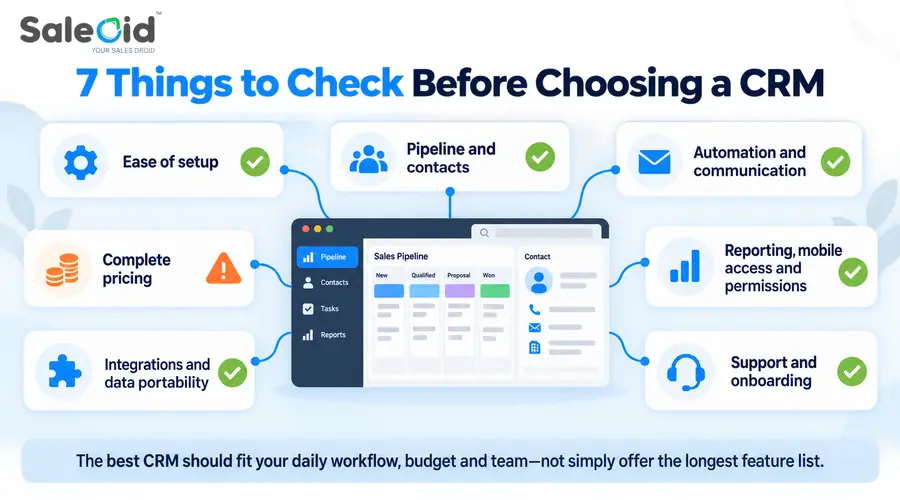
Choosing the right CRM for small businesses requires more than comparing feature lists. A platform may look affordable and capable at first, but limits on users, contacts, automation, integrations, or support can make a major difference once your team starts using it.
Before choosing a CRM, compare the areas that will directly affect your daily workflow and long term cost.
1. Ease of Setup and Daily Use
Small teams rarely have a dedicated CRM administrator, so everyday tasks should be straightforward. Adding contacts, updating deals, assigning activities, and finding customer history should not require extensive training.
Also consider how much configuration is required before the CRM becomes usable. A highly customizable platform can be valuable, but only if your team has the time and expertise to maintain it.
2. Sales Pipeline and Contact Management
A CRM should give your team a clear view of leads, deals, activities, and customer history. Look at whether you can customize pipeline stages, create custom fields, assign ownership, filter records, and track follow-ups. Sales CRM software helps teams prioritize opportunities and understand where deals are getting stuck.
Understanding how to manage a sales pipeline for small businesses can also help you identify which pipeline features are genuinely useful for your workflow.
3. Automation and Communication Tools
Workflow automation can reduce repetitive work such as reminders, lead assignments, follow up emails, and status updates. However, automation limits often vary by plan, so check how many workflows you can create and which triggers or actions require an upgrade.
If your team communicates heavily through email, phone, SMS, or WhatsApp, also check whether those channels are built in, available as paid add ons, or dependent on third party integrations.
4. Pricing, User Limits, and Billing Terms
Do not compare CRM software only by its advertised starting price. Check whether pricing is per user or per account, how many users are included, whether there is a minimum seat requirement, and whether the lowest rate requires annual or multi year billing.
Also review contact limits, additional user charges, paid add ons, onboarding fees, and features reserved for higher plans. The best affordable CRM is one that remains financially practical as your team and customer database grow.
5. Integrations and Data Portability
Your CRM should work with the tools your business already relies on, such as email, accounting, calendars, marketing platforms, forms, and communication apps.
Data portability is equally important. Check whether contacts, deals, activities, and other records can be imported and exported easily. This becomes especially valuable if you later migrate to another CRM.
6. Reporting, Mobile Access, and Permissions
Reporting needs vary by business, but even a small team may need visibility into pipeline value, sales activity, conversion rates, and individual performance.
If employees work away from a desk, review the mobile app rather than assuming the desktop experience carries over. Businesses with several users should also check role permissions and access controls so sensitive customer or financial information is not visible to everyone.
7. Support and Onboarding
Support can become important when importing data, configuring automation, or troubleshooting integrations. Check which support channels are available on the plan you are considering, whether onboarding costs extra, and whether help is offered through live chat, email, phone, or only a knowledge base.
For a small business, the best CRM is one that fits the way your team already works while leaving enough room to grow without forcing unnecessary complexity or unexpected costs.
How We Evaluated These CRM Platforms
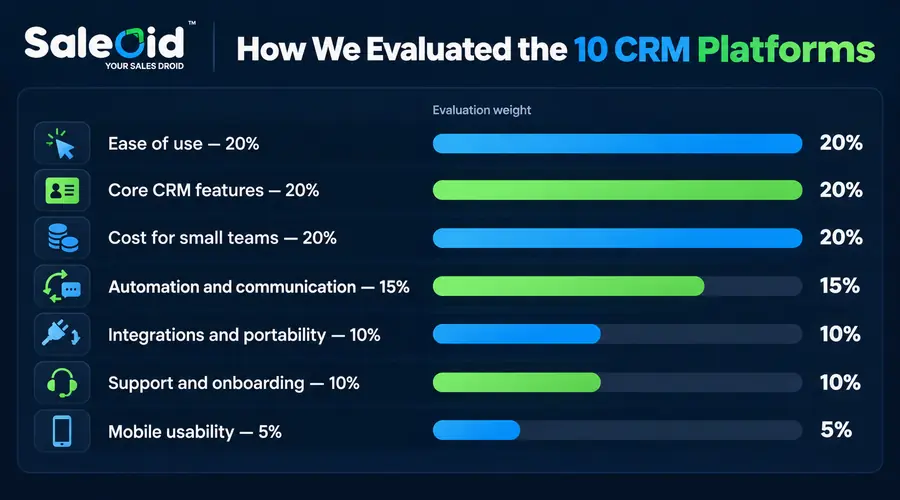
We reviewed each CRM using publicly available product documentation, pricing pages, plan details, feature limits, free plan or trial conditions, and suitability for businesses with roughly one to ten users. Pricing was checked in September 2026 and compared using the billing term shown by each provider.
Because Saleoid is our own product, we have disclosed that relationship and applied the same evaluation criteria to it as the other platforms in this guide.
Our evaluation focused on:
| Criterion | Weight |
|---|---|
| Ease of setup and daily use | 20% |
| Core CRM and pipeline features | 20% |
| Cost for small teams | 20% |
| Automation and communication tools | 15% |
| Integrations and data portability | 10% |
| Support and onboarding | 10% |
| Mobile usability | 5% |
We also looked at important practical restrictions, including user limits, contact limits, minimum seat requirements, billing commitments, paid add ons, and features that require a higher plan.
We did not assign numerical product scores where we could not document a consistent scoring basis. Instead, each CRM is matched to the type of small business it is best suited for, with its main limitations explained alongside its strengths.
A Quick Glance: 10 Best CRM For Small Businesses
| CRM Software | Best For | Entry Pricing | Free Plan or Trial | Pricing Model | Main Limitation |
|---|---|---|---|---|---|
| Saleoid | Affordable all in one CRM | Starts at $5/month with two year billing | No free plan | One user included, additional users cost extra | Some capabilities require paid apps |
| HubSpot CRM | Free CRM for small teams | Free plan available; paid Sales Hub plans start above the free tier | Free plan available | Seat and product based pricing | Advanced automation and reporting require paid upgrades |
| Pipedrive | Visual sales pipeline management | Starts with per user pricing | Free trial available | Per user pricing | Marketing and some lead generation features cost extra |
| Zoho CRM | Customization and scalability | Starts with per user paid plans | Free edition available with limits | Per user pricing | Advanced AI and automation depend on the selected edition |
| Freshsales | Built in communication tools | Entry paid plan priced per user | Free plan available for small teams | Per user pricing | More advanced automation and reporting require higher plans |
| monday CRM | Flexible workflows | Starts with per seat pricing | Trial available | Per seat pricing with minimum seat rules | Costs can increase as team size grows |
| Bigin by Zoho | Lightweight CRM for small teams | Low cost paid editions available | Free edition available | Per user pricing | Less suitable for complex sales operations |
| Less Annoying CRM | Straightforward CRM for beginners | Flat monthly price per user | Free trial available | Per user pricing | Fewer advanced enterprise features |
| Keap | Established service businesses | Higher starting monthly price | Trial availability varies | Account level pricing | Expensive for very small teams |
| Salesmate | Calling and sales automation | Starts with per user pricing | Trial available | Per user pricing | Broader marketing and operational workflows may need extra tools |
Pricing note (Updated September 2026): CRM costs can vary by billing term, number of users, plan limits, paid add ons, and minimum seat requirements. Prices and plan conditions should be checked again before purchase because vendors can change them at any time.
Many CRM tools look similar at first glance, but differences appear in pricing structure, ease of adoption, and how quickly teams can start using the system.
Some platforms focus heavily on marketing automation, others on sales pipelines, while newer all-in-one solutions aim to reduce the need for multiple tools altogether.
The best CRM for small businesses is usually the one that balances simplicity, affordability, and scalability without overwhelming small teams.
1. Saleoid
Best for: Small businesses that want an affordable CRM foundation with the option to add marketing, communication, scheduling, and billing tools as needed.
Not ideal for: Larger companies that need advanced enterprise reporting, complex organizational structures, or extensive API based customization.
Ideal user: A founder, consultant, agency, or service business that wants to start with core CRM functionality and expand the system without moving immediately into a larger software suite.
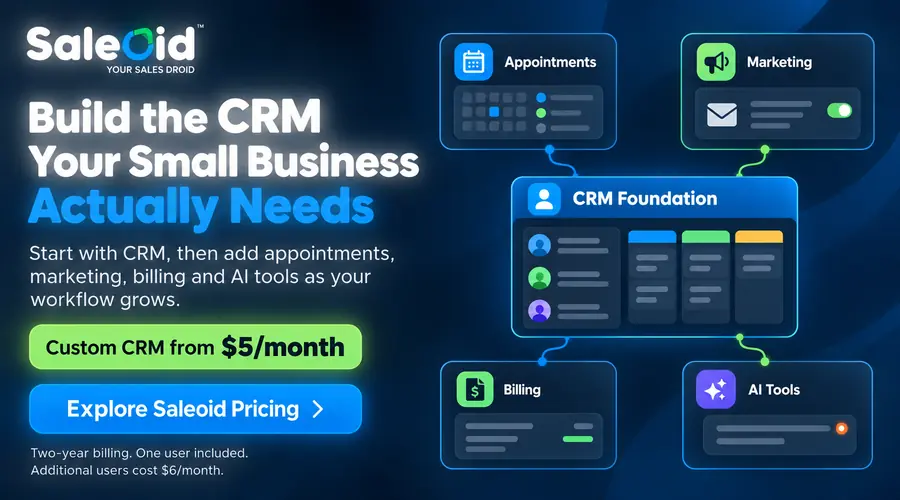
Saleoid uses a modular pricing model rather than placing every capability into fixed tiers. Its Custom CRM starts at $5 per month with two year billing and includes one user, 2,500 contacts and companies, three accounts, lead scoring, and five automations. Additional users cost $6 per user per month. A 15 day free trial is available.
The base CRM includes customer activity tracking, email engagement tools, tasks, notes, permissions, dashboards, and automation. Businesses can add functions such as invoicing, forms, landing pages, appointment scheduling, email marketing, and an AI chatbot separately, with some apps starting at $1 per month. API access and certain other specialist capabilities have separate pricing.
Key Features:
- Contact and company management
- Lead scoring and activity tracking
- Sales pipeline management
- Workflow automation
- Email tracking and scheduling
- Role and permission controls
- Optional business apps for appointments, marketing, billing, and AI chatbot functionality
For a closer look at its AI capabilities, explore Saleoid’s AI CRM for small businesses.
The $5 rate should be viewed as the starting cost of the CRM foundation rather than the price of every Saleoid feature. A five-user team using only the Custom CRM would pay $29 per month at the two-year rate, although one of Saleoid’s bundled plans may become more economical as users and apps are added.
2. Freshsales
Best for: Small sales teams that want CRM, email, phone, chat, and pipeline management in one system.
Not ideal for: Businesses that need advanced automation, forecasting, or deeper customization on the lowest paid plan, since several of those capabilities sit in higher tiers.
Ideal user: A small sales team that communicates frequently with leads and wants customer records, deal tracking, and day to day conversations connected in the same CRM.
Freshsales combines traditional CRM functions with built in communication tools. Teams can manage contacts and deals, connect email, make calls, use chat, create tasks, and track sales activity without relying on a separate tool for every interaction. Its pipeline can also be customized around the stages a business actually uses.
The Free plan supports up to three users. Growth costs $9 per user per month when billed annually, while Pro increases to $39 per user per month and Enterprise to $59. Freshworks also offers a 21 day trial without requiring a credit card.
Key Features:
- Contact and account management
- Customizable sales pipelines
- Two way email sync
- Built in phone and chat capabilities
- Tasks, appointments, and activity tracking
- Workflow automation
- Mobile CRM access
Freshsales is particularly useful when communication is central to the sales process. However, teams expecting advanced AI, automation, and reporting at the entry price should compare plan limits carefully before choosing a tier. To see how Saleoid compares, review our Freshsales alternative page.
3. monday CRM
Best for: Small teams that want a highly visual CRM they can shape around different sales and client workflows.
Not ideal for: Solo users or very small teams that want to pay for only the exact number of seats they use, since monday CRM subscriptions start with a minimum three seat package.
Ideal user: An agency, consultancy, or growing sales team that values customizable boards, shared dashboards, and flexible workflow management alongside core CRM functionality.
monday CRM organizes leads, contacts, deals, activities, and customer communication through customizable boards and dashboards. Its visual structure gives teams considerable control over how pipelines are arranged, which can be useful when a standard sales process does not fit the way the business operates.
The Basic plan starts at $12 per seat per month with annual billing. However, monday uses seat based packages rather than allowing every team size to pay for an exact number of users. Plans begin at three seats, so a business with one or two users still needs the three seat package. Larger subscriptions also move through predefined seat increments.
Basic supports up to 1,000 active contacts and deals and includes a custom dashboard and limited quote and invoice creation.
Key Features:
- Customizable sales pipelines
- Lead, contact, and deal management
- Dashboards and reporting
- Workflow automation
- Quotes and invoices
- Email and communication tracking on higher plans
- Mobile access
monday CRM is a good fit when workflow flexibility matters as much as conventional sales tracking. Its main consideration for a small business is the combination of minimum seat requirements and plan based feature limits, which can make the practical cost higher than the headline per seat price.
4. Bigin by Zoho
Best for: Very small businesses that want a lightweight CRM for managing contacts, pipelines, follow ups, and customer activity without the complexity of a larger CRM suite.
Not ideal for: Teams that need advanced forecasting, extensive reporting, or highly complex sales processes. Businesses expecting deeper enterprise level functionality may outgrow Bigin as their requirements expand.
Ideal user: A solo founder or small team moving away from spreadsheets and looking for a straightforward way to organize leads, customer conversations, and routine sales activity.
Bigin is built around a simpler pipeline based approach than Zoho CRM. Contacts, companies, deals, tasks, calls, and events can be managed within the same workspace, while web forms can capture new leads directly into the system. Routine actions such as assigning follow up tasks or notifying team members can also be automated.
The Free edition is available for basic use, while Express costs $9 per user per month. Bigin also offers higher editions for businesses that need more advanced capabilities. AI features such as Zia Assistive AI and Zia Agents are currently limited to Premier and Bigin 360 rather than being included across every plan.
Key Features:
- Multiple sales and customer pipelines
- Contact and company management
- Tasks, calls, and event tracking
- Workflow automation
- Web forms for lead capture
- Mobile CRM access
- Booking and appointment tools
Bigin is a stronger fit for businesses that want to start with a focused CRM and avoid the broader configuration requirements of a full Zoho CRM deployment.
5. Pipedrive
Best for: Small sales teams that want a clean, visual pipeline and straightforward deal tracking without dealing with unnecessary configuration.
Not ideal for: Businesses that want a complete sales, marketing, billing, and operations platform in one base subscription. Pipedrive remains primarily sales-focused. Projects is available as an add-on on Lite and Growth and included with Premium and Ultimate, while email marketing through Campaigns remains an additional add-on.
Ideal user: A sales rep or small B2B sales team of 2–10 people focused on closing deals, who wants to see exactly where every opportunity stands without spending time on CRM administration.
Pipedrive is a sales-focused CRM known for its simplicity and visual approach to pipeline management. It is designed for businesses that want a clear overview of deals without dealing with unnecessary complexity. Small sales teams often prefer it because it is easy to learn and keeps the focus on moving deals forward rather than managing extensive configurations. That said, businesses that grow beyond pure sales and need tools for billing, marketing, or client onboarding will quickly find themselves relying on additional software alongside it.
Teams that need more than pipeline management may want to compare a Pipedrive alternative with broader automation and business management capabilities.
Pipedrive’s Lite plan starts at $14 per seat per month with annual billing, and a 14 day free trial is available without a credit card. Teams that need email sync, automation, and nurturing sequences will need at least the Growth plan, while Projects and LeadBooster are included only from Premium onward. Campaigns for email marketing remains a paid add on across all plans.
Key Features:
- Visual sales pipeline for tracking opportunities
- Deal and contact management in one place
- Automation for reminders and repetitive tasks
- Sales reporting and forecasting tools
- Activity tracking for calls, emails, and meetings
6. Less Annoying CRM
Best for: Small businesses that want a straightforward CRM with simple pricing and very little setup complexity.
Not ideal for: Teams that need advanced forecasting, complex automation, or enterprise level reporting.
Ideal user: A solo business owner or small team that mainly needs reliable contact management, pipelines, follow ups, and shared customer visibility without navigating multiple pricing tiers.
Less Annoying CRM keeps its product structure deliberately simple. There is one paid plan at $15 per user per month, with no long term contract and no feature tiers. The same subscription includes pipeline management, calendars, email logging, mobile access, user permissions, custom fields, file storage, and support.
New users can try the full CRM free for 30 days without entering payment information. The trial does not restrict access to the core product, which makes it easier for a small team to test its actual workflow before paying.
Key Features:
- Contact and company management
- Customizable pipelines
- Calendar and task management
- Email logging
- Custom fields
- Mobile access
- User permissions
- Free email and phone support
Its biggest advantage is simplicity. Businesses that want one consistent feature set and predictable per user pricing may find it easier to evaluate than platforms with several editions and upgrade paths. Teams that need more advanced automation or complex sales analytics may eventually require a more sophisticated CRM.
7. Zoho CRM
Best for: Budget-conscious small and mid-sized businesses that want a feature-rich CRM with room to grow, especially those already using other Zoho products.
Not ideal for: Teams that need a quick setup or minimal learning curve. Zoho CRM’s depth can make initial configuration time-consuming, and the interface can feel cluttered without proper onboarding.
Ideal user: A growing SMB owner or sales manager who wants a highly customizable CRM with automation, AI-assisted insights, and integrations and is willing to invest time upfront to configure it correctly for their workflow.
Zoho CRM is a well-known choice among growing small and medium-sized businesses looking for a balance between affordability and functionality. It offers a wide range of tools covering lead management, automation, and reporting, making it suitable for teams that want flexibility without moving into enterprise-level pricing. While the platform is feature-rich, new users may need some time to fully understand its setup and customization options. Businesses that want to get up and running within a day or two may find Zoho CRM’s configuration requirements slower to navigate compared to simpler alternatives.
Before choosing an edition, review our breakdown of Zoho CRM pricing, add-ons, and hidden costs to check what your team would actually need to pay for. If the setup requirements do not suit your team, compare Saleoid as a Zoho alternative.
Key Features:
- Lead and contact management
- Sales automation and workflow rules
- Reporting dashboards and analytics
- AI agents and predictive intelligence on Professional and higher editions
- Integrations with the wider Zoho ecosystem and third-party tools
8. HubSpot CRM
Best for: First-time CRM users and early-stage startups that want to get organized quickly with a free tool and explore CRM features before committing to paid plans.
Not ideal for: Scaling businesses on a tight budget, HubSpot’s free plan is limited, and costs rise steeply once you need automation, sequences, or advanced reporting, making it one of the more expensive options at scale.
Ideal user: A founder or small marketing team at an early-stage startup that wants to centralize contacts, track emails, and manage a basic sales pipeline without paying anything upfront while the business is still finding its footing.
HubSpot CRM is often the starting point for businesses exploring CRM software for the first time, mainly because of its free entry-level plan. It provides essential tools for managing contacts, tracking communication, and organizing basic sales activities. Many startups begin with HubSpot due to its ease of adoption, though businesses sometimes find that costs increase significantly as advanced features and automation become necessary over time. Teams that grow beyond basic contact management often face a difficult decision between accepting higher HubSpot pricing or migrating to a more affordable alternative.
Businesses concerned about those upgrade costs can also compare a HubSpot alternative before committing to the paid ecosystem.
Key Features:
- Free contact and deal management
- Email tracking and communication tools
- Basic sales pipeline management
- Marketing and email integrations
- Reporting and activity tracking
HubSpot’s free tools support up to two users and do not require a credit card. Sales Hub Starter currently begins at $7 per seat per month with annual billing as a promotional rate, while the standard listed rate is $20 per seat.
9. Keap
Best for: Service-based small businesses and consultants that need sales automation, follow-up sequences, and client billing managed in one platform.
Not ideal for: Very small teams or early-stage businesses watching costs closely. Keap’s starting price is among the highest in this list, and many of its advanced features require time to set up correctly before delivering value.
Ideal user: An established solo consultant, coach, or small service business owner with a steady client base who wants to automate follow-ups, send invoices, and run email campaigns without juggling three separate tools.
Keap is designed mainly for service-based businesses, consultants, and small teams that want sales automation combined with client management. It combines CRM functionality with invoicing and email marketing, making it useful for businesses that manage long-term customer relationships. If billing is a priority, our comparison of CRM software with invoicing covers other options for connecting customer records and payments. However, its pricing can feel high for very small teams or early-stage businesses, especially compared to newer CRM alternatives.
Keap starts at $299 per month and includes two user licenses. Additional users cost $39 per month each, and implementation services are required when getting started. A 14 day free trial is available without a credit card, so businesses can test the platform before committing to the paid setup.
Key Features:
- Sales and follow-up automation
- Client and contact management
- Email marketing campaigns
- Invoicing and payment tracking
- Appointment and task management
If Keap’s starting cost is beyond your budget, review our Keap alternative comparison and check which features your business needs.
10. Salesmate
Best for: Small sales teams that need built-in calling, pipeline management, and automation in a clean interface without the complexity or cost of larger platforms.
Not ideal for: Businesses that need extensive marketing automation or invoicing built in Salesmate is sales-focused, and non-sales workflows typically require additional tools or integrations.
Ideal user: A sales-led startup or small inside sales team of 3–10 reps who make frequent calls, track deals across multiple stages, and want automation to handle reminders and follow-ups without a steep learning curve.
Salesmate focuses on helping small sales teams streamline their workflow through automation and communication tools. It offers a clean interface and practical features that support everyday sales activities without overwhelming users. The platform strikes a balance between usability and functionality, making it appealing for teams that want automation and reporting without a steep learning curve.
Salesmate’s Basic plan starts at $23 per user per month and includes 5,000 Smart Flow automation credits per user each month. Pro increases the allowance to 10,000 credits, while Business includes 15,000. A 15 day free trial is available, so teams that expect heavy automation should estimate their workflow usage as well as the per user subscription price.
Key Features:
- Visual sales pipeline management
- Built-in calling and communication tracking
- Workflow automation and reminders
- Sales reporting and performance insights
- Contact and deal management tools
For a comparison with Saleoid, visit our Salesmate alternative page and compare the workflows you need beyond deal tracking.
More Alternatives for Businesses Comparing Marketing Tools
Your shortlist may include tools beyond the ten CRMs above, especially if you are reviewing email campaigns and customer follow-ups alongside sales management. These pages compare Saleoid with other platforms you may already use or be considering:
- ActiveCampaign alternative
- Act-On alternative
- Autopilot alternative
- Constant Contact alternative
- Mailchimp alternative
- GoHighLevel alternative
Use the comparison for your current platform to identify the functions you need to retain, then test those tasks before making a switch.
How to Choose the Right CRM (Without Wasting Time or Money)
Choosing a CRM for small businesses can feel overwhelming. Most owners start by comparing feature lists or pricing pages, but that usually leads to confusion rather than clarity. The truth is, the right CRM is the one that fits how your business actually works day to day.
For solo founders and small teams, a CRM should simplify operations, not introduce another system that takes weeks to understand. Before committing to any platform, it helps to step back and evaluate your real needs instead of chasing popular software names.
A. Start With Your Business Stage, Not the Software
The CRM that works for a growing agency may not suit a solo consultant, and a system built for large enterprises can quickly become overwhelming for small teams. If you manage several client relationships, our guide to the best CRM for agencies offers a more focused comparison. Founders can also compare sales CRM options for startups based on their stage and sales process.
a. If you’re a solo business owner
You likely need a simple system to manage leads, schedule follow-ups, and keep customer information organized. Founders handling sales themselves can also explore how a CRM for startups supports lead tracking and follow-ups as the business grows. An easy-to-use sales CRM for small business with automation and reminders is usually enough. Complex customization and advanced analytics may only slow you down.
The right automation for solo business owners can also reduce the amount of time spent manually sending reminders, updating records, and chasing routine follow-ups.
b. If you have a small team (2–5 people)
Visibility becomes important. Everyone should be able to see deal progress, assigned tasks, and customer conversations without asking each other constantly. A small business CRM software with shared pipelines and activity tracking helps teams stay aligned.
c. If your business is growing quickly
You may need automation, reporting, and integrations that support marketing and billing workflows. At this stage, choosing a scalable cloud CRM for small business prevents switching platforms later.
B. Check the Hidden Costs Before You Decide
Pricing is where many businesses make expensive mistakes. A CRM may look affordable at first but become costly once you start using it fully.
Before choosing any platform, ask yourself:
- Will pricing increase as my contacts or users grow?
- Do I need additional tools alongside this CRM?
- Are important features locked behind higher plans?
- Will I need paid onboarding or technical setup?
- Can my team realistically use this every day?
An affordable CRM for small business should remain affordable as you grow, not only at the starting point. Our CRM pricing comparison for teams of 1–20 helps you compare subscription costs at different team sizes.
C. A Simple 5-Minute CRM Decision Framework
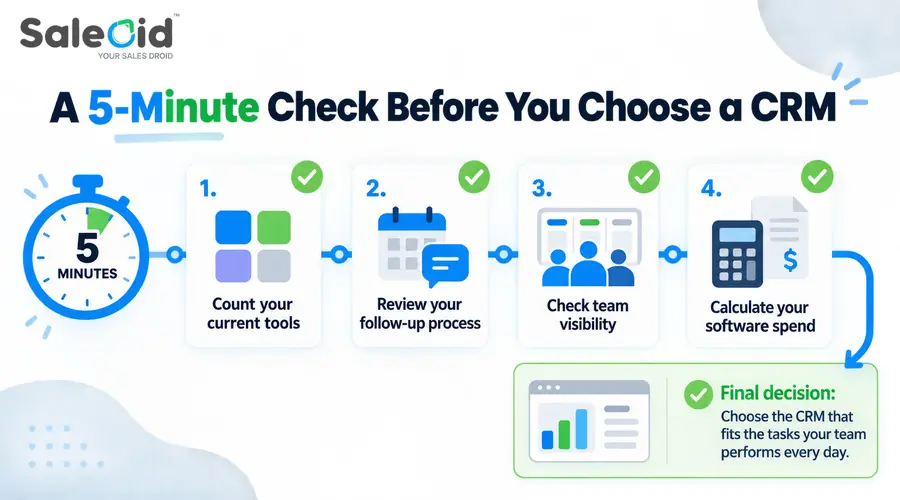
If you’re unsure where to begin, this quick evaluation can help narrow your options.
a. Count the tools you currently use
If you rely on multiple apps for leads, emails, scheduling, and billing, an all-in-one CRM for small business may save both time and money.
b. Look at your follow-up process
If reminders depend on memory or sticky notes, automation should be a priority.
c. Check team visibility
If only one person knows the status of deals, you need a CRM with clear pipeline tracking.
d. Calculate your monthly software spend
Sometimes replacing several small subscriptions with one connected system improves workflow and reduces overall costs.
D. Red Flags to Avoid When Choosing a CRM
Small businesses often regret CRM decisions for the same reasons. Watching for these early can prevent wasted time and money.
- Choosing software only because it’s popular
- Paying for features your team doesn’t understand or use
- Selecting enterprise-level tools too early
- Ignoring ease of use during trials
- Depending entirely on a free plan without considering future growth
A good CRM for small businesses should feel manageable from the beginning and remain useful as your needs evolve.
E. Match the CRM to Your Priority
Different businesses solve different problems with CRM software. Clarifying your main goal makes selection easier.
| If Your Priority Is | Look for a CRM That Focuses On |
|---|---|
| Keeping costs low | Flexible or modular pricing |
| Managing leads better | Strong sales pipeline tools |
| Automating follow-ups | Workflow and automation features |
| Reducing tool overload | All-in-one functionality |
| Growing steadily | Scalable small business CRM software |
When a system feels simple, organized, and aligned with your workflow, adoption happens naturally. For most small teams, the right CRM for small businesses is the one that brings clarity to leads, consistency to follow-ups, and structure to growth without adding unnecessary complexity.
Why Small Businesses Stop Using CRM Software
CRM adoption usually breaks down when the system adds more work than it removes. Small teams may stop updating records consistently, return to spreadsheets or messaging apps, or avoid features that take too much time to configure.
Three problems are especially common:
- Too much complexity: Teams struggle when basic tasks require extensive setup, training, or customization.
- Poor fit with existing workflows: A CRM can become difficult to maintain when sales, communication, billing, or follow ups still happen across several disconnected tools.
- Unexpected costs: Extra users, automation, integrations, support, or higher tier features can make a platform more expensive than expected.
Before committing to a CRM, test the tasks your team will perform most often, such as adding a lead, updating a deal, scheduling a follow up, finding customer history, and exporting data. A shorter feature list is often more useful than a larger one if the system matches how your team actually works.
FAQs
For most small businesses, the best CRM depends on team size and workflow. Saleoid is a strong option for businesses wanting an affordable all-in-one platform, while Pipedrive is ideal for sales-focused teams and HubSpot CRM works well for startups needing a free entry-level system.
Small teams usually benefit from CRM systems that are easy to adopt and don’t require technical setup. Saleoid, Pipedrive, and Zoho CRM are commonly chosen because they balance usability, automation, and affordability.
HubSpot CRM and Pipedrive are often considered beginner-friendly because of their clean interfaces and simple onboarding. But nothing can beat the simplicity and ease that Saleoid AI CRM software offers to smaller teams, consultants and agencies wanting minimal setup complexity.
Saleoid offers one of the lowest entry prices among modern CRM platforms, starting at $5/month on long-term plans. Zoho CRM and HubSpot CRM are also popular among budget-conscious businesses.
Yes. As customer conversations and leads increase, managing follow-ups manually becomes difficult. A CRM helps organize contacts, track deals, automate reminders, and reduce missed opportunities.
HubSpot CRM includes a free plan, but many advanced automation and reporting features require paid upgrades as businesses grow.
Platforms like Saleoid and Keap combine CRM functionality with invoicing, automation, and client management features inside one system.
Businesses looking to reduce tool overload often prefer all-in-one CRM systems that combine lead management, automation, scheduling, and billing in one platform. Saleoid and Keap are examples of this approach.
Conclusion
For small businesses, choosing the right CRM in 2026 comes down to fit rather than feature count. The strongest option is the one that supports your sales process, matches your budget, and gives your team the tools they will actually use.
The right CRM depends less on how many features a platform offers and more on how well it fits your actual workflow.
For some businesses, a sales-focused platform like Pipedrive may be enough. Others may prefer HubSpot for its free entry-level access, Zoho CRM for scalability, or Keap for service-based workflows.
Saleoid is another option for smaller teams that prefer a modular setup combining CRM with optional automation, communication, scheduling, and billing tools. Its lower entry price can be attractive, but businesses should still compare the cost of any additional users or apps they expect to need.
Before choosing a platform, compare the actual plan limits, billing terms, communication tools, and upgrade requirements that apply to your team size. Testing the CRM with real tasks such as importing contacts, updating deals, sending follow ups, and exporting data will give you a better indication of fit than comparing feature lists alone.
Saleoid is not affiliated with or endorsed by any third-party brands mentioned. All trademarks, product names, and logos belong to their respective owners and are used for identification/comparison only. Details may change, verify on each vendor’s site.