
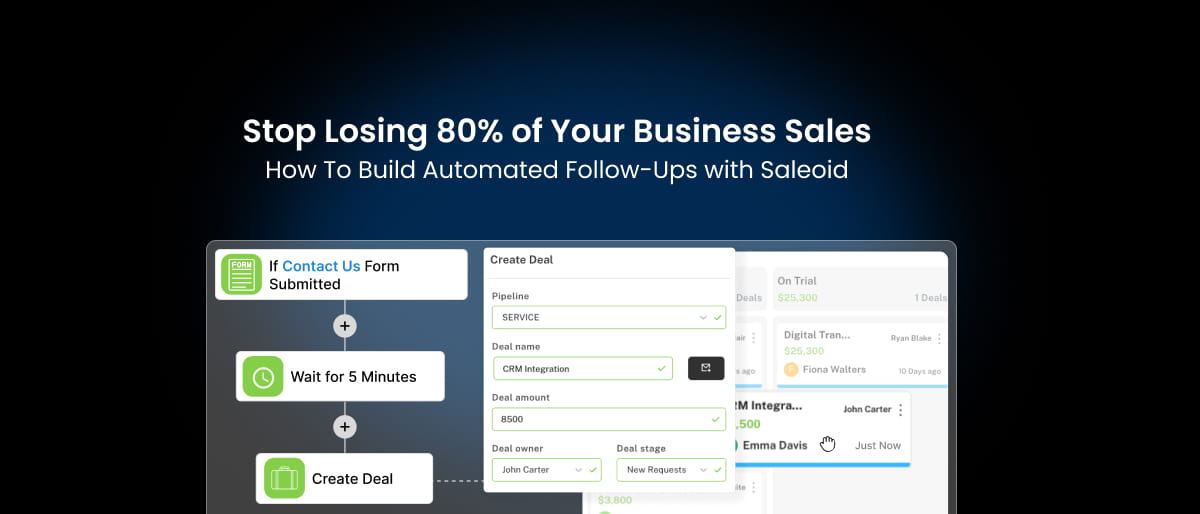

Most small businesses don’t lose sales because their service is bad. They lose sales because they stop following up too soon.
Research shows that 80% of sales require at least five follow-ups. Yet 44% of salespeople give up after just one. That gap alone explains why so many good leads never turn into paying customers.
It gets worse. Leads contacted within 5 minutes are 21 times more likely to convert than those contacted after 30 minutes. But when follow-ups depend on memory, spreadsheets, or manually checking emails, response times become inconsistent. Some leads get quick replies. Others wait days. Some are forgotten completely.
And in 2026, buyers aren’t patient. The average professional receives over 100 business emails per day and compares multiple providers before making a decision. If you don’t follow up consistently, someone else will.
In this guide, you’ll see why manual follow-ups quietly drain revenue, and how you can build simple automated follow-up systems with Saleoid so every lead gets timely communication without adding more work to your day.
What Is a Follow-Up Process?

A follow-up process is simply a clear plan for what happens after someone shows interest in your business.
Someone fills out a form. Sends an inquiry. Downloads a guide. Books a call. What happens next?
If there’s no plan, follow-ups happen randomly when you remember, when you have time, or when you “feel” the lead is worth it. That’s not a system. That’s guesswork.
A proper follow-up process answers three simple questions:
- When should we follow up? (Day 0, Day 2, Day 5, Day 9, etc.)
- What should we say each time?
- What happens if they open, click, reply, or don’t respond at all?
An effective follow-up system usually includes:
- Clear timing for each message
- Pre-written messages so communication stays consistent
- Automatic responses based on actions (like form submissions or link clicks)
- A way to see who opened, replied, or ignored
- Basic tracking to know what’s working and what’s not
When follow-ups depend only on memory and discipline, they break the moment you get busy. When they’re built into a system, they run consistently, whether you’re working, in meetings, or focused on something else.
And that consistency is what turns more leads into customers.
3 Critical Problems with Manual Follow-Ups

1. High Rate of Missed Follow-Ups
The problem:
When you’re handling sales, delivery, operations, and admin at the same time, follow-ups slip through the cracks. You mean to reply. You plan to follow up tomorrow. Then something urgent comes up.
By the time you remember, the lead has moved on.
The data:
Research shows 80% of sales require at least five follow-ups. Yet 44% of salespeople stop after just one. That means most businesses quit long before the customer is ready to decide.
The real cost:
Every missed follow-up isn’t just one lost deal. It can mean:
- Lost revenue (anywhere from a few hundred to thousands depending on your service)
- Lost referrals and repeat business
- Lower lifetime value per customer
- Revenue leaks you don’t even notice because nothing is tracked
Over time, this becomes a silent growth problem.
2. Inconsistent Response Timing
The problem:
One lead gets a reply in two hours. Another waits four days. There’s no pattern, it depends on how busy you are.
From the customer’s side, that feels unprofessional.
Why it matters:
Leads contacted within five minutes are 21 times more likely to convert than those contacted after 30 minutes, according to Harvard Business Review.
Speed matters. Consistency matters even more.
If you take too long, prospects don’t wait. They contact the next provider. In competitive markets, the fastest structured system often wins, not necessarily the best offer.
3. Emotion-Based Decision Making
The problem:
Manual follow-ups often depend on mood.
- Feeling confident → You send a message
- Feeling unsure → You delay
- Think the lead seems “cold” → You stop trying
But most buyers aren’t ready immediately. They need time, comparison, and reminders.
When follow-ups depend on how you feel instead of a clear system, revenue becomes unpredictable.
And unpredictable follow-ups lead to unpredictable sales.
So What’s the Alternative?
If manual follow-ups create missed leads, inconsistent timing, and unpredictable results, the solution isn’t “try harder.” It’s to stop relying on memory altogether.
A structured, automated follow-up system makes sure every lead gets a response, immediately and consistently. It doesn’t forget. It doesn’t get busy. It doesn’t decide based on mood.
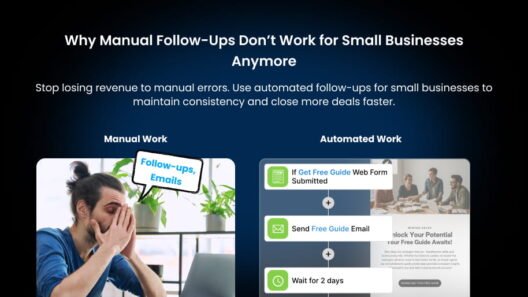
When someone fills out a form, they get an instant reply. If they don’t respond, a second message goes out automatically. If they click a link, the next message adjusts based on that action.
Instead of chasing leads manually, the system does the routine work for you, while you focus on conversations that actually require your attention.
This is where tools like Saleoid come in.
With simple follow-up workflows, timed email sequences, and behavior-based triggers, you can build a process that runs in the background, making sure no lead is ignored and no opportunity is lost.
You’re not sending more messages. You’re sending the right messages, at the right time, every time.
Why Manual Follow-Ups Worked Before 2020 (But Don’t Work Now)
Manual follow-ups didn’t always fail. A few years ago, you could send one email, wait a few days, and still close the deal. Customers were slower to decide. Competition was easier to evaluate. Expectations were lower. But buying behavior has changed.
Today, people compare options instantly, expect quick replies, and move on fast if they don’t hear back. The environment has shifted, and follow-up systems need to shift with it.
Let’s see what has changed:
| Then (Pre-2020) | Now (2026) |
| Less crowded inboxes | Average professional receives 100+ business emails per day |
| Lower competition visibility | Prospects compare 5+ providers before deciding |
| More patient customers | Decision cycles shortened significantly |
| Slower, email-only conversations | Real-time expectations (instant replies, quick confirmations) |
| Fewer automation tools in use | Competitors already using CRM automation and drip campaigns |
Buyers now assume:
- You will respond quickly
- You will follow up professionally
- You will stay consistent
If you don’t, they don’t complain. They just choose someone else. Manual systems weren’t built for this kind of market speed. And that’s why what “worked before” quietly stops working now.
Real Case Scenario: How a Freelance Consultant Fixed a Follow-Up Gap
A freelance marketing consultant was generating around 35–40 leads per month. On paper, that looked healthy. But revenue wasn’t growing.
After reviewing the process, the issue became clear:
- There was no defined follow-up schedule
- No reminders or tracking system
- Most leads received just one reply
- Everything was handled manually through Gmail
If a lead didn’t respond to the first email, the conversation usually stopped there.
What Changed
Instead of changing the offer or pricing, the consultant set up a simple CRM-based follow-up workflow:
- Day 0: Immediate welcome email
- Day 2: A relevant case study
- Day 5: A helpful insight related to the lead’s problem
- Day 9: A soft follow-up with a clear next step
Nothing aggressive. Just structured and consistent.
What Happened Next
Within a couple of months, response rates improved noticeably. More leads started replying on the second and third follow-ups. Close rates increased because conversations didn’t stop after the first message.
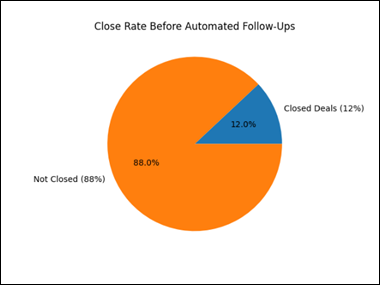
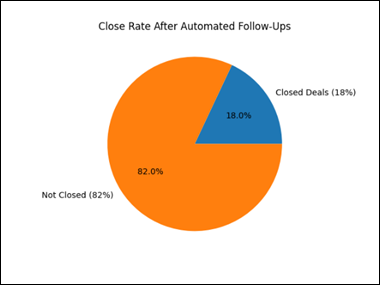
Most importantly, follow-ups stopped depending on memory. The offer didn’t change. The traffic didn’t change. The only thing that changed was the system.
How to Build a Modern Follow-Up System (4 Simple Steps)
You don’t need something complex. You need something consistent. Let’s see how you can build a follow-up system that actually works.
Step 1: Decide What Should Trigger a Follow-Up
Start by listing the actions people take when they show interest in your business. For each action, decide what should happen automatically next. For example:
| When This Happens | Send This Automatically |
| Someone fills out a form | Immediate welcome email + helpful resource |
| Someone asks about a product | Product details + short case study |
| Someone downloads a guide | 3-part educational email over 7 days |
| Someone abandons cart | Reminder at 1 hour, 24 hours, 72 hours |
| Someone books a consultation | Confirmation + what to expect next |
The goal is simple: No action should go unanswered. When triggers are defined clearly, you remove the need to “remember” to follow up.
Step 2: Create Simple Follow-Up Sequences Inside Your CRM
Now turn those triggers into short email sequences. Instead of sending one message and waiting, plan a structured series. For example:
If someone downloads your pricing guide:
- Day 0: Thank them + share an extra helpful resource
- Day 3: Send a short success story
- Day 7: Answer common objections
- Day 14: Invite them to book a call or take the next step
This does two things:
- Keeps you visible while they’re deciding
- Builds trust without being pushy
The key is spacing messages naturally, not daily pressure, but steady presence.
Step 3: Let Automation Handle the Routine Work
Once your sequences are written, let the system run them automatically. That means:
- Every new lead gets the same consistent experience
- No one is forgotten when you get busy
- Follow-ups continue even if you’re in meetings or offline
- Conversations don’t stop after the first message
Important: Automation handles consistency. You still step in personally when someone replies or shows strong interest. Think of automation as a safety net, not a replacement for real conversation.
Step 4: Track What’s Working (And Improve It)
A follow-up system isn’t “set and forget.” It improves over time. Here are the numbers that matter:
- Open rate → Are people opening your emails?
- Click rate → Are they engaging with your content?
- Reply rate → Are conversations starting?
- Conversion rate → Are leads becoming customers?
If open rates are low, improve your subject lines. If click rates are low, simplify your message. If replies are low, make your emails shorter and more direct.
Practical tips:
- Keep follow-up emails between 150–200 words
- Send one clear message with one clear call-to-action
- Test different subject lines
- Try different sending times
Small improvements in each step can significantly increase overall conversions.
The Big Picture
A modern follow-up system is not about sending more emails. It’s about sending the right message at the right time, automatically, so opportunities don’t disappear just because you got busy.
How to Automate Sales Follow-Ups Using Saleoid CRM

You can automate your sales follow-ups in Saleoid in four clear steps. No technical setup is required beyond basic configuration.
1. Capture Every Lead Inside Saleoid
Start by ensuring every inquiry enters Saleoid automatically.
You can connect:
- Website forms
- Landing pages
- Manual lead entries
- Imported contact lists
Once a lead is inside the CRM, automation can begin immediately. No lead should stay only in your inbox.
2. Create an Automation Trigger
In Saleoid, you define what action starts the follow-up.
Common triggers include:
- New lead added
- Form submitted
- Tag assigned
- Pipeline stage changed
Example setup:
Trigger: New lead added
Action: Send welcome email immediately
This guarantees instant response without manual effort.
3. Build a Timed Follow-Up Sequence
After the first email, you create a structured sequence.
Example sequence:
- Day 0: Welcome email
- Day 2: Product/service details
- Day 5: Case study or testimonial
- Day 9: Reminder with clear call-to-action
You set the timing once. Saleoid sends the emails automatically for every new lead.
This ensures:
- Consistent timing
- Multiple touchpoints
- No forgotten follow-ups
4. Organize Leads Using Tags and Stages
Not all leads are the same.
In Saleoid, you can segment contacts using:
- Tags (e.g., “Hot Lead,” “Pricing Downloaded”)
- Pipeline stages (New, Contacted, Qualified, Closed)
- Activity tracking (Opened, Clicked, Replied)
This allows you to send different follow-up sequences based on behavior or interest.
More relevant messaging leads to higher response rates.
5. Track Performance and Improve
Saleoid allows you to monitor:
- Email open rates
- Click rates
- Replies
- Lead-to-customer conversion
If engagement is low, adjust the subject line.
If replies are low, shorten the message.
If conversions are low, improve the offer or call-to-action.
Everything is visible in one place.
What You Achieve with Saleoid
By automating sales follow-ups inside Saleoid, you get:
- Immediate response to every lead
- Structured multi-step communication
- Consistent timing
- Clear visibility into performance
- Reduced manual workload
Instead of relying on memory, reminders, or spreadsheets, your follow-up process runs automatically inside your CRM. No missed leads. No inconsistent timing. No guessing what’s working.