
Running an agency or consulting practice sounds exciting until Monday hits and you’re drowning in sticky notes, unread emails, and half-finished follow-ups. If you’re still tracking your clients in spreadsheets or relying on memory to remember who you pitched last week, you’re already leaving money on the table.
The best CRM for agencies is the system that keeps every client conversation, deal, and follow-up organized. For CRM for consultants, it’s even more personal. Your reputation is built on responsiveness, and a missed follow-up can cost you a retainer worth months of income.
In 2026, with leads flooding in from LinkedIn, referrals, cold email, and paid ads all at once, having a single place to manage it all isn’t optional anymore. It’s survival. This guide walks you through what to look for, what to avoid, and which tools actually work for agencies and consulting firms today.
Quick Answer: What Is the Best CRM for Agencies in 2026?
The best CRM for agencies and consultants depends on how they manage leads, client communication, and follow-ups. Popular options in 2026 include:
- Pipedrive – best for visual sales pipelines
- Monday CRM – best for workflow customization
- Bigin by Zoho – best for small teams starting with CRM
- OnePageCRM – best for action-driven sales management
- Saleoid – best affordable CRM for small agencies and consultants
A good CRM for agencies helps manage leads, track client conversations, automate follow-ups, and maintain visibility across the sales pipeline.
Why Agencies and Consultants Need a CRM

Most agencies don’t lose clients because their work is bad. They lose clients because communication slips. A deal goes cold because no one followed up. A prospect falls through because the lead sat unassigned for a week. These are fixable problems, but only if you have the right system in place.
Managing Leads from Multiple Channels
Today’s agency doesn’t get leads from one place. You’re pulling inquiries from contact forms, Instagram DMs, LinkedIn outreach, referral emails, and paid campaigns, sometimes all in the same day. Without a central system, those leads don’t get worked properly.
A solid CRM for service businesses pulls all of those leads into one dashboard. You can see where each one came from, who owns it, and what the next step is. Nothing falls through the cracks because there’s no “crack” to fall through. Every lead is a record. Every record has an owner and a next action.
Tracking Client Conversations and Deals
Most agency owners know well that a client calls and references “what we talked about last month,” and you have to scramble through emails to find the thread. It’s embarrassing, and worse, it signals to your client that they’re not your priority.
A CRM solves this instantly. Every call, every email, every note lives inside that client’s record. You open their profile and you’re fully briefed in thirty seconds. That’s the kind of responsiveness that keeps retainers renewed and referrals flowing.
Keeping Sales and Project Work Organized
One thing that separates high-growth agencies from those stuck at the same revenue year after year is how well they connect the sales side to the delivery side. Winning a deal is step one. Smoothly handing it off to the team doing the work is step two and most agencies fumble step two completely.
A good CRM gives you a clear picture of where every deal stands. You know what’s been promised, what’s been signed, and what’s been delivered. That visibility keeps your team aligned and your clients happy.
If you’re new to CRM systems, it may help to first understand what sales CRM software actually does and how it helps businesses manage leads, conversations, and deals more effectively.
Key Features Agencies Should Look for in a CRM

Not every CRM is built for agency work. Some are designed for big enterprise sales teams. Others are built for e-commerce. When you’re evaluating agency sales CRM software, these are the features that actually move the needle.
Lead and Deal Tracking
The most basic function of any CRM is knowing where your deals are. You need a visual pipeline, something you can look at and immediately understand which deals are hot, which are stalled, and which need attention today.
Kanban-style boards are the gold standard here. You drag deals from stage to stage as they progress. No reports required. You see the health of your pipeline at a glance, every morning when you open your laptop.
Client Communication and Email Integration
If your CRM doesn’t connect with email, it’s only doing half the job. You want every email to a prospect or client automatically logged inside their record. No manual data entry. No copy-pasting.
The best CRMs go further. They let you send emails directly from the platform, track opens and clicks, and even suggest follow-up timing based on how a prospect is engaging with your messages. That’s intelligence your inbox alone will never give you.
Task and Project Coordination
Agencies wear a lot of hats. Whoever wins the deal often hands off to someone else who delivers the work. Your CRM needs to bridge that gap with tasks, notes, and internal coordination tools.
At a minimum, you want to be able to assign tasks, set deadlines, and attach notes to any client record. The better tools go further and offer basic project boards or deep integrations with dedicated project management software.
Automation for Follow-Ups
Follow-ups are where agencies consistently lose deals. Not because they don’t want to follow up, but because they’re busy doing client work and forget. Marketing automation software fixes this permanently.
Set a rule: if a lead hasn’t responded in five days, send a check-in email automatically. If a deal sits untouched for two weeks, notify the owner. These small automations add up to a dramatically tighter pipeline and more revenue without more effort.
Many agencies also use marketing automation alongside CRM tools to nurture leads and manage campaigns. If you’re deciding between the two, this guide explains the difference between CRM vs marketing automation and when you actually need each one.
Reporting and Revenue Tracking
You can’t manage what you can’t measure. A decent CRM gives you a real-time picture of your pipeline value, your win rate, and your revenue forecast. You stop guessing and start planning.
Look for CRMs that let you build custom dashboards. Different agency owners care about different metrics. Some want to see deal velocity. Others want to track revenue by service type. A good CRM lets you set that up in minutes, not days.
Many agencies operate like service businesses, which means a CRM for service businesses must handle client relationships, follow-ups, and recurring projects.
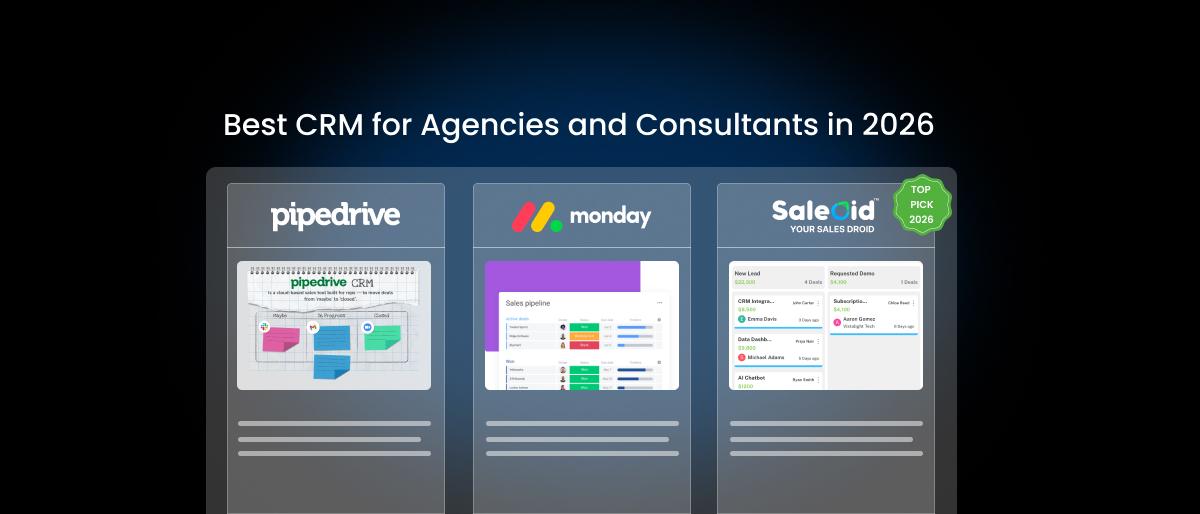
Best CRM for Agencies and Consultants in 2026
Below we’ve listed the top 5 tools that have earned their spot in the agency world this year. Each one serves a different type of agency, so read the context before you decide.
| CRM | Best For | Key Strength |
|---|---|---|
| Bigin | Small agencies | Simple pipeline CRM |
| Pipedrive | Sales-focused agencies | Visual deal pipeline |
| OnePageCRM | Growing agencies | Action-based follow-ups |
| Monday CRM | Workflow-heavy teams | Custom processes |
| Saleoid | Small agencies & consultants | Affordable modular CRM |
Bigin: Best Simple CRM for Small Agencies
Bigin, built by Zoho, punches well above its price point. It’s a pipeline-first CRM designed to replace the messy spreadsheet-and-inbox combo that most small to mid-size agencies are living with. The interface is clean, the setup takes less than an hour, and it comes with predefined templates for industries like software consulting, legal, and recruitment.
Pricing starts at just $7 per user/month billed annually, one of the most competitive rates in the market. The Premier plan at $12/user/month unlocks multiple currencies, more pipelines, and expanded automation.
One caveat: Bigin is primarily built for smaller teams, so if you’re managing a CRM team of 15+, you’ll eventually want to graduate to full Zoho CRM. But for agencies running tight, focused operations, it’s genuinely excellent. Source
Pipedrive: Best Visual Sales Pipeline
Pipedrive has been the visual pipeline benchmark for years, and in 2026 it still holds that title. The drag-and-drop deal view is instantly understandable; even someone who’s never used a CRM before can figure it out within a day.
What makes Pipedrive particularly good for agencies is its activity-based selling model. Every deal has a scheduled next action, i.e. a call, an email, or a proposal review. That structure keeps your sales process moving, even when you’re pulled in a dozen directions. The built-in AI Sales Assistant flags deals at risk and suggests next steps based on historical patterns. It connects with over 350 tools and has a capable mobile app for managing deals on the go. The trade-off is that deeper collaboration features are limited, and automation is locked to higher-tier plans. Source
OnePageCRM: Best Value for Growing Agencies
OnePageCRM is built around one very simple idea: every contact should always have a clear next action. That’s it. And for growing agencies trying to stay on top of a ballooning list of leads and clients, that focus is exactly what’s needed.
The platform’s signature feature, the Action Stream, turns your contact list into a prioritized to-do list. Every lead you log has a scheduled follow-up attached. You never wonder what to do next because the CRM tells you.
Pricing is genuinely accessible at $15/user/month on the Professional plan and $29/user/month for Business. The Autoflow automation feature handles repetitive tasks like updating deal stages and sending routine emails, so your team stays focused on the work that actually requires human judgment. Source
Monday CRM: Best for Workflow Customization
Monday CRM sits at the intersection of CRM and project management, which makes it a natural fit for agencies that need to see both their sales pipeline and their active client work in one place. You can build boards that mirror your exact process, from first contact through proposal, onboarding, delivery, and renewal.
The customization here is genuinely impressive. You’re not constrained by a preset pipeline structure. You can adapt the layout, add automations, and create views that make sense for how your team actually works. Starting at $15/user/month annually, it’s competitively priced for the breadth of features you get. Creative agencies especially love it because the visual, board-based interface feels familiar and doesn’t require a sales-specific mindset to operate. Source
Saleoid: Best Affordable CRM for Small Agencies
Saleoid is the underdog on this list, but it deserves serious attention, especially for small agencies that are tired of paying for five different tools that don’t talk to each other. The platform is modular; you start with a core CRM at $5/month on a two-year plan, then add capabilities like email marketing software, appointment scheduling, landing pages, invoicing, and SMS communication as you need them.
This approach is genuinely smart for lean agencies. You’re not paying for features you haven’t unlocked yet. The core functionality handles contact management, deal tracking, and follow-up automation cleanly. As your operation grows, you layer in the pieces that support that growth. For solo consultants and boutique agencies, this beat paying $50/month for a bloated tool you use at 20% capacity.
CRM Features That Matter Most for Marketing Agencies

CRM for marketing agencies has a specific flavor. You’re not just tracking deals but managing campaign relationships, creative approvals, client check-ins, and performance conversations. Here’s what actually matters in that context.
- Managing Client Pipelines
A marketing agency typically runs multiple clients simultaneously, each at a different stage of engagement. Your CRM needs to make that complexity manageable. You want separate pipelines for new business, active retainers, and renewals, each with its own stages and milestones.
The ability to see all three in one place, without switching tabs or exporting reports, is what separates a CRM built for agency work from one that was adapted for it after the fact.
- Tracking Campaign Conversations
When a client brings up a Facebook campaign from six weeks ago, you need to find that conversation in seconds, not minutes. Campaign notes, performance discussions, creative feedback, all of it belongs inside the client’s CRM record, not buried in an email thread.
The best CRMs for marketing agencies make it easy to log calls, tag notes by campaign or project, and search your entire communication history from one place. That institutional memory is what makes your agency look sharp and professional to long-term clients.
- Automating Client Follow-Ups
Marketing agencies live and die by their client relationships, and relationships die quietly when follow-ups stop happening. Automated sequences ensure that a client on a 90-day contract gets a check-in at week six, not week eleven when it’s too late to address any concerns.
Set up renewal reminders, satisfaction check-ins, and post-project review prompts as automated workflows. Your clients feel cared for, your team stays focused on delivery, and your renewal rate climbs without anyone having to think about it.
Final Thoughts: Choosing the Right CRM for Agencies
There’s no single best CRM for small businesses, or one that works for every agency. There’s only the best CRM for your agency, at your current size, with your specific workflow. But the non-negotiables are consistent: you need real visibility into your pipeline, a reliable system for client follow-ups, and a central home for every client conversation and deal.
Start with what you actually need right now, not what you might need in three years. If you’re a solo consultant, Saleoid or OnePageCRM gives you everything without overwhelming you. Or you’re scaling a sales team and need pipeline clarity above all else, Pipedrive is the benchmark. If your work overlaps heavily with project delivery, Monday CRM makes that connection seamless. And if you want room to grow into a broader ecosystem, Bigin is the intelligent entry point into Zoho’s orbit.
The worst CRM is the one collecting dust because nobody on your team uses it. The best CRM is the one your team opens every morning because it makes their day easier and their pipeline tighter. Pick the one that fits how you work and then actually use it.
FAQs on CRM for Agencies
- What CRM do marketing agencies use?
Many marketing agencies use CRM tools such as Pipedrive, HubSpot, Zoho CRM, and Monday CRM to manage leads, track client conversations, and automate follow-ups.
- What is the best CRM for consultants?
Consultants typically prefer lightweight CRM tools that help manage relationships and follow-ups without heavy setup. Tools like Saleoid, Bigin, and OnePageCRM are often popular choices.
- Do small agencies really need CRM software?
Yes, even small agencies benefit from CRM systems because they help track leads, organize client communication, and maintain visibility across the sales pipeline.