
You signed up for a CRM, went through the onboarding, and then stared at a dashboard with 47 menu items. There, you’ll see 12 pipeline views, and a “territory management” tab that your 3-person team will never once click.
Does this sound familiar? Here’s the uncomfortable truth CRM vendors won’t tell you. The average small business pays for a tool loaded with 10+ features and actively uses maybe 3-4 of them. What about the rest? Shelfware.
In fact, these are features built for 200-person sales floors. Somehow, they ended up in your $49/month subscription. As a result, instead of helping, they make the software harder to learn, slower to adopt, and easier to abandon.
Common Problem with All CRMs
The problem is that most CRMs are designed for enterprise sales teams. Then, they’re repackaged with a “small business” label slapped on the pricing page. So, strip away the packaging and you’re still holding a tool built for a completely different type of business.
In reality, small businesses don’t need 40 features. Instead, they need a system that stops leads from falling through the cracks. Keeps follow-ups running when the day gets chaotic. And tells you clearly whether your pipeline is healthy or quietly on fire.
In fact, Nucleus Research reports businesses see an average ROI of $8.71 for every $1 spent, and adoption of CRM for small businesses can boost sales productivity by up to 34%.
So, that’s exactly what this post is about. No feature bloat, no enterprise wish lists. Just the CRM features that actually move the needle for small sales teams. In other words, these sales CRM features for small businesses are the ones that save real time, close real deals, and drive revenue you can feel.
And if you’re still getting your head around what a CRM even does before diving into features, start from here by reading What Is Sales CRM Software? Then come back and let’s get into what your business actually needs from one.
What are the most important Sales CRM Software features?
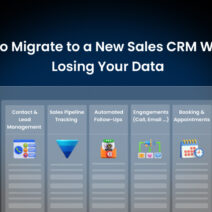
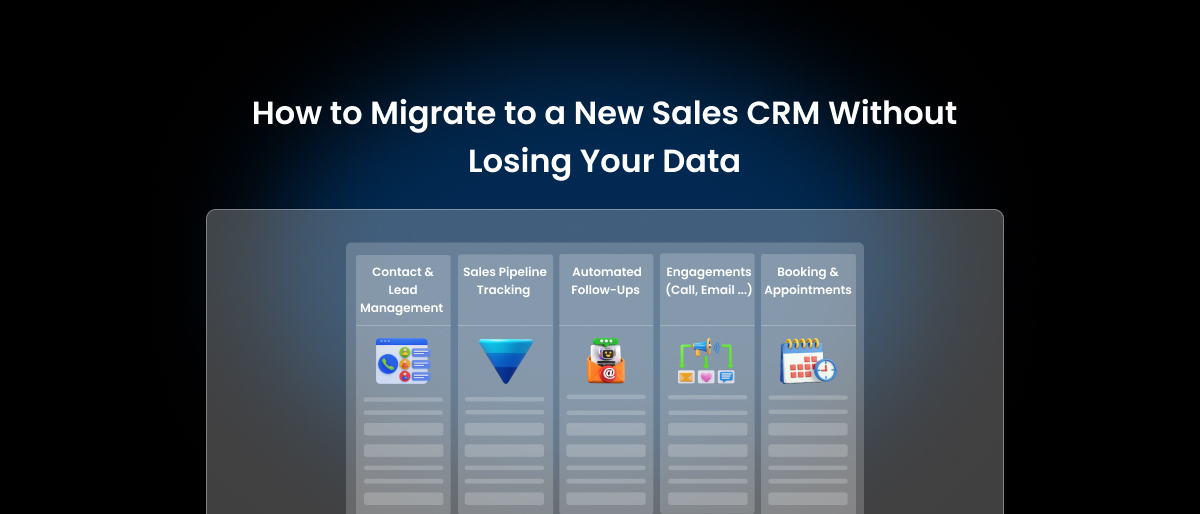
Sales CRM software should cover the basics that keep your deals moving and your follow-ups consistent:
- Contact & Lead Management
- Sales Pipeline Tracking
- Automated Follow-Ups
- Engagements (Call, Email, Activity Tracking)
- Booking & Appointments
- Billing & Invoicing
Why Small Businesses Need Different CRM Features Than Enterprises

Walk into any enterprise sales organization and you’ll find a dedicated CRM admin, an onboarding team, a training budget, and probably a consultant on retainer. Now compare that to your business.
You’ve got a sales rep who also handles customer service, an owner who reviews the pipeline on Sunday evenings, and a part-time hire who’s still learning the shared inbox. In other words, that’s just how small businesses actually run. And that’s exactly why your CRM feature checklist should look nothing like the one a 500-person sales organization puts together.
Enterprise CRMs Are Built for a Different World
Enterprise CRMs are designed for scale, complexity, and heavy customization. In other words, they assume someone has the time and technical know-how to:
- Configure workflows from scratch
- Manage multi-level user permissions
- Build custom dashboards and reports
- Troubleshoot third-party integrations
- Onboard new team members into the system
For a large company, that investment makes sense. However, for a small business owner who needs to close 3 deals this week and invoice to clients by Friday, it becomes a trap, not a tool.
What Small Teams Actually Need Is the Opposite
So, what do small businesses actually need? Small businesses don’t need power. Instead, they need simplicity that works on day one. Below is what that actually looks like in practice:
- Fast setup: You shouldn’t need a week of onboarding before your team can log a lead
- Smooth navigation: If your rep has to think too hard about where to click, they’ll stop using it
- Out-of-the-box automation: Not automation that requires three hours of configuration before it does anything useful
- Transparent, flat pricing: No per-feature add-ons that quietly double your monthly bill as you grow
The Real Cost of Choosing the Wrong CRM
The real cost of the wrong CRM isn’t just money; it’s time. When that happens, the tool feels like more work than it saves, and people stop using it. Data goes unlogged. Follow-ups get missed. The pipeline becomes a guess.
Before long, the CRM that was supposed to fix your sales process becomes just another tab nobody opens. That’s the problem this guide exists to solve.
Sales CRM features for small businesses covered in the sections below were chosen with one filter in mind – Does it actually help a small sales team close more deals without making their day harder?
If the answer is yes, it’s in. If it’s built for an enterprise with resources you don’t have, it’s out.
Must-Have Sales CRM Features Every Small Business Actually Needs
Now that we’ve established why small businesses need a different approach to CRM, let’s get into the features that actually matter. Each feature below is explained in terms of what it does, why it’s important for smaller teams, and what specifically to look for when evaluating a tool.
- Contact and Lead Management: The Foundation Everything Else Sits On
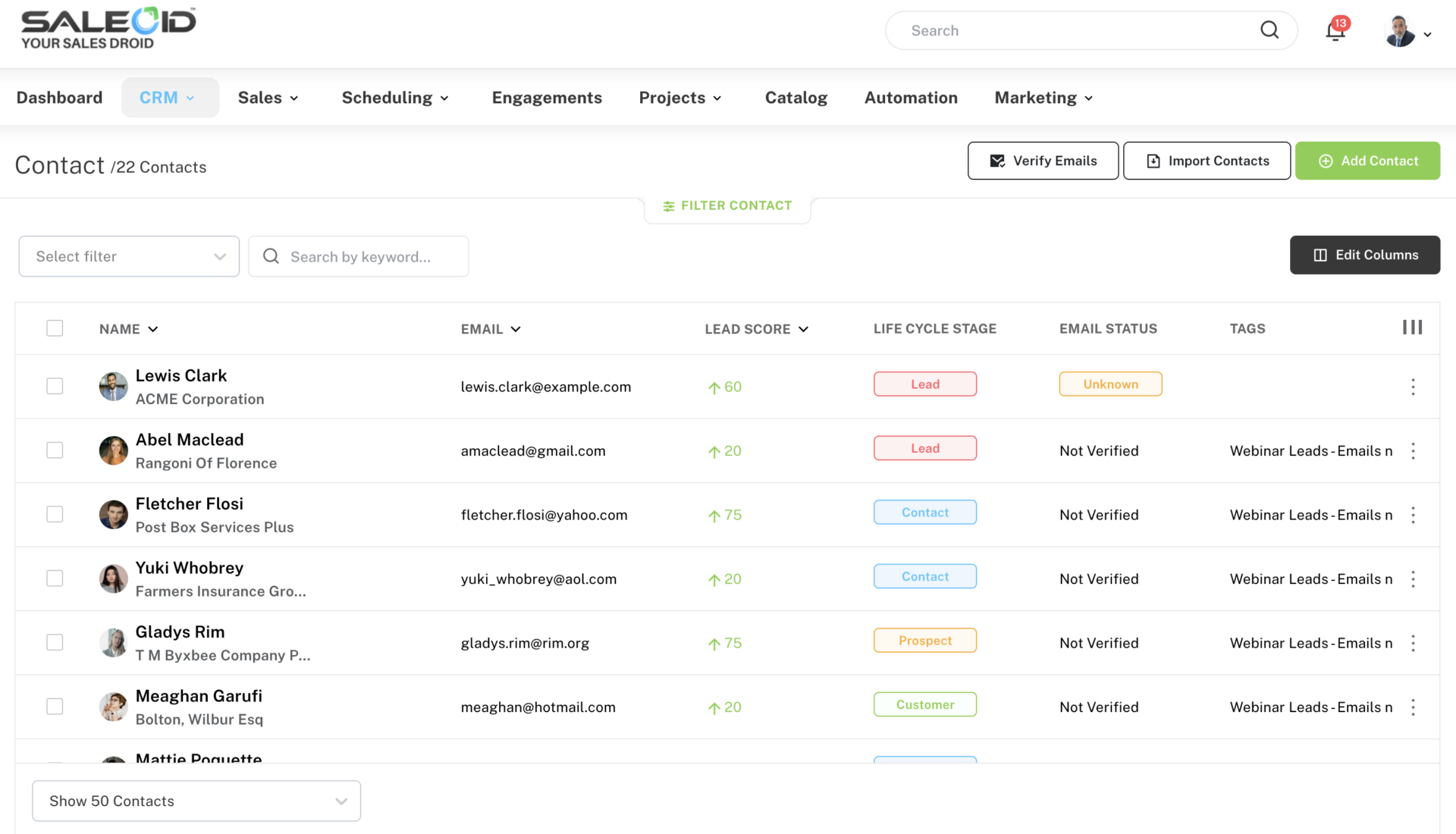
Contact and lead management is your CRM’s core job. It’s where you store every customer and prospect’s name, phone number, email, company details, and the full history of every interaction you’ve had with them. Think of it as a living, searchable record of every relationship your business has.
Why it matters for small businesses
Without this, everything falls apart. Your sales rep remembers a conversation from last Tuesday but can’t find the notes. Your owner calls a prospect who was already told “no” last month. A new hire has no idea where a lead came from or what was promised.
Good contact management fixes all of that. When every lead is organized in one place with its source, current stage, last activity, and custom notes, your team stops guessing and starts selling with context.
What to look for
You need a system that lets you capture leads from multiple sources, such as web forms, LinkedIn, Gmail, and landing pages, and organizes them automatically into contact profiles.
- Sales Pipeline Tracking: See Exactly Where Every Deal Stands
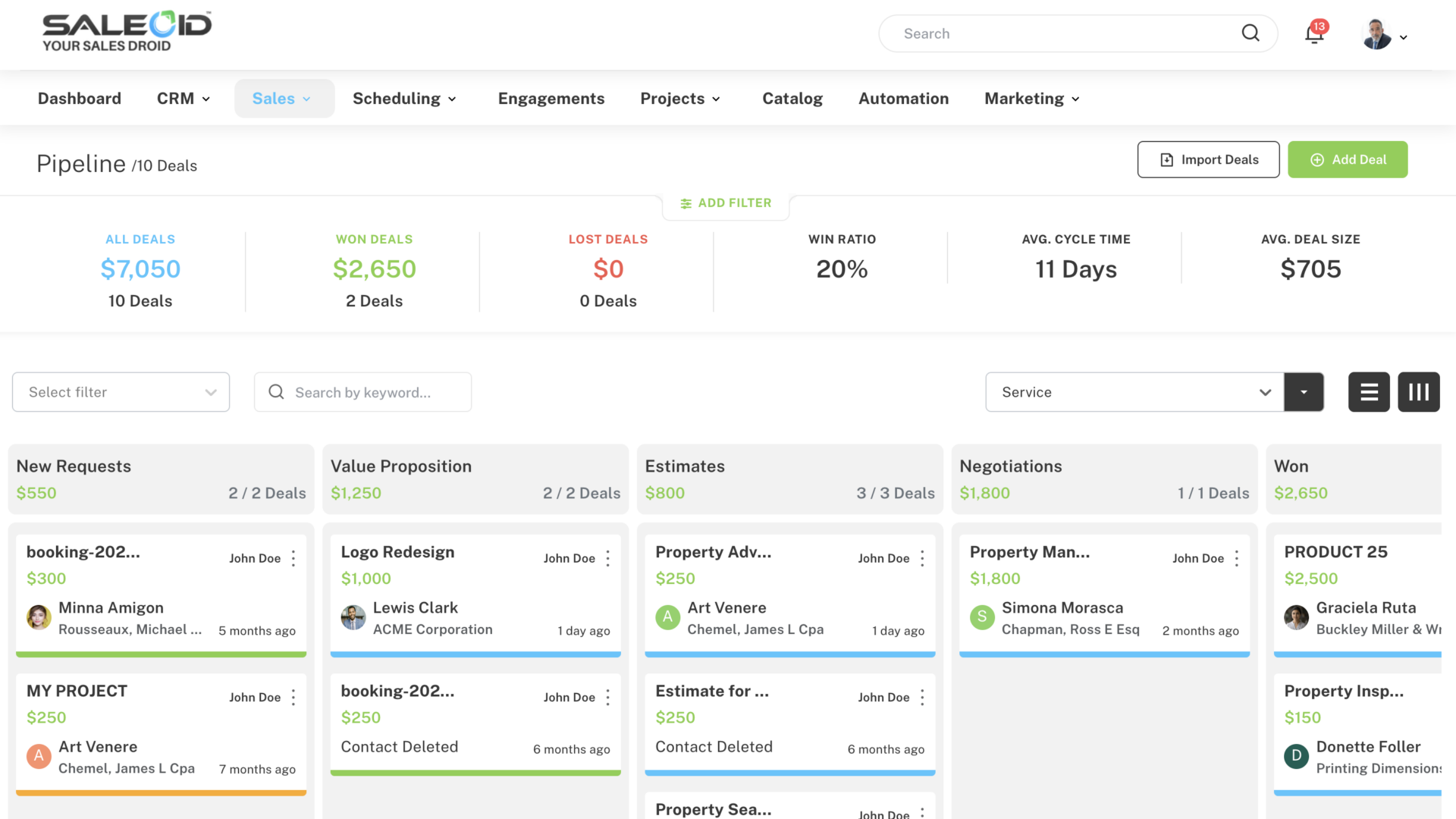
A sales pipeline is a visual map of every active deal, organized by stage. Each stage represents a step in your sales process, from first contact all the way through to closed won. Pipeline tracking lets you see where every deal is sitting at any point in time.
Why it matters for small businesses
Without a pipeline, your sales process lives in someone’s head. You think you have 3-4 deals close to closing, but 2 of them went cold 2 weeks ago and nobody noticed. That’s revenue walking out the door quietly.
A clear pipeline forces visibility. It shows you which deals need attention today, which ones have been sitting too long without a next step, and where your team’s energy is actually going. Moreover, it helps you roughly forecast what revenue is coming in the next 30 to 60 days, which matters a lot when you’re running a lean operation.
What to look for
Look for a CRM that supports multiple pipelines, so you can manage different products, services, or customer types separately without mixing everything together.
- Automated Follow-Ups: Stop Letting Deals Go Cold
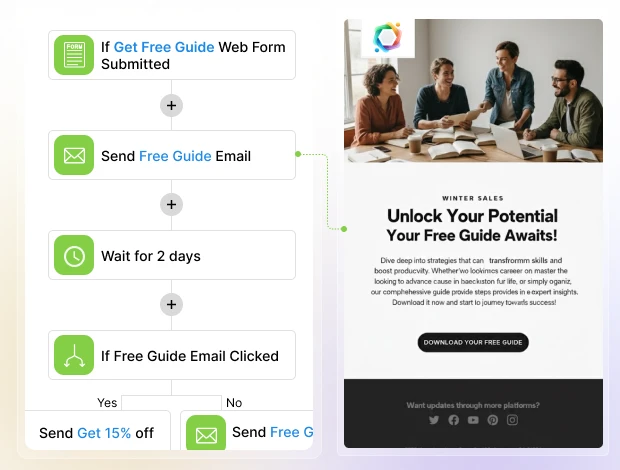
Automated follow-ups for small businesses are pre-set sequences of emails, SMS messages, or WhatsApp messages that go out to a lead or customer automatically based on triggers you define. For example, when someone fills out a form on your website, a follow-up email goes out within five minutes without anyone lifting a finger.
Why it matters for small businesses
Most deals don’t close on the first contact. In fact, most require five to eight touchpoints before a prospect makes a decision. For a small team juggling everything at once, manually tracking and sending each of those follow-ups is simply not realistic.
When follow-ups are automated, however, no lead gets forgotten. The prospect who downloaded your brochure on Friday gets a check-in email on Monday. The client whose proposal you sent last week gets a gentle nudge on day four. As a result, your pipeline stays active even when your team is focused elsewhere.
What to look for
The best follow-up automation works across multiple channels and not just email. Sales CRM handles this through its customer engagement platform and marketing automation software, which let you set up drip campaigns via email, SMS notifications, and WhatsApp follow-ups, all from one place.
- Engagements: Call, Email, and Activity Tracking in One Place
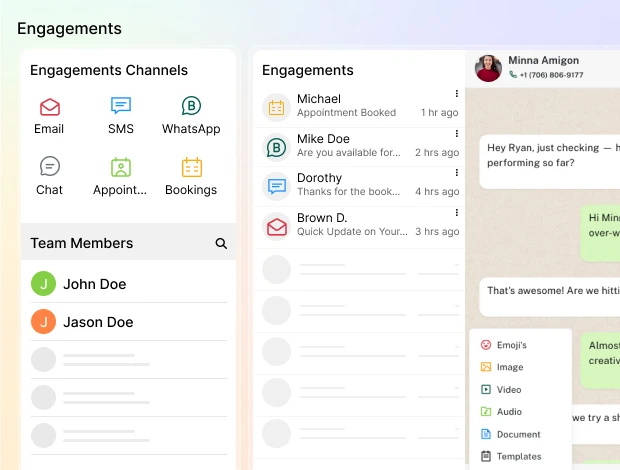
Engagement tracking records every interaction your team has with a customer, every email sent, every call made, every SMS exchanged, every WhatsApp message replied to. All of it gets logged under the customer’s profile automatically.
Why it matters for small businesses
Let’s consider a scenario that most small business owners are familiar with. A prospect calls in, has a great conversation with your sales rep, and then calls back 2 days later. A different person picks up, has no idea what was discussed, and the prospect has to repeat everything. That friction kills trust fast.
Engagement tracking solves this. When every touchpoint is logged in one place, anyone on your team can pick up a conversation mid-stream and sound like they’ve been involved from the beginning. Furthermore, it removes the “he said, she said” problem when deals stall. You can see exactly what was promised, when, and by whom.
What to look for
You want a CRM that centralizes all communication channels. Every interaction should be automatically linked to the customer’s CRM profile, so your team always has full context before responding. If there’s an InApp Calling feature, then you can make, receive, and record calls directly inside the CRM.
- Booking and Appointments: Let Your Calendar Run Itself
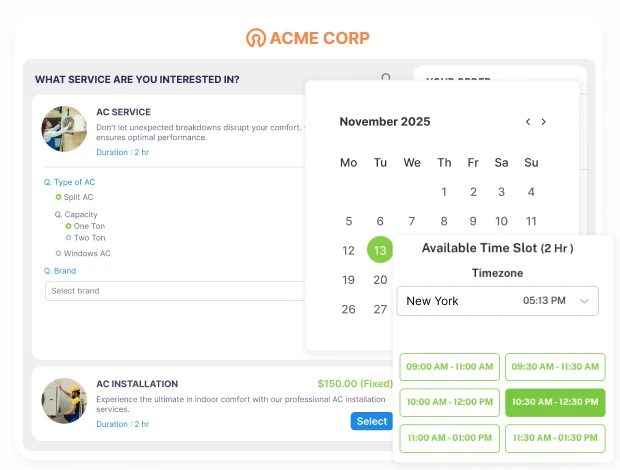
An appointment and booking feature lets prospects and clients schedule meetings, demos, or consultations directly without the back-and-forth of finding a time that works. You share a link, they pick a slot, and it lands in both calendars automatically.
Why it matters for small businesses
If your sales process involves a discovery call, a product demo, or an in-person consultation, every scheduling delay costs you momentum. The longer the gap between a prospect showing interest and actually speaking with you, the colder they get.
Beyond convenience, automated booking also handles the follow-up. Sending reminders before the appointment and follow-up messages if someone doesn’t show. That’s typically a few hours of admin work per week that simply disappears.
What to look for
Look for a booking tool that syncs with Gmail or Outlook calendars, sends automatic reminders via email, SMS, or WhatsApp, and allows clients to reschedule with a single click. An appointment scheduling software feature does all of this. You can also embed an appointment widget directly on your website so visitors can book without ever leaving the page.
- Billing and Invoicing: Close the Loop Between Sales and Revenue
Billing and invoicing inside a CRM means you can generate, send, and track invoices for clients directly from the same platform where you manage your sales pipeline without switching to a separate accounting or invoicing tool.
Why it matters for small businesses
This is the feature most small businesses overlook until they’re deep in the problem. A deal closes on Tuesday. Someone manually creates an invoice in a separate tool on Thursday. The client doesn’t receive it until Friday. They pay 2 weeks later. Meanwhile, nobody is sure if the deal is actually “done” because the payment is still pending in a different system.
Connecting billing to your CRM closes that gap entirely. When the sales process and the payment process live in the same place, your team knows the real status of every deal.
What to look for
Invoicing and billing software lets you auto-send invoices, charge clients automatically, and track payment status, all from within the platform. For businesses with recurring clients, the subscription management software feature automates renewals so you never have to manually follow up on the same invoice every month.
Essential CRM Features vs. Enterprise Bloat: What Small Businesses Actually Need
Most CRM vendors sell you everything and let you figure out what you actually need. This table cuts through that. For each core feature, below is what a small business genuinely needs and what the enterprise version adds that you’ll likely never use.
| Feature | What Small Businesses Need | What Enterprises Add |
|---|---|---|
| Contact & Lead Management | A single profile per contact with name, email, phone, lead source, notes, and interaction history. Searchable, simple, and accessible to the whole team. | Territory assignment, account hierarchies, multi-org structures, complex data governance rules, and dedicated data stewards to manage it all. |
| Sales Pipeline Tracking | A visual Kanban board showing every deal by stage. Ability to move deals, set a next step, and see what needs attention today, across one or two pipelines. | AI-powered forecasting models, revenue intelligence layers, multi-region pipeline segmentation, quota management dashboards, and enterprise-wide rollup reporting. |
| Automated Follow-Ups | Pre-set email, SMS, and WhatsApp sequences that trigger when a lead fills a form, misses an appointment, or goes quiet for a set number of days. | Complex multi-branch drip logic, A/B testing engines, predictive send-time optimization, and dedicated marketing ops teams to manage campaign architecture. |
| Engagements: Call, Email, Activity Tracking | Every email, call, SMS, and WhatsApp message logged automatically under the contact profile so any team member can pick up the conversation with full context. | Conversation intelligence platforms, real-time call coaching, sentiment analysis, call transcription libraries, and compliance recording across global regions. |
| Booking & Appointments | A shareable scheduling link that syncs with Gmail or Outlook, sends automatic reminders, and allows one-click rescheduling with optional payment at booking. | Enterprise resource planning for room bookings, multi-timezone staff scheduling, compliance-level audit trails, and integrations with internal HR calendar systems. |
| Billing & Invoicing | Auto-send invoices after a deal closes, track payment status inside the CRM, and automate recurring billing for repeat clients, all without switching tools. | Multi-entity invoicing, global tax compliance engines, ERP integrations, multi-currency reconciliation, and dedicated finance team workflows with approval hierarchies. |
Every feature in the left column helps a small business close deal and get paid faster. Everything in the right column exists to manage complexity that most small businesses simply don’t have.
How These Features Work Together in a Real Sales Process
When you look at sales CRM features for small businesses, they can feel like a long list. However, their real value shows up when they work together as one smooth process and not as separate tools.
Let’s walk through how this actually plays out in a real sales journey.
Step 1. A Lead Comes In
First, a new lead enters your system, maybe through a form, message, or direct inquiry. Instead of getting buried in emails or spreadsheets, it is instantly captured under contact and lead management. At this stage, all key details are stored in one place. As a result, you always have context before starting a conversation.
Step 2. Lead Gets Assigned Instantly
Next, the lead is assigned to you or a team member. This step may seem simple, but it removes confusion around ownership. Because everything is visible inside the sales pipeline, you know exactly who is responsible. Consequently, leads don’t sit idle or get overlooked.
Step 3. Follow-Ups Happen Without Delays
Now comes the most important part, i.e. follow-ups. Instead of relying on memory, automated follow-ups and task reminders makes sure every lead gets timely attention.
For example, if a prospect doesn’t respond, the system prompts you to follow up. As a result, you stay consistent without constantly checking or remembering manually.
Step 4. Deal Moves Through Pipeline Stages
As conversations progress, the deal moves across stages as shown in the image below.
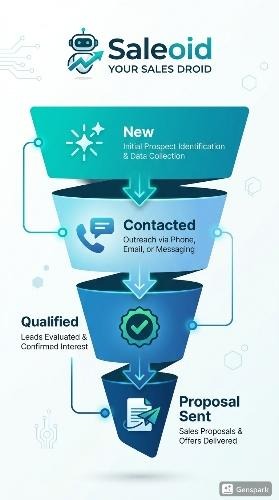
This is where multiple sales CRM features for small businesses, pipeline tracking and engagement history, come together.
You can instantly see:
- Where each deal stands
- What was last discussed
- What needs to happen next
Because of this clarity, your decisions become faster and more informed.
Step 5. Proposal or Quote Is Shared
Once the lead is ready, you send a proposal or quote. Instead of switching between tools, this step connects directly with your CRM data.
Everything, from client details to deal value, stays aligned. Therefore, you avoid errors and save time on repetitive work.
Step 6. Payment Closes the Loop
Finally, when the deal is won, billing or invoicing features take over. This is where your sales effort turns into actual revenue.
More importantly, the entire journey, from first interaction to payment, remains connected. As a result, you don’t lose visibility after closing the deal.
Why This Flow Matters
Individually, these features solve small problems. However, when combined, they create a system that actually supports how small businesses sell.
With the right sales CRM features for small businesses, you get:
- Clear visibility of every deal
- Consistent follow-ups without chasing
- Faster movement from lead to payment
That’s exactly how a platform like Saleoid is designed. Not as a bundle of disconnected tools, but as a connected workflow that simplifies sales. And once this flow is in place, growth stops feeling scattered and starts feeling structured.
Conclusion
Choosing the best sales CRM for startups and small businesses is all about finding the one your team will actually open every morning, trust with their data, and use consistently enough that it changes how your business runs.
Most CRMs make you choose between affordability and capability. You either get a tool that’s cheap but hollow, or one that’s powerful but built for a sales team three times your size. Saleoid was built specifically to close that gap.
Rather than locking core features behind higher pricing tiers, Saleoid gives small businesses access to a complete sales toolkit from day one, starting at just $5 a month. Additional apps can be added as per requirement by just paying $1 per app.
What makes this different from most CRM options is that you don’t have to stitch 6 separate tools together to get there. Everything above lives inside one platform, under one login, at a price that doesn’t require a board-level budget approval.
If you want to see how it fits your business specifically, you can view Saleoid’s CRM pricing or schedule a free demo to walk through the features with our sales rep.
FAQs
1. What is the most important feature of a sales CRM for small business?
Contact and lead management is the single most important feature. If your CRM can’t reliably store, organize, and surface the right customer information at the right moment, no other feature works properly.
2. Do small businesses really need CRM automation?
Yes, and arguably more than larger businesses do. Enterprise teams have enough people to manually chase leads, send follow-ups, and update records. Small businesses don’t. Automation fills that gap without adding headcount. Even basic automation, like a follow-up email triggered when a lead fills out a form, or a reminder when a deal has been sitting idle for 5-7 days.
3. How many CRM features does a small business actually need?
For most small sales teams, 6 core features cover the vast majority of daily needs:
- Contact Management
- Pipeline Tracking
- Automated Follow-Ups
- Engagement Tracking
- Appointment Scheduling
- Billing and Invoice
Beyond that, additional features should only be added when there’s a clear, specific reason.
4. What CRM features should I look for if I’m switching from spreadsheets?
Look for 2 things your spreadsheet could never do – automated follow-ups and activity tracking. These are the features that will immediately show you the gap between what you had before and what a proper CRM can do. Keep the initial setup simple, get your team comfortable, and layer on additional features only once the basics are working well.