


What Are the Most Important Sales CRM Features for Small Businesses? (Quick Answer)
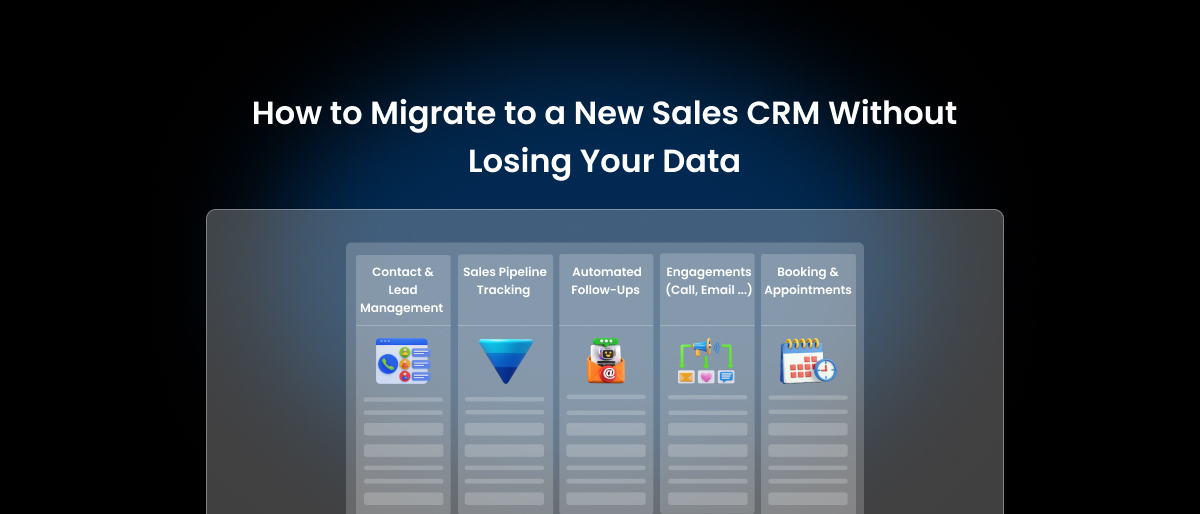
Sales CRM software for a small business should cover six core features that keep deals moving and follow-ups consistent:
- Contact & Lead Management
- Sales Pipeline Tracking
- Automated Follow-Ups
- Engagement (Call, Email & Activity) Tracking
- Booking & Appointments
- Billing & Invoicing
Beyond these six, another six features become worth it at specific growth stages; we cover the exact adoption thresholds below.
Introduction
You signed up for a CRM, went through the onboarding, and then stared at a dashboard with 47 menu items. There, you’ll see 12 pipeline views, and a “territory management” tab that your 3-person team will never once click.
Does this sound familiar? Here’s the uncomfortable truth CRM vendors won’t tell you. The average small business pays for a tool loaded with 10+ features and actively uses maybe 3-4 of them. What about the rest? Shelfware.
In fact, these are features built for 200-person sales floors. Somehow, they ended up in your $49/month subscription. As a result, instead of helping, they make the software harder to learn, slower to adopt, and easier to abandon.
Common Problem with All CRMs
Most of the CRMs are designed for enterprise sales teams. Then, they’re repackaged with a “small business” label slapped on the pricing page. So, strip away the packaging and you’re still holding a tool built for a completely different type of business.
In reality, small businesses don’t need 40 features. Instead, they need a system that stops leads from falling through the cracks. Keeps follow-ups running when the day gets chaotic. And tells you clearly whether your pipeline is healthy or quietly on fire.
In fact, Nucleus Research reports businesses see an average ROI of $8.71 for every $1 spent, and adoption of CRM for small businesses can boost sales productivity by up to 34%.
So, that’s exactly what this post is about. No feature bloat, no enterprise wish lists. Just the CRM features that actually move the needle for small sales teams. In other words, these sales CRM features for small businesses are the ones that save real time, close real deals, and drive revenue you can feel.
And if you’re still getting your head around what a CRM even does before diving into features, start from here by reading What Is Sales CRM Software? Then come back and let’s get into what your business actually needs from one.
Why Small Businesses Need Different CRM Features Than Enterprises

Walk into any enterprise sales organization and you’ll find a dedicated CRM admin, an onboarding team, a training budget, and probably a consultant on retainer. Now compare that to your business.
You’ve got a sales rep who also handles customer service, an owner who reviews the pipeline on Sunday evenings, and a part-time hire who’s still learning the shared inbox. In other words, that’s just how small businesses actually run. And that’s exactly why your CRM feature checklist should look nothing like the one a 500-person sales organization puts together.
Enterprise CRMs Are Built for a Different World
Enterprise CRMs are designed for scale, complexity, and heavy customization. In other words, they assume someone has the time and technical know-how to:
- Configure workflows from scratch
- Manage multi-level user permissions
- Build custom dashboards and reports
- Troubleshoot third-party integrations
- Onboard new team members into the system
For a large company, that investment makes sense. However, for a small business owner who needs to close 3 deals this week and invoice to clients by Friday, it becomes a trap, not a tool.
What Small Teams Actually Need Is the Opposite
So, what do small businesses actually need? Small businesses don’t need power. Instead, they need simplicity that works on day one. Below is what that actually looks like in practice:
- Fast setup: You shouldn’t need a week of onboarding before your team can log a lead
- Smooth navigation: If your rep has to think too hard about where to click, they’ll stop using it
- Out-of-the-box automation: Not automation that requires three hours of configuration before it does anything useful
- Transparent, flat pricing: No per-feature add-ons that quietly double your monthly bill as you grow
The Real Cost of Choosing the Wrong CRM
The real cost of the wrong CRM is time. When that happens, the tool feels like more work than it saves, and people stop using it. Data goes unlogged. Follow-ups get missed. The pipeline becomes a guess. Click here to read more about common CRM problems for small businesses.
Before long, the CRM that was supposed to fix your sales process becomes just another tab nobody opens. That’s the problem this guide exists to solve.
This isn’t a hypothetical risk. Research from Merkle Group found that 63% of CRM initiatives fail, and across studies, the number one cause isn’t bad software. It’s poor user adoption: the team simply stops opening the tool. That’s why every feature recommendation in this guide is filtered through one question first:
Will a busy small team actually use this daily?
Sales CRM features for small businesses covered in the sections below were chosen with one filter in mind: Does it actually help a small sales team close more deals without making their day harder?
If the answer is yes, it’s in. If it’s built for an enterprise with resources you don’t have, it’s out.
Must-Have Sales CRM Features Every Small Business Actually Needs
Now that we’ve established why small businesses need a different approach to CRM, let’s get into the features that actually matter. Each feature below is explained in terms of what it does, why it’s important for smaller teams, and what specifically to look for when evaluating a tool.
1. Contact and Lead Management: The Foundation Everything Else Sits On
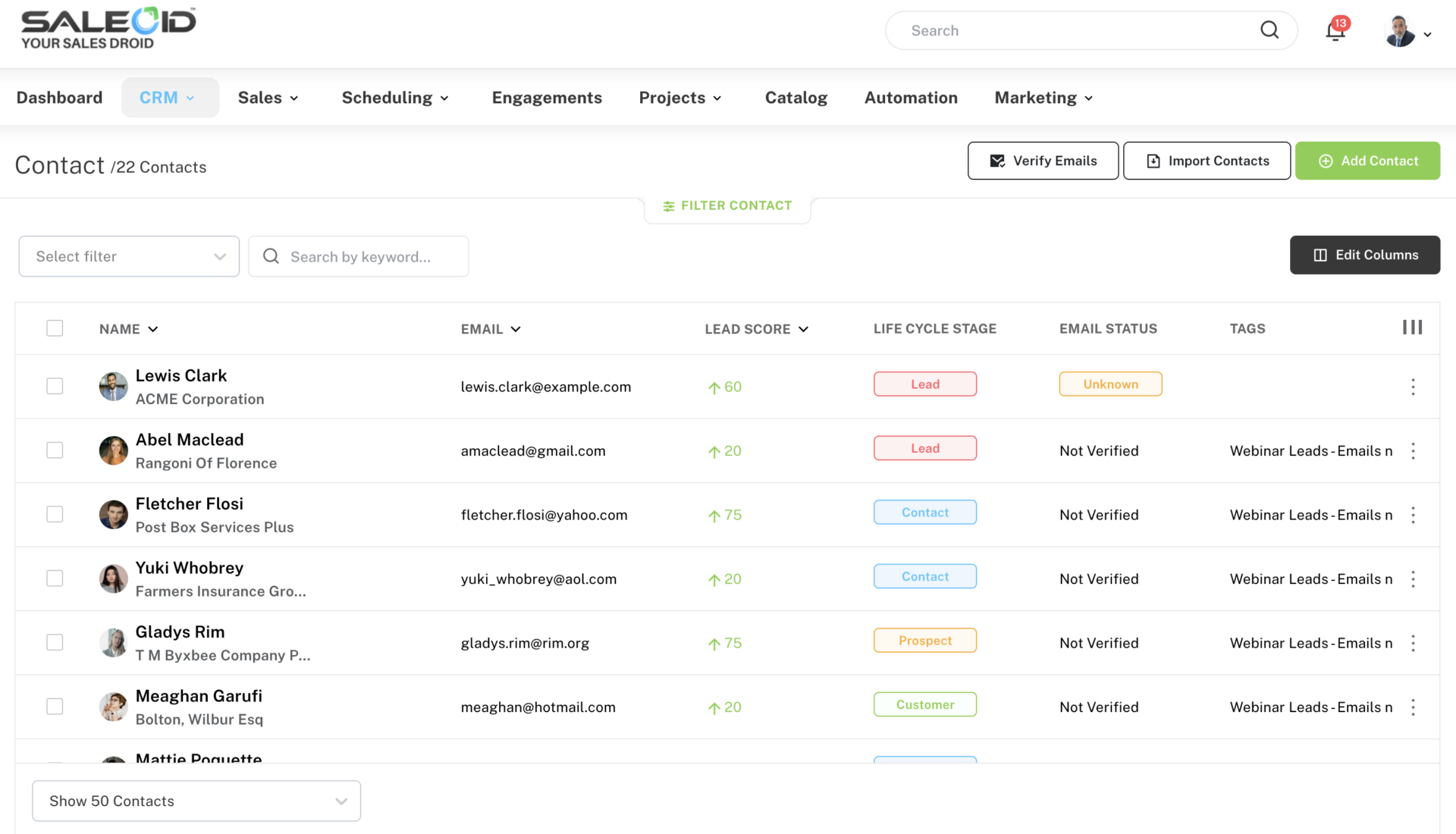
Contact and lead management is your CRM’s core job. It’s where you store every customer and prospect’s name, phone number, email, company details, and the full history of every interaction you’ve had with them. Think of it as a living, searchable record of every relationship your business has.
Why it matters for small businesses
Without this, everything falls apart. Your sales rep remembers a conversation from last Tuesday but can’t find the notes. Your owner calls a prospect who was already told “no” last month. A new hire has no idea where a lead came from or what was promised.
Good contact management fixes all of that. When every lead is organized in one place with its source, current stage, last activity, and custom notes, your team stops guessing and starts selling with context.
What to look for
You need a system that lets you capture leads from multiple sources, such as web forms, LinkedIn, Gmail, and landing pages, and organizes them automatically into contact profiles.
2. Sales Pipeline Tracking: See Exactly Where Every Deal Stands
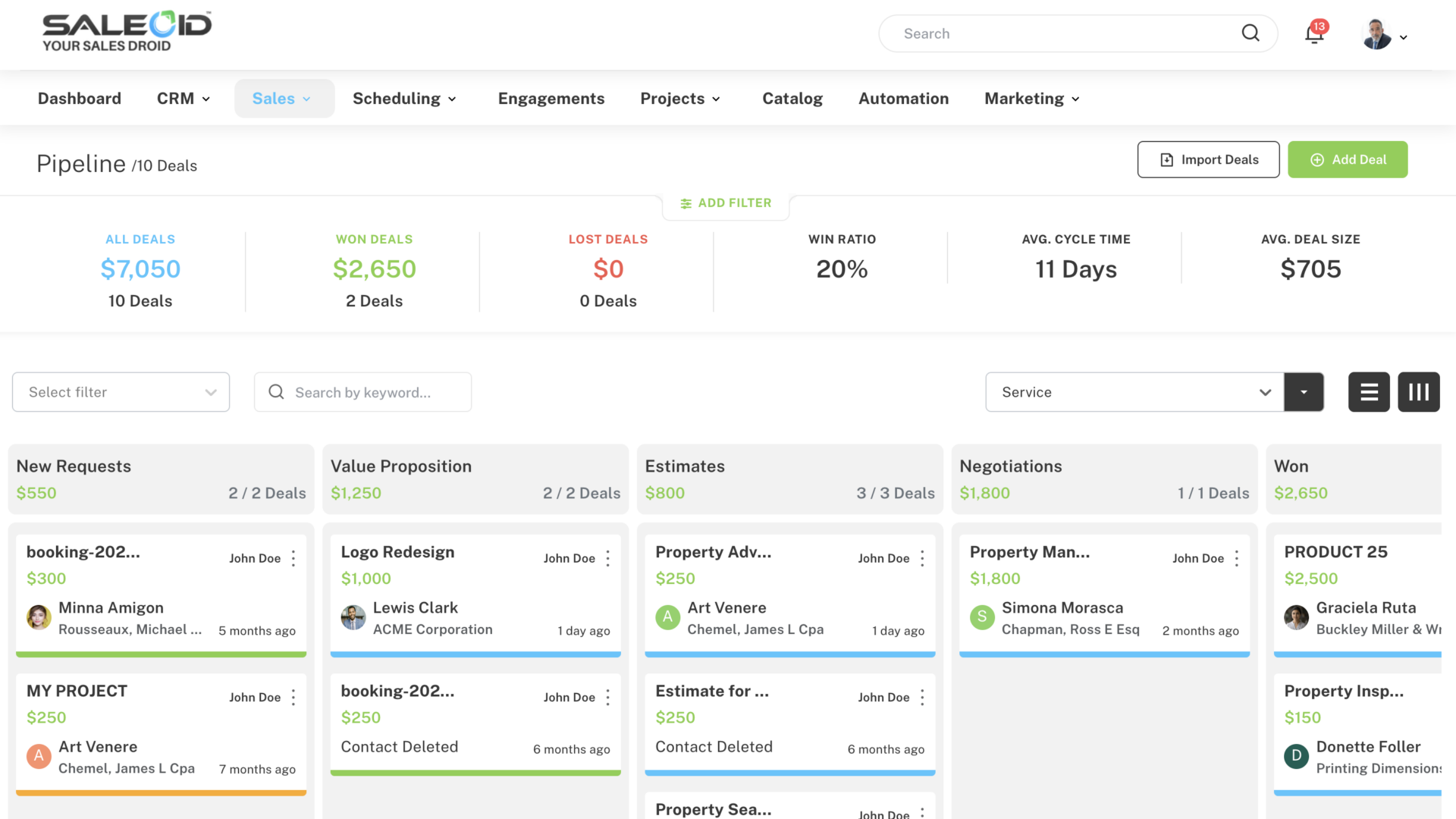
A sales pipeline is a visual map of every active deal, organized by stage. Each stage represents a step in your sales process, from first contact all the way through to closed won. Pipeline tracking lets you see where every deal is sitting at any point in time.
Why it matters for small businesses
Without a pipeline, your sales process lives in someone’s head. You think you have 3-4 deals close to closing, but 2 of them went cold 2 weeks ago and nobody noticed. That’s revenue walking out the door quietly.
A sales pipeline CRM offers clear pipeline visibility. It shows you which deals need attention today, which ones have been sitting too long without a next step, and where your team’s energy is actually going. Moreover, it helps you roughly forecast what revenue is coming in the next 30 to 60 days, which matters a lot when you’re running a lean operation.
What to look for
Look for a pipeline tracking software that supports multiple pipelines, so you can manage different products, services, or customer types separately without mixing everything together.
Not sure what your stages should actually be? We break down the exact 6 stages small businesses should use later in this guide.
3. Automated Follow-Ups: Stop Letting Deals Go Cold
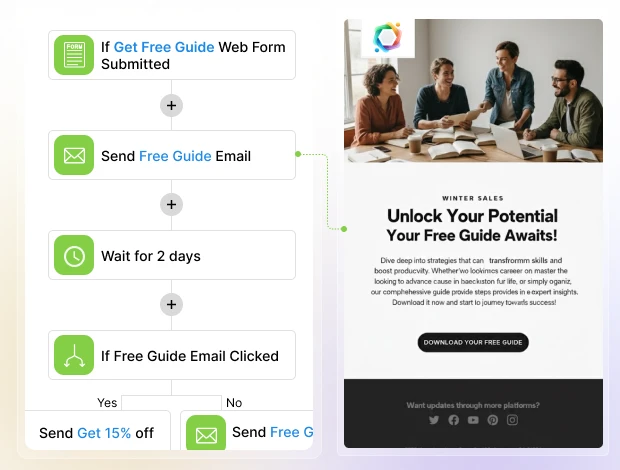
Automated follow-ups for small businesses are pre-set sequences of emails, SMS messages, or WhatsApp messages that go out to a lead or customer automatically based on triggers you define. For example, when someone fills out a form on your website, a follow-up email goes out within five minutes without anyone lifting a finger.
Why it matters for small businesses
Most deals don’t close on the first contact. In fact, most require five to eight touchpoints before a prospect makes a decision. For a small team juggling everything at once, manually tracking and sending each of those follow-ups is simply not realistic.
When follow-ups are automated, however, no lead gets forgotten. The prospect who downloaded your brochure on Friday gets a check-in email on Monday. The client whose proposal you sent last week gets a gentle nudge on day four. As a result, your pipeline stays active even when your team is focused elsewhere.
What to look for
The best follow-up automation works across multiple channels and not just email. Sales CRM handles this through its customer engagement platform and marketing automation software, which let you set up drip campaigns via email, SMS notifications, and WhatsApp follow-ups, all from one place.
4. Engagements: Call, Email, and Activity Tracking in One Place
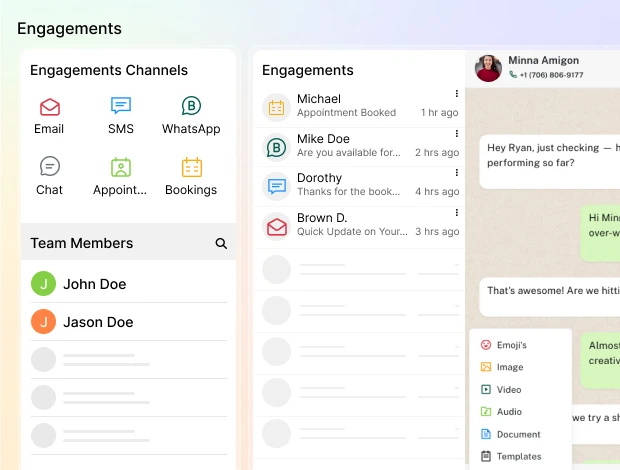
Engagement tracking records every interaction your team has with a customer, every email sent, every call made, every SMS exchanged, every WhatsApp message replied to. All of it gets logged under the customer’s profile automatically.
Why it matters for small businesses
Let’s consider a scenario that most small business owners are familiar with. A prospect calls in, has a great conversation with your sales rep, and then calls back 2 days later. A different person picks up, has no idea what was discussed, and the prospect has to repeat everything. That friction kills trust fast.
Engagement tracking solves this. When every touchpoint is logged in one place, anyone on your team can pick up a conversation mid-stream and sound like they’ve been involved from the beginning. Furthermore, it removes the “he said, she said” problem when deals stall. You can see exactly what was promised, when, and by whom.
What to look for
You want a CRM that centralizes all communication channels. Every interaction should be automatically linked to the customer’s CRM profile, so your team always has full context before responding. If there’s an InApp Calling feature, then you can make, receive, and record calls directly inside the CRM.
5. Booking and Appointments: Let Your Calendar Run Itself
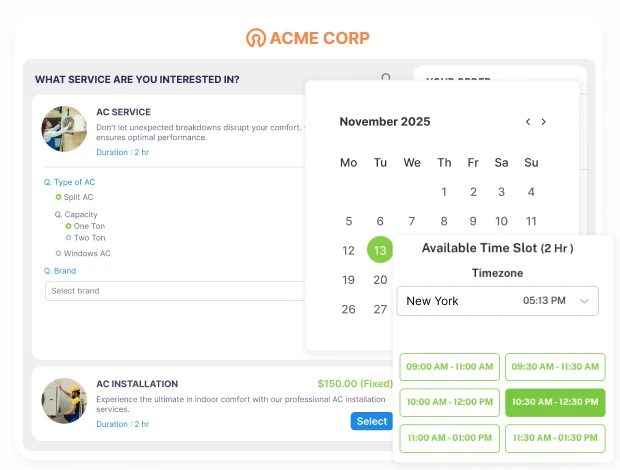
An appointment and booking feature lets prospects and clients schedule meetings, demos, or consultations directly without the back-and-forth of finding a time that works. You share a link, they pick a slot, and it lands in both calendars automatically.
Why it matters for small businesses
If your sales process involves a discovery call, a product demo, or an in-person consultation, every scheduling delay costs you momentum. The longer the gap between a prospect showing interest and actually speaking with you, the colder they get.
Beyond convenience, automated booking also handles the follow-up. Sending reminders before the appointment and follow-up messages if someone doesn’t show. That’s typically a few hours of admin work per week that simply disappears.
What to look for
Look for a booking tool that syncs with Gmail or Outlook calendars, sends automatic reminders via email, SMS, or WhatsApp, and allows clients to reschedule with a single click. An appointment scheduling software feature does all of this. You can also embed an appointment widget directly on your website so visitors can book without ever leaving the page.
6. Billing and Invoicing: Close the Loop Between Sales and Revenue
Billing and invoicing inside a CRM means you can generate, send, and track invoices for clients directly from the same platform where you manage your sales pipeline without switching to a separate accounting or invoicing tool.
Why it matters for small businesses
This is the feature most small businesses overlook until they’re deep in the problem. A deal closes on Tuesday. Someone manually creates an invoice in a separate tool on Thursday. The client doesn’t receive it until Friday. They pay 2 weeks later. Meanwhile, nobody is sure if the deal is actually “done” because the payment is still pending in a different system.
Connecting billing to your CRM closes that gap entirely. When the sales process and the payment process live in the same place, your team knows the real status of every deal.
What to look for
Invoicing and billing software lets you auto-send invoices, charge clients automatically, and track payment status, all from within the platform. For businesses with recurring clients, the subscription management software feature automates renewals so you never have to manually follow up on the same invoice every month.
Note : These 6 features are non-negotiable. But the next 6 are different and genuinely useful features, but only once your business hits a specific stage.
6 More CRM Features That Are Worth It (In Specific Situations)
Everything below this line is a “sometimes.” None of these belong in your day-one setup, and a CRM missing one of them isn’t disqualified. But each becomes genuinely valuable once your business crosses a specific threshold, and knowing that threshold is what keeps you from paying for shelfware.
For each feature, we’ve included the honest trigger point: adopt it when you hit the trigger; ignore it until then.
7. Reporting and Analytics
Dashboards and reports that show how your sales engine is performing, not 40 configurable charts, just answers to real questions. For a small team, only 3 or 4 reports matter, such as pipeline velocity (how fast deals move from captured to closed), win rate (what percentage of qualified deals you actually close), lead source performance (which channels produce customers, not just leads), and average deal size. Those 4 numbers tell you where to spend your time and marketing money.
Adopt it when: you’re running 20+ deals a month through the pipeline. Below that, you can see the patterns with your own eyes, a dashboard summarizing 8 deals is decoration.
Skip the trap: custom report builders. If a CRM makes you build these four reports instead of giving them out of the box, that’s configuration work you’ll never do.
8. Email Marketing Integration
Your CRM and your email campaigns live in one system, so the newsletter list, the drip campaign, and the sales pipeline all read from the same contact database. When a lead clicks a campaign link, your sales rep sees it on the contact profile. When a deal closes, the customer automatically moves from the “prospect” sequence to the “customer” one.
This is different from the automated follow-ups in feature #3: follow-ups are 1-to-1 messages triggered by deal activity; email marketing is 1-to-many campaigns and newsletters sent to segments.
Adopt it when: you’re emailing your list at least monthly, or you’re currently paying separately for Mailchimp/Brevo and a CRM and manually syncing contacts between them. That manual export-import cycle is exactly where lists rot, and unsubscribes get missed. It usually costs you more in a second subscription than the integrated option would.
Skip the trap: contact-based pricing. Some platforms charge by database size, so your bill grows even if you never email anyone. Look for pricing based on what you send, not what you store. Here’s how email marketing inside a CRM should work without the double subscription.
9. Mobile Access
A proper mobile app where you can look up a contact before walking into a meeting, log a call from the parking lot, and move a deal to the next stage from your phone.
Adopt it when: anyone on your team sells away from a desk. For field services, real estate, contractors, and anyone doing onsite visits, this quietly becomes a must-have because a CRM that only gets updated “when I’m back at the office” is a CRM full of stale data by Thursday.
Skip the trap: don’t evaluate the mobile app on feature count. Evaluate it on one thing: can your rep log an interaction in under 30 seconds? If logging is slow, it won’t happen, and the whole system decays.
10. Lead Scoring (Rule-Based)
Simple rules that rank leads by fit and behavior: +10 points for filling the pricing-page form, +5 for opening two emails, -10 for a free-email-domain address if you sell B2B. The result is a sorted list, so follow-up time goes to the hottest leads first.
This is the manual cousin of the AI lead scoring covered in the 2026 section below. Same goal, but you define the rules instead of an algorithm learning them. Rule-based is cheaper and more transparent; AI scoring earns its keep at higher volume.
Adopt it when: you’re generating 30+ leads a month and can no longer follow up with everyone the same day. Below that volume, scoring is a spreadsheet solving a problem you don’t have.
Skip the trap: over-engineering the rules. Start with three signals (source, engagement, fit) and refine quarterly. Teams that build 20-rule scoring models on day one abandon them by week three.
11. Task and Reminder Management
Built-in to-dos attached to deals and contacts: “call Ramesh Thursday 11am,” “send revised quote by Friday,” with reminders that surface on the right day. The point isn’t project management but making sure every open deal always has a next step with a date.
Adopt it when: honestly, this is the closest thing to a seventh must-have on this list. The trigger is simply having more than one person touching deals, or more than ~10 active deals per person. If you’re a solo founder with five deals, your calendar can carry the load a little longer.
Skip the trap: using a separate task app (Todoist, Asana) for sales tasks. The moment sales to-dos live outside the CRM, they detach from deal context. You see “follow up with Rocky” but not the proposal, the last email, or the deal stage. Sales tasks belong next to the deal.
12. Integrations (Accounting, Calendar, Forms)
The connections that stop double data entry: calendar sync so booked meetings appear on deals, website form sync so leads flow in automatically, and accounting sync so closed deals become invoices without retyping (less critical if your CRM has billing built in.
Adopt it when: you catch yourself typing the same information into two systems. That’s the entire test. Every duplicate entry is a future data mismatch. The CRM says the deal is worth ₹50,000, the invoice says ₹45,000, and now nobody trusts either number.
Skip the trap: judging a CRM by the size of its integration marketplace (“500+ integrations!”). You will use four, maybe five. Check that your specific tools, such as your calendar, your form builder, your accounting software, connect natively, and ignore the other 495.
Still not sure which side of the line a feature falls on for your business? Score it. Below is the two-question method we use.
How to Prioritize: A Simple Scoring Method
You’ve now seen 12 features and a set of adoption thresholds. But thresholds are generalizations, your business might genuinely need mobile access at two deals a month (if you’re always on the road) or genuinely not need reporting at fifty (if you’re a one-person shop with one lead source). Below, we’ve discussed a two-question method that adapts the whole guide to your situation.
For any CRM feature you’re evaluating from this list or from a vendor’s pitch, score it 1 to 5 on two questions:
Question 1: How often will we actually use this in a normal week?
- 1 = Maybe once a month, if we remember
- 3 = A few times a week
- 5 = Multiple times a day, by multiple people
Question 2: What breaks if we don’t have it?
- 1 = Nothing, it would just be nice
- 3 = We’d lose time to manual workarounds
- 5 = Leads get lost, deals go cold, or money leaks
Add the two numbers together.
8–10: Must-have. This feature should be in your CRM from day one, and a platform missing it is disqualified, no matter how good the rest looks.
6–7: Worth it. Adopt it, but it shouldn’t drive your platform choice on its own. If your CRM offers it as an affordable add-on, that’s fine.
5 or below: Bloat for you, for now. Doesn’t matter how impressive the demo was or how prominently it’s featured on the pricing page. Ignore it and re-score in six months.
An Example: Scoring “AI Chatbot” for Two Different Businesses
A local plumbing company with a busy website that gets after-hours emergency inquiries: usage is daily (5), and without it, night-time leads call a competitor by morning (5). Score: 10 – must-have.
A B2B consultant whose leads come entirely from referrals and LinkedIn: the website gets 40 visits a month, so usage is rare (1), and nothing breaks without it (1). Score: 2 – bloat.
Same feature, same price, completely different answer. That’s the point, feature lists can’t make this call for you, but two honest questions can.
Three Rules for Scoring Honestly
- Score based on this quarter, not your five-year vision.
“We’ll eventually have a 10-person sales team” is how businesses end up paying enterprise prices for a 2-person operation. Buy for the business you run today; upgrade when today changes.
2. Have the person who’ll actually use it do the scoring.
Owners consistently over-score reporting (they love dashboards) and under-score mobile logging (they’re not the ones in the field). If your rep scores something a 9 and you scored it a 4, trust the rep.
3. Re-score every 6 months.
The triggers from the previous section. Lead volume, deal count, team size shift as you grow. A feature that scored 4 in January might be an 8 by July. The scorecard isn’t a one-time filter; it’s a recurring 10-minute exercise that keeps your CRM spend matched to your actual needs.
Run all 12 features from this guide through the scorecard and you’ll end up with something more useful than any “best CRM features” list, which turns CRM shopping from comparing marketing pages into checking boxes.
The 6 Sales Pipeline Stages Every Small Business Should Use
A pipeline is only as useful as its stages. Too few, and you can’t tell where deals are stuck. Too many, and your team stops updating them. For most small businesses, six stages hit the sweet spot. Here’s what each one means, when a deal should move forward, and the mistake that quietly kills deals at that stage.
Stage 1: Lead Captured
A new lead has entered your system from a web form, a call, a referral, or a walk-in, but no one has spoken to them yet. Their contact details and lead source are logged, nothing more.
MIT’s Lead Response Management study (analyzing 15,000+ leads and 100,000 call attempts) found that calling a lead within 5 minutes makes you 100x more likely to reach them and 21x more likely to qualify them than waiting just 30 minutes. Meanwhile, a Harvard Business Review audit found the average company takes 42 hours to respond, and 23% never respond at all. That gap is the cheapest competitive advantage available to a small business.
Move the deal forward when: the lead has been assigned to a specific person on your team.
Common mistake: leads sit unassigned for days. Research consistently shows that responding within the first few minutes dramatically increases your odds of qualifying a lead, after 24 hours, most have already moved on. If a lead is still in this stage tomorrow, something is broken.
Stage 2: Contacted
Someone on your team has made the first real touch a call, email, or WhatsApp message and you’re waiting on or working through the initial conversation.
Move the deal forward when: the lead has responded and shown genuine interest in talking further.
Common mistake: treating one unanswered call as “contacted, done.” Most leads need 3–5 touch attempts before they respond. Deals die here when reps give up after one try and never schedule the next attempt.
Stage 3: Qualified
You’ve confirmed this lead is worth pursuing: they have a real need, a budget that fits your pricing, and the authority (or path to the person with authority) to buy. This is the stage that separates real pipeline from wishful thinking.
Move the deal forward when: you can answer 3 questions like what problem are they solving, roughly what can they spend, and who makes the final call.
Common mistake: skipping qualification entirely and jumping straight to a proposal. Unqualified deals inflate your pipeline, distort your forecast, and waste hours on proposals that were never going to close.
Stage 4: Proposal Sent
The prospect has your quote, proposal, or estimate in hand and is evaluating it.
Move the deal forward when: the prospect responds with feedback, questions, or negotiation points.
Common mistake: this is where deals rot. A proposal goes out on Tuesday with no follow-up date attached, and 3 weeks later, nobody remembers to check in. Every deal in this stage should have a scheduled follow-up within 3–4 days of sending. This is exactly where automated follow-ups (covered above) earn their keep.
Stage 5: Negotiation
The prospect wants to buy but is working through final details, such as price, scope, timeline, or payment terms. Active back-and-forth is happening.
Move the deal forward when: both sides agree on final terms and the prospect verbally or in writing commits.
Common mistake: discounting too fast. Small business owners often drop the price at the first pushback when the real objection was scope or timing. Log every objection in the CRM, including patterns across deals will show you what’s actually blocking sales.
Stage 6: Closed Won / Closed Lost
The deal is decided. Won means the agreement is signed and it’s time to invoice. Lost means they went elsewhere, went silent, or the timing wasn’t right.
What to do here: for won deals, trigger invoicing immediately (this is where billing inside your CRM closes the loop). For lost deals, always log the reason like price, competitor, timing, no decision.
Common mistake: treating “Closed Lost” as a trash bin. A lead lost to bad timing today is a warm lead in six months. Tag lost deals with a reason and set a re-engagement reminder. This is the cheapest lead source you have.
Quick Reference: Pipeline Stages at a Glance
| Stage | Owner’s Key Action | Healthy Time in Stage |
|---|---|---|
| 1. Lead Captured | Assign owner, first response | Under 24 hours |
| 2. Contacted | 3–5 touch attempts, book a conversation | 3–7 days |
| 3. Qualified | Confirm need, budget & decision-maker | 3–5 days |
| 4. Proposal Sent | Follow up within 3–4 days of sending | 7–14 days |
| 5. Negotiation | Resolve objections, agree on terms | 7–14 days |
| 6. Closed Won/Lost | Invoice immediately / log loss reason | Same day |
If a deal has been sitting in any stage two to three times longer than the healthy range, that’s your signal to act. Follow up, requalify, or close it as lost and move on. A pipeline full of stale deals isn’t a pipeline; it’s a to-do list nobody looks at.
One note before you copy these stages – They’re a starting point, not a rule. A service business might add an “Onsite Visit” stage; a SaaS reseller might add “Demo Scheduled.” The principle stays the same. Every stage needs a clear exit condition, and every deal needs a next step with a date. If your CRM makes it easy to customize stages per pipeline, adapting this to your process takes five minutes.
Essential CRM Features vs. Enterprise Bloat: What Small Businesses Actually Need
Most CRM vendors sell you everything and let you figure out what you actually need. This table cuts through that. For each core feature, below is what a small business genuinely needs and what the enterprise version adds that you’ll likely never use.
| Feature | What Small Businesses Need | What Enterprises Add |
|---|---|---|
| Contact & Lead Management | A single profile per contact with name, email, phone, lead source, notes, and interaction history. Searchable, simple, and accessible to the whole team. | Territory assignment, account hierarchies, multi-org structures, complex data governance rules, and dedicated data stewards to manage it all. |
| Sales Pipeline Tracking | A visual Kanban board showing every deal by stage. Ability to move deals, set a next step, and see what needs attention today, across one or two pipelines. | AI-powered forecasting models, revenue intelligence layers, multi-region pipeline segmentation, quota management dashboards, and enterprise-wide rollup reporting. |
| Automated Follow-Ups | Pre-set email, SMS, and WhatsApp sequences that trigger when a lead fills a form, misses an appointment, or goes quiet for a set number of days. | Complex multi-branch drip logic, A/B testing engines, predictive send-time optimization, and dedicated marketing ops teams to manage campaign architecture. |
| Engagements: Call, Email, Activity Tracking | Every email, call, SMS, and WhatsApp message logged automatically under the contact profile so any team member can pick up the conversation with full context. | Conversation intelligence platforms, real-time call coaching, sentiment analysis, call transcription libraries, and compliance recording across global regions. |
| Booking & Appointments | A shareable scheduling link that syncs with Gmail or Outlook, sends automatic reminders, and allows one-click rescheduling with optional payment at booking. | Enterprise resource planning for room bookings, multi-timezone staff scheduling, compliance-level audit trails, and integrations with internal HR calendar systems. |
| Billing & Invoicing | Auto-send invoices after a deal closes, track payment status inside the CRM, and automate recurring billing for repeat clients, all without switching tools. | Multi-entity invoicing, global tax compliance engines, ERP integrations, multi-currency reconciliation, and dedicated finance team workflows with approval hierarchies. |
Every feature in the left column helps a small business close deal and get paid faster. Everything in the right column exists to manage complexity that most small businesses simply don’t have.
That said, not everything new is bloat. A handful of features that went mainstream in 2026 are genuinely worth a small team’s attention, with conditions.
New CRM Features Small Businesses Should Look For in 2026
Every year, CRM vendors announce a wave of “revolutionary” features. Most of them are enterprise toys wearing a small-business costume. But 2026 is a little different. A few genuinely new capabilities, mostly AI-driven, have become affordable and simple enough for a 3-person team to actually use.
Below are 5 worth knowing about, and an honest filter for when each one is worth paying for and when it’s just noise. If you want the full picture of how AI changes the category, start with what an AI CRM actually is and come back.
1. AI Lead Scoring and Prioritization
Instead of treating every lead equally, the CRM analyzes behavior, such as email opens, page visits, response speed, form answers, and ranks leads by how likely they are to buy. Your Monday morning starts with “call these 5 first” instead of a flat list of 40 names.
Useful only if: you’re getting more leads than you can personally follow up with roughly 30+ new leads a month. Below that volume, you already know who your hot leads are, and scoring just tells you what you can see yourself.
Watch out for: vendors charging enterprise prices for basic scoring. Here’s a breakdown of what AI CRM features actually cost in 2026 so you know a fair price when you see one.
2. AI-Drafted Follow-Up Emails
The CRM reads the context of a deal, like the last conversation, stage, time since contact, and drafts the follow-up email for you. You review, tweak one line, and send. What used to take 10 minutes per email takes 30 seconds.
Useful only if: follow-ups are genuinely your bottleneck. If deals in your pipeline die because nobody followed up, this feature pays for itself in the first week.
Watch out for: sending AI drafts unedited. Prospects can smell a generic email. The win here is speed, not autopilot. A 30-second human edit is what keeps response rates up.
3. Conversational AI Chatbots That Qualify Leads
A chatbot on your website that doesn’t just say “leave your email” but actually asks qualifying questions like what are you looking for, what’s your timeline, what’s your budget range. It drops a pre-qualified lead with full context into your pipeline. The 2 a.m. website visitor gets answered instantly instead of bouncing to a competitor.
Useful only if: your website gets real traffic (a few hundred visitors a month or more) and you currently lose inquiries outside business hours. If your leads mostly come from referrals and calls, skip it for now.
Watch out for: chatbots that can’t hand off smoothly. The bot’s job is to qualify and book. The moment a lead wants a human, a human should get the full transcript, not a cold start.
4. WhatsApp and SMS-Native Pipelines
Email open rates keep sliding while WhatsApp and SMS messages get read within minutes. Newer CRMs now treat these channels as first-class citizens: conversations logged on the contact profile automatically, follow-up sequences that run over WhatsApp instead of email, and pipeline updates triggered by message replies.
Useful only if: your customers actually live on these channels. For local services, real estate, clinics, salons, and most B2C businesses, this is arguably the single most impactful item on this list. For B2B companies selling to corporate buyers, email still rules. Don’t pay extra for channels your customers won’t use.
Watch out for: per-message pricing that scales ugly. Some platforms charge usage fees that quietly double your bill once campaigns ramp up. Ask for the per-message rate before you commit, not after.
5. Predictive “Deal at Risk” Alerts
Rather than you scanning the pipeline for stale deals, the CRM flags them for you: “This deal has had no activity in 9 days and deals like it usually close within 14, follow up now.” It’s the difference between finding out a deal went cold during your Sunday pipeline review and catching it while it’s still warm.
Useful only if: you have 15+ active deals at a time. With five deals in play, you don’t need software to tell you one’s gone quiet. With twenty-five spread across two people, deals slip through silently. This is the safety net.
Watch out for: alert fatigue. If the CRM flags everything, you’ll ignore everything. Good implementations let you tune the thresholds per pipeline.
None of these replaces the 6 fundamentals covered earlier, but they accelerate them. AI scoring is useless without clean contact management. Deal-risk alerts are useless without honest pipeline stages. Get the foundation right first, then add the 2026 layer where it matches your actual volume and channels.
The good news is that these features are no longer locked behind enterprise pricing. Here’s what to look for in an AI CRM built for small businesses, including how Saleoid bakes several of these in without the per-feature markup bigger platforms charge.
How These Features Work Together in a Real Sales Process
When you look at sales CRM features for small businesses, they can feel like a long list. However, their real value shows up when they work together as one smooth process and not as separate tools.
Let’s walk through how this actually plays out in a real sales journey.
Step 1. A Lead Comes In
First, a new lead enters your system, maybe through a form, message, or direct inquiry. Instead of getting buried in emails or spreadsheets, it is instantly captured under contact and lead management. At this stage, all key details are stored in one place. As a result, you always have context before starting a conversation.
Step 2. Lead Gets Assigned Instantly
Next, the lead is assigned to you or a team member. This step may seem simple, but it removes confusion around ownership. Because everything is visible inside the sales pipeline, you know exactly who is responsible. Consequently, leads don’t sit idle or get overlooked.
Step 3. Follow-Ups Happen Without Delays
Now comes the most important part, i.e. follow-ups. Instead of relying on memory, automated follow-ups and task reminders makes sure every lead gets timely attention.
For example, if a prospect doesn’t respond, the system prompts you to follow up. As a result, you stay consistent without constantly checking or remembering manually.
Step 4. Deal Moves Through Pipeline Stages
As conversations progress, the deal moves across stages as shown in the image below.
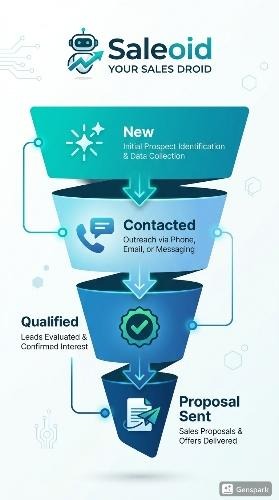
This is where multiple sales CRM features for small businesses, pipeline tracking and engagement history, come together.
You can instantly see:
- Where each deal stands
- What was last discussed
- What needs to happen next
Because of this clarity, your decisions become faster and more informed.
Step 5. Proposal or Quote Is Shared
Once the lead is ready, you send a proposal or quote. Instead of switching between tools, this step connects directly with your CRM data.
Everything, from client details to deal value, stays aligned. Therefore, you avoid errors and save time on repetitive work.
Step 6. Payment Closes the Loop
Finally, when the deal is won, billing or invoicing features take over. This is where your sales effort turns into actual revenue.
More importantly, the entire journey, from first interaction to payment, remains connected. As a result, you don’t lose visibility after closing the deal.
Why This Flow Matters
Individually, these features solve small problems. However, when combined, they create a system that actually supports how small businesses sell.
With the right sales CRM features for small businesses, you get:
- Clear visibility of every deal
- Consistent follow-ups without chasing
- Faster movement from lead to payment
That’s exactly how a platform like Saleoid is designed. Not as a bundle of disconnected tools, but as a connected workflow that simplifies sales. And once this flow is in place, growth stops feeling scattered and starts feeling structured.
Conclusion
Choosing the best sales CRM for startups and small businesses is all about finding the one your team will actually open every morning, trust with their data, and use consistently enough that it changes how your business runs.
Most CRMs make you choose between affordability and capability. You either get a tool that’s cheap but hollow, or one that’s powerful but built for a sales team three times your size. Saleoid was built specifically to close that gap.
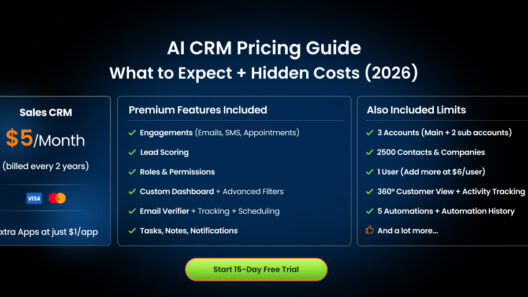
Rather than locking core features behind higher pricing tiers, Saleoid gives small businesses access to a complete sales toolkit from day one, starting at just $5 a month. Additional apps can be added as per requirement by just paying $1 per app.
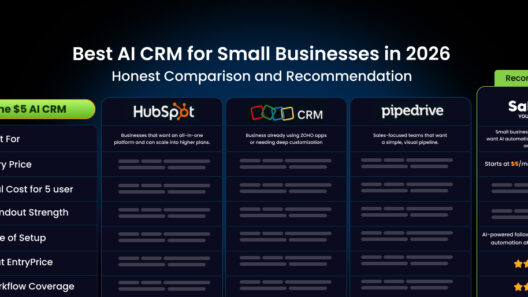
What makes this different from most CRM options is that you don’t have to stitch 6 separate tools together to get there. Everything above lives inside one platform, under one login, at a price that doesn’t require a board-level budget approval. Read our absolutely transparent and genuine list of the best CRM for small businesses.
If you want to see how it fits your business specifically, you can view Saleoid’s CRM pricing or schedule a free demo to walk through the features with our sales rep.
FAQs
Add features based on volume triggers, not vendor pitches. Reporting becomes useful at 20+ deals per month, lead scoring at 30+ leads per month, and email marketing integration once you’re campaigning monthly or paying for a separate email tool. Task management and mobile access become essential as soon as multiple people work deals or anyone sells away from a desk.
Score each feature 1–5 on two questions: how often you’ll use it weekly, and what breaks without it. A combined score of 8–10 means must-have, 6–7 means worth adopting, and 5 or below means it’s bloat for your current stage. Re-score every six months as your lead volume and team size grow.
For most small sales teams, 6 core features cover the vast majority of daily needs – Contact Management, Pipeline Tracking, Automated Follow-Ups, Engagement Tracking, Appointment Scheduling, and Billing and Invoicing. Beyond that, additional features should only be added when there’s a clear, specific reason. We’ve written a detailed CRM migration guide for our customers’ reference.
Look for 2 things your spreadsheet could never do. First, automated follow-ups and second, activity tracking. These are the features that will immediately show you the gap between what you had before and what a proper CRM can do. Keep the initial setup simple, get your team comfortable, and layer on additional features only once the basics are working well. For more details, read our blog on the CRM vs Excel comparison.
Most small businesses need six pipeline stages: Lead Captured, Contacted, Qualified, Proposal Sent, Negotiation, and Closed Won/Lost. Each stage should have a clear exit condition that tells you when a deal is ready to move forward. Avoid using more than 7–8 stages, overly complex pipelines are one of the main reasons small teams stop updating their CRM.
The 5 most impactful new CRM features in 2026 are AI lead scoring, AI-drafted follow-up emails, conversational AI chatbots that qualify leads automatically, WhatsApp/SMS-native pipelines, and predictive deal-at-risk alerts. Small businesses should adopt these based on lead volume and customer channels. They enhance the core CRM fundamentals but don’t replace them.
For email marketing inside a CRM, you need four things: a shared contact database (so campaign lists and sales pipeline read from the same records), segmentation by tags or deal stage, automated sequences triggered by lead behavior, and engagement tracking that logs opens and clicks on the contact’s profile.
A sales CRM is built around deals such as pipeline stages, follow-ups, quotes, and closings. A CRM with marketing automation is built around audiences, such as campaigns, segmentation, and nurturing at scale. Small businesses usually need the sales side first because unclosed deals cost more than unsent newsletters. The best option for a small team is a platform that handles both from one contact database, so you’re not paying for and syncing two separate tools.
Most small businesses should expect to pay $10–$50 per user per month for the six core features, though big-name platforms often charge $50–$150+ once essentials like automation get unlocked in higher tiers. Watch for per-feature paywalls, a low advertised price that requires three upgrades to be usable isn’t a low price. Some platforms, like Saleoid, use modular pricing instead, starting at $5/month with additional apps at $1 each, making it one of the best affordable CRM software for small businesses like startups, agencies and consultants.