


For many businesses, lead management starts in a simple way. Someone creates an Excel sheet. They add names, phone numbers, emails, and notes. Track follow-ups in rows and columns. Update statuses manually.
At first, it works.
Excel feels familiar. It’s easy to use. It doesn’t require training. And it costs almost nothing. So when people hear about CRM software, the usual reaction is, “Why do we need that? We already manage leads in Excel.”
But as the business grows, things start changing. Follow-ups get missed. Data becomes messy.
Different versions of the same file appear. No one is sure which sheet is the latest.
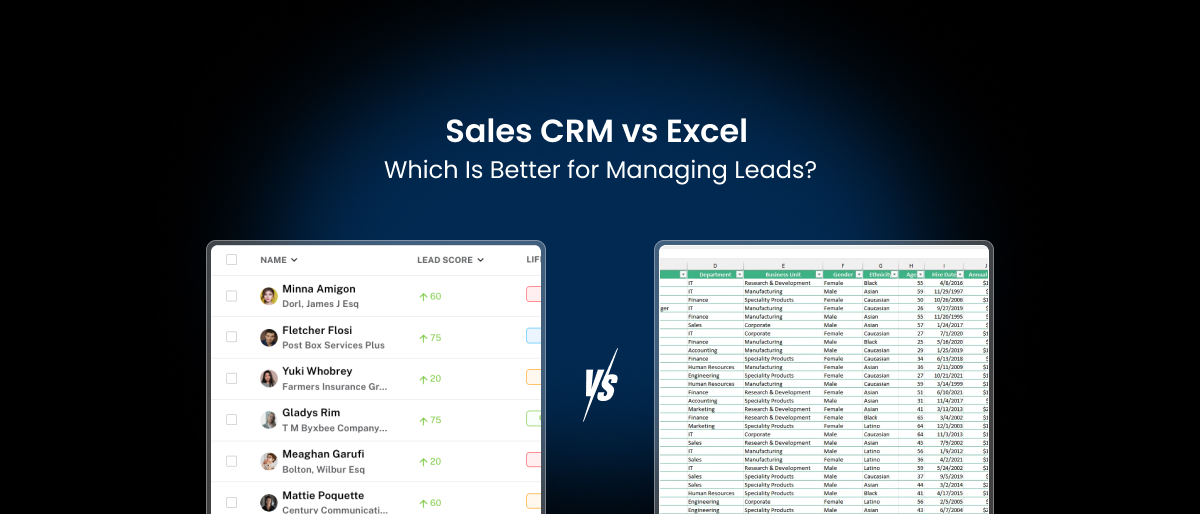
This is where the real debate begins: CRM vs Excel for sales.
Is Excel still enough? Or is it time to move to a proper CRM for lead management? Let’s break it down clearly and honestly.
Why Businesses Still Use Excel for Lead Management
Before comparing anything, it’s important to understand why so many teams continue tracking leads in Excel.
- It’s Familiar: Most people already know how to use Excel. There’s no learning curve. No setup. No onboarding. You can start using it immediately.
- It Feels Flexible: You can create any columns you want. You can customize it easily. You can change formats anytime. This makes Excel feel like a “do-it-yourself” solution.
- It’s Low Cost: For small teams and early-stage businesses, Excel looks like the cheapest option. There are no monthly subscriptions and no extra charges.
- It Works in the Beginning: When you have 20–30 leads, Excel works fine. You can see everything on one screen. You remember most conversations. Follow-ups are manageable.
At this stage, using a CRM may feel unnecessary. But problems usually appear when volume increases.
What Happens When You Manage Leads in Excel for Too Long

Many teams stay with Excel longer than they should. Not because it’s perfect, but because switching feels uncomfortable. Over time, this creates real challenges.
1. Data Becomes Hard to Maintain
As more people access the sheet, errors increase. A row gets deleted by mistake. A column gets overwritten. A status doesn’t get updated. Slowly, the sheet loses accuracy.
2. Follow-Ups Become Inconsistent
Excel does not remind you when to follow up. Everything depends on memory, notes, or personal reminders. This leads to:
- Late callbacks
- Missed emails
- Forgotten prospects
Which directly affects sales.
3. No Clear Sales Process
With Excel, everyone manages leads differently. One person writes detailed notes. Another writes nothing. Someone updates daily. Someone updates weekly. There is no standard process. This creates confusion and weak performance tracking.
4. Collaboration Becomes Difficult
When multiple people use the same file:
- Different versions get created
- Files get locked
- Updates get delayed
- Data conflicts appear
Team coordination suffers.
5. Reporting Takes Time
Want to know:
- How many leads converted last month?
- Which source performs best?
- Who is closing most deals?
In Excel, this requires manual work. Reports are built by filtering, sorting, and calculating. It takes time. And mistakes are common.
These are some of the biggest Excel limitations for sales that businesses experience over time.
What Is a CRM for Lead Management?
A CRM (Customer Relationship Management system) is software designed to manage customers and lead interactions in one place. Unlike Excel, it is built specifically for sales workflows. A CRM for lead management usually includes:
- Lead capture
- Contact management
- Deal tracking
- Follow-up reminders
- Activity logs
- Reporting dashboards
- Automation tools
Instead of manually updating rows, everything is structured and connected. Each lead has a profile. Every interaction is recorded. Each stage is tracked. The system supports how sales teams actually work.
Sales CRM vs Excel: Feature Comparison
Let’s look at the main differences side by side.
| Feature | Excel | Sales CRM |
|---|---|---|
| Lead Storage | Manual entries | Automatic + structured |
| Follow-Up Reminders | No built-in reminders | Automatic alerts |
| Data Accuracy | Depends on users | System-controlled |
| Collaboration | Limited | Real-time |
| Activity Tracking | Manual notes | Automatic logs |
| Reporting | Manual | Built-in dashboards |
| Automation | Not available | Available |
| Data Security | Basic | Advanced |
| Scalability | Limited | High |
| Mobile Access | Limited | Usually available |
This table shows why many growing businesses move away from spreadsheets.
Managing Leads in Excel: When It Still Makes Sense
To be fair, Excel is not always a bad choice. It can still work in certain situations. Excel works when:
- You have very few leads
- Only one person manages sales
- Sales volume is low
- No automation is needed
- Reporting is basic
For freelancers, solo founders, or very early-stage startups, Excel may be enough for a while. But it rarely works long-term.

CRM Benefits for Sales Teams
Let’s look at how CRM systems improve daily sales work.
1. Better Lead Organization
In a CRM, every lead has a profile. It includes:
- Contact details
- Source
- Communication history
- Status
- Notes
- Tasks
Nothing is scattered. Everything stays connected.
2. Automatic Follow-Ups
CRMs send reminders for:
- Calls
- Emails
- Meetings
- Demos
Sales reps don’t have to rely on memory. This improves response time and conversion.
3. Clear Sales Pipeline
CRMs show leads in stages:
- New
- Contacted
- Qualified
- Proposal
- Closed
Managers can see progress instantly. Bottlenecks become visible.
4. Strong Team Coordination
Everyone works on the same platform. Files aren’t duplicated. Versions don’t get mixed up. Updates don’t go missing. This improves accountability.
5. Reliable Reporting
CRMs generate reports automatically. You can see:
Without manual work.
- Conversion rates
- Revenue forecasts
- Lead sources
- Team performance
6. Automation Saves Time
Many repetitive tasks can be automated:
- Lead assignment
- Follow-up emails
- Status updates
- Notifications
This reduces manual workload. These are some of the strongest CRM benefits for sales teams.
Excel vs CRM for Sales: Real-World Workflow Comparison
To understand the real difference between Excel and a CRM, it helps to look at how a typical workday feels when using each system. The contrast becomes clear when you see how much effort goes into basic tasks.

Working With Excel: A Fully Manual Process
When managing leads in Excel, most of the work depends on personal discipline and memory. Sales representatives usually start by opening the spreadsheet and scanning rows to check lead status. To understand the last interaction, they often need to search through emails or messages separately.
Notes are added manually, and follow-ups are recorded as reminders outside the sheet, usually in calendars or personal apps. Every update has to be saved carefully to avoid losing changes. Because nothing is connected automatically, even small tasks take extra time. Over the day, this manual handling slows down work and increases the chance of missing important actions.
Working With a CRM: A Structured and Guided Workflow
When using a CRM for lead management, daily work is more organized and predictable. Sales teams begin by opening a dashboard that shows pending tasks, follow-ups, and priorities. Lead profiles already contain contact details, communication history, and deal status in one place.
Calls, emails, and meetings are logged automatically, and status updates happen within the system. Follow-up reminders are generated without manual effort. Because most information is already connected, employees spend less time searching and more time engaging with prospects. As a result, work flows faster and remains consistent across the team.
The Hidden Cost of Tracking Leads in Excel
Excel looks cheap on the surface. But it creates hidden costs.
- Lost Deals: Missed follow-ups mean lost sales. Even one missed deal can cost more than a CRM subscription.
- Time Waste: Manual updates and reporting take hours every week. That time could be spent selling.
- Poor Visibility: Without clear data, decisions become guesswork. This affects growth.
- Employee Frustration: Sales teams prefer tools that make work easier. Spreadsheets often frustrate high performers.
- Limited Scaling: Excel cannot handle large volumes smoothly. As leads increase, chaos increases.
This is why many businesses eventually outgrow spreadsheets.
When Should You Switch from Excel to a CRM for Lead Management?
Many businesses continue using spreadsheets longer than they should, simply because the system still “works.” But in reality, managing leads in Excel becomes risky once sales activity starts increasing.
If you are comparing CRM vs Excel for sales, the following signs can help you decide whether it is time to move to a dedicated CRM for lead management.
You Should Consider Switching to a CRM If:
- You regularly miss follow-ups because reminders are tracked manually
- Sales leads fall through the cracks due to incomplete or outdated records
- Creating sales reports takes hours instead of minutes
- Different team members use separate files or versions of the same spreadsheet
- Your sales volume is growing and spreadsheets are becoming difficult to manage
- Customer and lead data is often inaccurate or inconsistent
These issues indicate that Excel limitations for sales are beginning to affect performance.
If you recognize two or more of these signs in your daily work, relying on spreadsheets is likely slowing down your sales process. At this stage, moving to a CRM system is a practical step toward better lead management, higher productivity, and more predictable growth.
How to Transition from Excel to CRM Smoothly
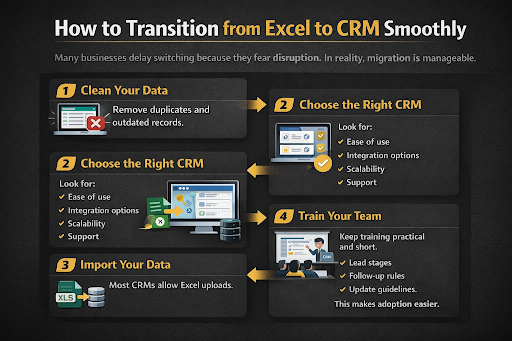
Many businesses delay switching because they fear disruption. In reality, migration is manageable.
Step 1: Clean Your Data
Remove duplicates and outdated records.
Step 2: Choose the Right CRM
Look for:
- Ease of use
- Integration options
- Scalability
- Support
Step 3: Import Your Data
Most CRMs allow Excel uploads.
Step 4: Train Your Team
Keep training practical and short.
Step 5: Set Clear Processes
Define:
- Lead stages
- Follow-up rules
- Update guidelines
This makes adoption easier.
Final Comparison: Excel vs CRM for Lead Management
| Area | Excel | CRM |
|---|---|---|
| Ease of Start | High | Medium |
| Long-Term Efficiency | Low | High |
| Sales Productivity | Limited | Strong |
| Growth Support | Weak | Strong |
| Data Accuracy | Unstable | Stable |
| Team Collaboration | Poor | Good |
This makes the difference clear.
Conclusion!
The debate between crm vs excel is about how seriously a business takes its sales process. Excel works when sales are simple. But most businesses do not stay small forever. As leads grow, relationships become complex, and teams expand, spreadsheets become a limitation. A CRM for lead management provides structure, visibility, and automation that Excel cannot match.
- It helps teams work faster.
- It improves follow-ups.
- It supports better decisions.
- It prepares the business for growth.
If your goal is to manage a few contacts, Excel may be enough. If your goal is to build a strong, scalable sales system, a CRM is the better choice. In the long run, the right system does not just organize leads but also helps you close more of them.
That’s where Saleoid comes in.
Saleoid lets you start with a simple CRM from $5/month, then add follow-ups, appointments, and marketing tools only when you need them—without forced bundles or complexity.