
HubSpot free plan is one of the most generous entry points in the industry. A real pipeline, contact records, basic email tracking, forms, live chat, meeting scheduling, and, until recently, enough room to run a small business on it for months without feeling the ceiling.
Then something changes. Your contact list crosses a threshold. Need to send a follow-up email? Want a second pipeline for a different service line? Hire a new team member, and you may suddenly find yourself hitting your user limit. The free plan suddenly stops keeping up, and you’re faced with a decision most businesses find more complicated than it looks at first glance.
This guide is for the moment right after that realization. What exactly are HubSpot free plan limits in 2026? What does upgrading actually cost, not the headline price, but the real number? And if upgrading doesn’t make financial sense for your stage, what are the alternatives that give you more without the price jump?
First: What Most Articles Get Wrong About HubSpot Free Plan in 2026
If you’ve done any reading on HubSpot’s free plan, you’ve probably seen articles describing it as offering storage for up to one million contacts with unlimited users. That was true until September 2024.
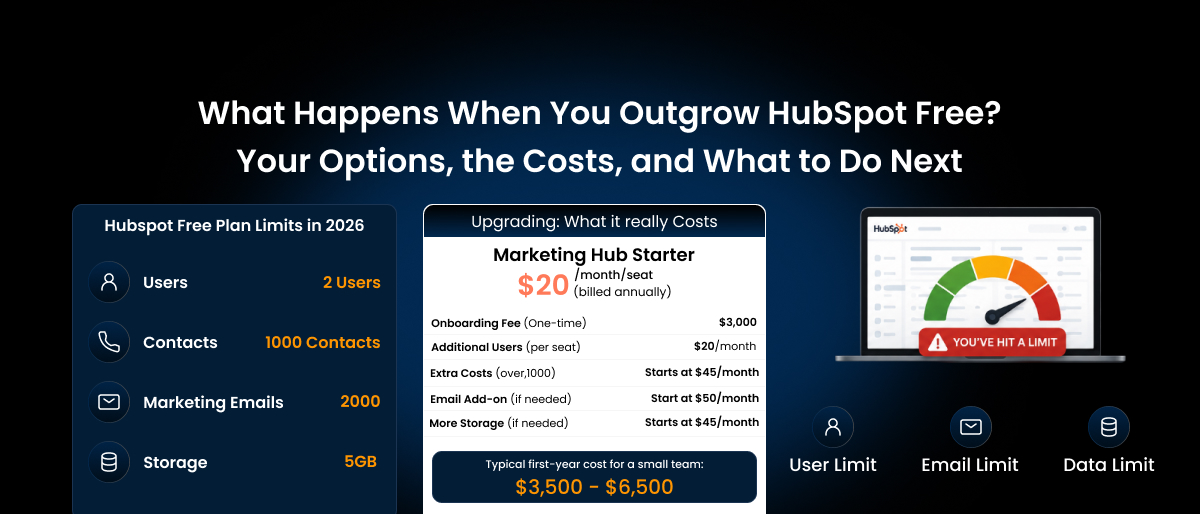
HubSpot tightened the free plan significantly for new accounts created after that date. Most guides haven’t caught up. Here’s what free actually looks like in 2026:
HubSpot Free Plan – Confirmed Limits (2026):
| Feature | Free Plan Limit |
|---|---|
| Contacts | 1,000 maximum (down from 1,000,000 pre-Sept 2024) |
| Users | 2 users maximum |
| Deal pipelines | 1 pipeline |
| Custom properties | 10 properties |
| Marketing emails per month | 2,000 sends |
| Email templates | 5 templates |
| Landing pages | 30 |
| Website pages | 30 |
| Workflow automation | None, zero automation |
| Reporting dashboards | 10 dashboards, 10 reports each |
| Email/form branding | HubSpot branding on everything |
| Customer support | Community and documentation only (no direct support) |
If you created a HubSpot account before September 2024, your limits may be different, legacy accounts carried over the older, more generous contact allowance. But any account created after that date works within these tighter restrictions.
The two limits that end the free experience fastest for growing businesses are the contact cap and the absence of automation. Most small businesses hit one or both within six to twelve months of actively using the platform.
The 5 Signs You’ve Outgrown HubSpot Free Plan
You don’t always know you’ve outgrown a platform until it starts costing you time rather than saving it. Here are the specific moments that signal it’s time to reassess.
1. You’re approaching 1,000 contacts
At 1,000 contacts, you either stop importing new people or you start having to manually delete old records to make room. Neither is a good answer for a business trying to grow its reach. And once you cross the threshold, you can no longer add new marketing contacts without upgrading, which means campaigns stop, lead capture forms become less useful, and any list growth you’ve worked for hits a wall.
2. You’re doing manually what should be automatic
The free plan has zero workflow automation. None. Without automation, your CRM will not move deals between stages based on actions, trigger follow-up emails after form submissions, or automatically assign new leads to team members.
Every step that should happen in the background requires someone to manually do it, which works for a week and breaks down at scale.
If you find yourself spending real time on tasks that feel like they should just happen, that’s the automation ceiling showing itself.
3. You need a third person on the account
The free plan allows two users. The moment your business has three people who need CRM access, a founder, a salesperson, and a virtual assistant, someone is locked out. You can work around this with shared login credentials, but you lose visibility into who did what, and shared logins create a mess in the activity feed.
4. You need a second pipeline
One pipeline means one sales process for your entire business. If you sell two services with different stages, run separate B2B and B2C processes, or want to manage a new product line separately from your core business, you cannot do it on the free plan. Everything shares one pipeline, which means you either compromise your process or live with visual noise that makes the CRM harder to use.
5. You’re embarrassed by HubSpot branding on your communications
Every email you send, every landing page you publish, every form you embed, and every meeting link you share on the free plan carries HubSpot’s branding. For a business at any professional stage, sending emails with “Powered by HubSpot” in the footer isn’t the image you want to project. This alone pushes many businesses toward the first paid tier earlier than they’d planned.
If any of these sound familiar, you don’t have to upgrade to HubSpot Starter just to get the basics. Saleoid’s free migration and full-feature plans start at $5 with automation, multiple pipelines, and zero HubSpot branding included from day one.
What Actually Happens When You Hit the Contact Limit
When your contact count reaches 1,000, HubSpot doesn’t disable your account or archive your existing records. What happens is more subtle and more disruptive.
You lose the ability to add new marketing contacts until you either delete existing ones or upgrade to a paid plan that includes a higher contact tier. Lead capture forms continue to work, but new contacts coming in cannot be enrolled in email lists or campaigns. They sit in your CRM without being actionable for marketing purposes until the limit is resolved.
If you’re running any kind of inbound lead generation, content, social, paid ads, events, hitting the contact cap mid-campaign is the kind of thing that breaks momentum at exactly the wrong moment.
Your Options When You Outgrow HubSpot Free Plan
You have 3 paths. Each has a different cost, complexity, and outcome.
Option 1: Upgrade to HubSpot Starter
The Starter plan is the most natural next step, and it genuinely solves the most immediate free plan frustrations.
What Starter adds over Free:
- Removes HubSpot branding from emails, forms, and pages
- Increases contact limits (1,000 marketing contacts included at Starter, scalable)
- Adds up to 10 users (from 2)
- Adds basic automation; simple triggers and follow-up sequences
- Adds multiple deal pipelines
- Increases custom properties beyond the 10-property free cap
- Adds email and in-app customer support
HubSpot Starter pricing (2026):
- Customer Platform Starter (all Hubs at Starter level): $20/seat/month billed annually
- Individual Hub Starter (Marketing, Sales, or Service only): $15–$20/seat/month
- Additional contacts: ~$50 per 1,000 above the included tier
For a 2-3-person team with basic needs, Starter is affordable and genuinely useful. The catch is what it still doesn’t include: real workflow automation. HubSpot Starter gives you simple triggers, but the multi-step, condition-based automation that most businesses think of when they imagine “marketing automation” lives exclusively at Professional level.
Before you commit to upgrading, it’s worth doing a proper tier-by-tier evaluation. We’ve covered exactly what each HubSpot plan delivers and where it falls short.
Read our full breakdown of whether HubSpot is worth it for small businesses →
If the reason you’re upgrading is automation, sequences that branch, lead scoring, lifecycle stage triggers, and automated reporting, Starter won’t fully resolve it. You’ll find its ceiling within a few months and face the same decision again, this time with the Professional price tag in view.
Before you upgrade, check what else is out there. Saleoid includes everything HubSpot Starter offers, plus automation, WhatsApp marketing, and invoicing without locking features behind the next expensive tier. 📊 See the Side-by-Side Comparison →
Option 2: Upgrade to HubSpot Professional
Professional is where HubSpot becomes the platform it’s marketed as. Real automation, advanced reporting, A/B testing, social publishing, custom reporting, and proper workflow logic all live here.
HubSpot Professional pricing (2026):
| Buying Path | Price | Included Seats | Onboarding Fee |
|---|---|---|---|
| Marketing Hub Professional only | $890/month | 3 seats | $3,000 (mandatory) |
| Customer Platform Professional (all Hubs) | $1,300/month | 5 seats | ~$3,750–$4,500 (mandatory) |
| Additional core seats (Pro) | $50/seat/month | — | — |
| Additional contacts (5,000 block) | +$250/month | — | — |
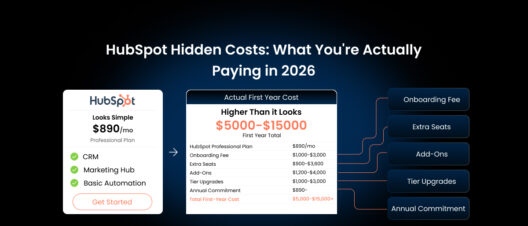
Year 1 real cost for a 5-person team on Marketing Hub Professional:
| Item | Cost |
|---|---|
| Marketing Hub Professional × 12 months | $10,680 |
| 2 additional seats × $50 × 12 | $1,200 |
| Contact overage (5,000 contacts) × 12 | $3,000 |
| Mandatory onboarding fee (one-time) | $3,000 |
| Year 1 total | $17,880 |
For a business coming off a free plan, this is a significant leap, not just in price, but in commitment. Professional requires a 12-month annual contract. You cannot cancel mid-year. If you sign up and decide three months in that it’s not right, you pay through the end of the term.
The platform genuinely delivers at this tier if you have a marketing-focused team, a growing contact list, and the budget to support it. But for many small businesses making this evaluation honestly, the jump from free to Professional is a $17,000+ year-one decision, and that deserves careful scrutiny before signing.
Option 3: Move to a Platform That Includes What HubSpot Charges Extra For
This is the option most businesses don’t consider during the initial free-plan evaluation because they assume upgrading within HubSpot is the only logical path. It isn’t.
The reason so many small businesses end up on HubSpot’s free plan isn’t because HubSpot is the best fit. It’s because the free plan is well-marketed, easy to sign up for, and functional enough to get started. But “easy to start on” and “best long-term fit” are different criteria.
When a small business reaches HubSpot’s free plan ceiling and evaluates what upgrading costs actually are, automation only at Professional ($890/month+), invoicing requiring a separate Commerce Hub, WhatsApp requiring Professional tier or above, a client portal locked behind Service Hub Professional, the honest question becomes: is HubSpot the right tool, or is it just the tool I started with?
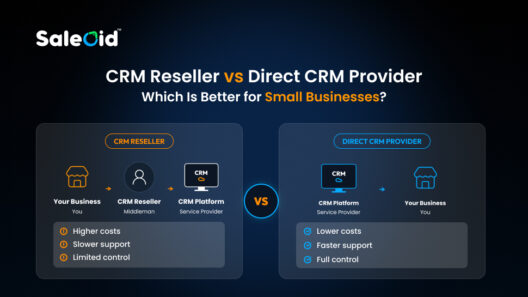
For businesses that need CRM, email and WhatsApp marketing, automation, invoicing, project management, and a client portal, all in one place, without paying Hub-by-Hub, some platforms include all of this at a fraction of HubSpot Professional’s cost.
See the full comparison of HubSpot alternatives for small businesses →
HubSpot Free Plan vs Starter vs Professional: What Each Tier Actually Gives You
| Feature | Free | Starter | Professional |
|---|---|---|---|
| Contacts | 1,000 | 1,000+ (scalable) | 2,000+ (scalable) |
| Users | 2 | Up to 10 | 3 included (+$50/seat) |
| Deal pipelines | 1 | Multiple | Multiple |
| Workflow automation | ❌ None | ⚠️ Basic triggers only | ✅ Full multi-step automation |
| Email sends/month | 2,000 | 5× contact limit | 10× contact limit |
| HubSpot branding removed | ❌ | ✅ | ✅ |
| A/B testing | ❌ | ❌ | ✅ |
| Custom reporting | ❌ | ❌ | ✅ |
| Lead scoring | ❌ | ❌ | ✅ |
| Social media publishing | ❌ | ❌ | ✅ |
| WhatsApp marketing | ❌ | ❌ | ✅ Pro+ only |
| Invoicing / billing | ❌ | ❌ | ✅ Commerce Hub (add-on) |
| Client portal | ❌ | ❌ | ✅ Service Hub Pro (add-on) |
| Direct customer support | ❌ | ✅ Email + chat | ✅ Phone + email + chat |
| Annual commitment required | ❌ | ❌ | ✅ 12-month |
| Mandatory onboarding fee | ❌ | ❌ | ✅ $3,000+ |
| Starting price | $0 | $15–$20/seat/mo | $890/mo (Marketing Hub) |
The table tells the story clearly. Starter fills the most obvious gaps but leaves the most impactful feature with full automation locked away. Professional unlocks everything but requires a year-long commitment and a $3,000+ onboarding fee before you’ve used a single workflow.
The Honest Assessment: Is Upgrading HubSpot Worth It?
For a specific type of business, a marketing-led team of 10+ people with a dedicated marketing manager, a growing contact database, and a $1,500–$2,000/month software budget, HubSpot Professional delivers real value that justifies the cost.
For a freelancer, a 3-person startup, a consulting firm, a service-based small business, or a team that needs invoicing and client management alongside CRM, the upgrade math rarely works out. You’d be paying $890–$1,300/month for a platform that still requires separate tools or additional Hub subscriptions for invoicing, WhatsApp, and project management. And you’d be committing to 12 months before you’ve confirmed the platform fits how you actually work.
The smarter question at this decision point isn’t “which HubSpot tier do I need?” It’s “which platform actually fits my business at its current stage?”
What’s easy to miss is that these numbers are just the starting point. Mandatory onboarding fees, contact tier overages, and seat repricing traps can push your real bill significantly higher, here’s every hidden HubSpot cost with actual numbers →
What Most Businesses Do After Outgrowing HubSpot Free Plan
Based on the pattern of businesses making this transition, three paths are most common:
Path 1: Upgrade to HubSpot Starter: Works well if the main pain points are branding, user limits, and basic pipeline management. Breaks down again within 3–6 months for businesses that need real automation.
Path 2: Jump directly to HubSpot Professional: Appropriate for marketing-led teams with the budget and a clear plan for the platform. Painful for businesses that discover 3 months in that they’re using 20% of what they’re paying for.
Path 3: Switch to an affordable all-in-one CRM: Increasingly common for small businesses and startups that want everything in one place without the Hub-by-Hub pricing model. The free plan outgrow moment is actually the ideal time to make this switch, before you’ve signed an annual contract and before you’ve rebuilt your processes around HubSpot’s architecture.
Frequently Asked Questions
New HubSpot free plan accounts (created after September 2024) are capped at 1,000 contacts, 2 users, 1 deal pipeline, 10 custom properties, and 2,000 marketing email sends per month. Zero workflow automation is included at the free tier. All emails, forms, landing pages, and meeting links carry HubSpot branding.
No. HubSpot’s free CRM is genuinely free forever, it doesn’t expire or convert to a trial. However, the free plan has hard feature and contact limits that most growing businesses hit within 6 to 12 months of active use.
You lose the ability to add new marketing contacts until you either delete existing contacts to get back under 1,000 or upgrade to a paid plan. Your existing data is not deleted, but new contacts cannot be enrolled in marketing campaigns until the limit is resolved.
HubSpot Starter removes branding, increases limits, and adds basic automation triggers. For teams whose main frustrations with the free plan are branding and user limits, Starter is a reasonable step at $15–$20/seat/month. For teams that need full workflow automation, lead scoring, or advanced reporting, Starter won’t resolve the core limitation, those features only unlock at Professional ($890/month+).
Marketing Hub Professional starts at $890/month with a mandatory, non-refundable $3,000 onboarding fee for new customers. For a 5-person team with a 5,000-contact list, Year 1 typically costs $17,000–$18,000 including onboarding, additional seats, and contact tier overages. The Customer Platform Professional (all Hubs bundled) starts at $1,300/month with similar onboarding fees.
For small businesses that need CRM, automation, email and WhatsApp marketing, invoicing, project management, and a client portal without paying $890–$1,300/month, platforms like Saleoid offer everything in a single flat-priced plan starting from $5/month with unlimited users and no onboarding fees. See how they compare to HubSpot →
No. Free accounts created after September 2024 are limited to 2 users. Additional users require upgrading to a paid tier. HubSpot Starter adds up to 10 users at $15–$20/seat/month; Professional includes 3–5 seats depending on the Hub or bundle.
Outgrowing HubSpot Free Plan doesn’t mean you have to pay HubSpot Professional prices. Saleoid is built for exactly this moment, when you need more than a free plan, but a $15,000/year commitment makes no sense for your business.
Disclaimer: The pricing, features, fees, and other information presented in this article are based on publicly available data from the vendor’s official website, reputable third-party review platforms, and experiences shared by verified customers. While every effort has been made to ensure accuracy at the time of writing, product offerings and pricing may change over time. Readers should verify the latest information directly with the respective provider before making a purchasing decision.