
If you’ve started shopping around for an AI CRM, you’ve probably already hit the wall that frustrates most small business owners: nobody wants to tell you straight AI CRM pricing.
The marketing pages show you “starting at $20 a user.” Then you book a demo, and 40 minutes later you’re looking at a quote that’s three times that number once you add the AI features, the onboarding fee, and the higher tier you apparently need to do anything useful.
So let me save you the runaround. Depending on the platform, AI CRM software can start at around $5 per month for a lean small-business plan and exceed $300 per user per month for advanced enterprise editions. Vendors may charge separately for AI agents, onboarding, communications, and implementation.
Below, we’ll walk you through what you’re actually paying for, the traps to watch for, and how to figure out your true number before you sign anything.
How Much Does an AI CRM Cost? (The Quick Answer)
Public AI CRM pricing can start at around $5 per month for a lean account-level plan and exceed $300 per user per month for advanced enterprise editions. The final cost depends on users, features, AI consumption, contacts and communication usage.
Before comparing platforms, identify what each vendor charges for. A low monthly fee may cover only basic access, while essential AI tools and communication usage cost extra.
Advertised price: The lowest public subscription price.
Usable price: The lowest plan with the required AI features, workflows, reporting, and integrations.
Workload adjusted price: The estimated monthly bill that includes actual usage.
| CRM level | Typical advertised range | Common additional costs |
| Entry-level CRM | $5 to $25 per user per month | Limited automation, AI sessions, email, or contact upgrades |
| Advanced CRM | $39 to $100 per user per month | Onboarding, credits, reporting, and integrations |
| Enterprise CRM | $100 to $300 or more per user per month | Implementation, support, storage, and custom configuration |
| AI agents | Varies by usage model | Credits, tokens, sessions, responses, resolutions, or locations |
A couple of things to keep in mind before you anchor to these numbers.
- First, the AI features are often the whole reason you’re buying, yet many platforms reserve them for higher-priced plans.
- Second, the per-user price is only one line on the invoice. Implementation, migration, and usage fees can easily match or exceed your seat costs in year one.
So when someone asks “how much does an AI CRM cost,” the truthful answer is: the subscription is the part they advertise, and the rest is the part you find out about later.
Curious how a $5 AI CRM is even possible? See how Saleoid stacks up →
Different Types of AI CRM Pricing Models
Traditional CRM pricing was built around human users. However, the shift from an AI CRM vs traditional CRM also changes the pricing model entirely. AI agents can now complete tasks without occupying a standard seat, so many vendors combine subscription fees with usage based charges. Understanding the unit behind each fee is essential when estimating the actual AI CRM software cost.
| Pricing model | What creates the charge | What buyers should calculate | Brand examples |
| Per user or seat | Each employee who needs access | Included users, additional-user price, minimum seats and charges for inactive users | Saleoid, HubSpot and Salesforce |
| Tier or edition based | The selected package determines features and limits | Required tier, user allowance, contact allowance and features locked behind higher plans | Zoho CRM and Saleoid |
| Base account or platform fee | A subscription provides access to the core platform | Included users, accounts, contacts, automations and required add-ons | GoHighLevel; Saleoid’s $5 CRM includes 1 user, 3 accounts, 2,500 contacts and 5 automations |
| Modular or add-on based | Customers pay separately for selected applications or capabilities | Base subscription plus the cost of every required app and premium capability | Saleoid offers optional apps starting at $1 per month |
| Per contact or record | Stored, active or marketable contacts determine the bill | Billable-contact definition, database growth, duplicate handling and higher-tier thresholds | HubSpot. |
| AI credit based | AI actions consume credits from an allowance | Credits used per task, monthly allowance, reset rules and top-up or overage price | HubSpot and Saleoid Unlimited includes 200 credits |
| Session based | Customer interactions are grouped into billable sessions | What starts a session, session duration and when another session is charged | Freshsales for certain chat or messaging capabilities. |
| Conversation, message or response based | Each message, conversation or AI-generated response creates a charge | Expected volume, inbound versus outbound rules, channel charges and included allowance | GoHighLevel for certain communication services. |
| Hybrid | Multiple pricing units apply together | Base fee, users, apps, plan limits, AI credits, communications and premium services | HubSpot and Saleoid |
For most small businesses, modular pricing or predictable per-seat pricing is the easiest to budget. The trouble starts when you mix a low seat price with heavy usage-based AI that combination produces the “wait, why is the bill so high?” moment.
AI CRM Pricing Comparison by Vendor
Prices shift constantly, so treat this as a framework and always confirm on the vendor’s current pricing page before deciding. That said, here’s roughly how the market looks in 2026:
| Vendor | Advertised entry price | Lowest AI-enabled option | Charging unit | Mandatory costs |
| Saleoid | $5/month, billed every two years | $6/month for the $5 CRM plus the $1 AI Chatbot app | Account, users, optional apps and credits | Two-year billing required for the advertised $5 rate. The AI Chatbot adds $1/month. |
| HubSpot | $0 for up to two users | $0 for limited embedded AI tools; paid Starter is currently advertised from $7/seat/month and includes credit-based AI access | Seats, marketing contacts and HubSpot Credits | No mandatory onboarding at Free or Starter. Certain Professional and Enterprise products carry mandatory onboarding fees. |
| Zoho CRM | $0 for up to three users; paid plans from $14/user/month, billed annually | Professional at $23/user/month, billed annually, is the safest entry point for clearly documented AI agents and predictive intelligence | Per user and edition | At least one paid user for a paid edition. Local taxes may apply. |
| Freshsales | $0 for up to three users; Growth starts at $9/user/month, billed annually | $58/month for one user, comprising Growth at $9 plus a Freddy AI Agent pack at $49 | CRM seats and AI sessions | A paid CRM seat plus an AI session pack for Freddy AI Agent usage |
| GoHighLevel | $97/month for the Starter account | $97/month plus token-based AI usage under the AI Core option; packaged AI plans add $50 or $97 per subaccount | Account, subaccounts, tokens, AI responses, voice minutes and other usage | The $97 base platform subscription is required before AI usage or AI-plan charges |
| Salesforce | $25/user/month for Starter Suite | $25/user/month for Starter Suite with limited embedded AI; more advanced Agentforce access appears in higher editions | Per user, edition and AI or data credits | At least one user licence. Pro and higher subscriptions are generally billed annually. Advanced AI may require higher editions or additional credits. |
Note: We reviewed publicly available US pricing and product documentation in August, 2026. We show prices in US dollars before taxes. Where applicable, we express annual and multi-year pricing as monthly equivalents. “AI-enabled” means the vendor explicitly advertises at least one native AI capability at that price. It does not mean the vendor includes every AI agent or automation feature.
HubSpot’s eye-catching $7/seat figure is a limited-time promotional rate for new customers, not a permanent price. The vendor discounts it from the $20 list price during the promotion, but the price reverts when the offer ends, so don’t base your long-term budget on the discounted rate. And HubSpot’s real cost lives at the Professional tier, which starts in the high hundreds to low thousands per month once you need actual automation.
How Leading AI CRM Platforms Structure Their Pricing
1. Saleoid Pricing
Saleoid combines sales CRM, lead management, automated follow-ups, appointments, campaigns, deal tracking and billing in a platform designed for small businesses. Its pricing is available through either a customizable CRM plan or prebuilt bundles.
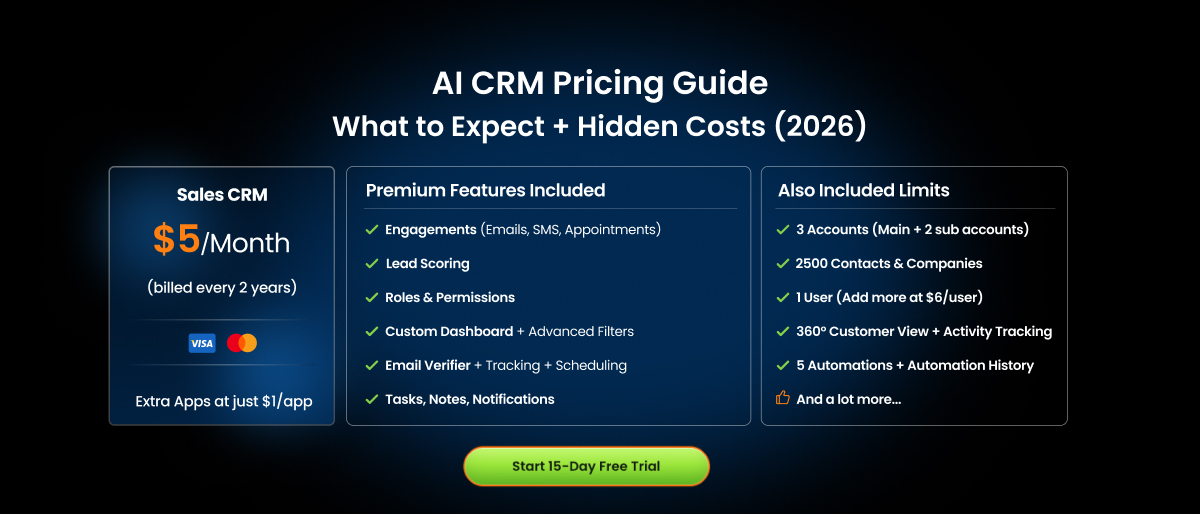
The customizable Saleoid CRM plan starts at $5 per month when billed every two years. It includes one user, three accounts, 2,500 contacts and companies, and five automations. Additional users cost $6 each, while optional applications start at $1 per application per month.
Because the Saleoid custom-plan builder lists the AI Chatbot as a $1 add-on, the lowest advertised AI-enabled configuration is effectively $6 per month: $5 for the CRM foundation and $1 for the chatbot.
Businesses that need a broader set of connected applications can select a prebuilt Saleoid plan. With two-year billing, Starter costs $19 per month, Growth costs $25 and Unlimited costs $39. Annual prices are $25, $35 and $49 respectively, while month-to-month prices are $29, $49 and $99.
The Starter, Growth and Unlimited bundles support up to 3, 10 and 20 users respectively. Contact allowances also increase from 5,000 on Starter to 10,000 on Growth and 20,000 on Unlimited.
Therefore, treat the advertised $5 price as the CRM foundation rather than the complete bundled product. Buyers should calculate their billing term, required applications, additional users, contact limits, automation needs and AI usage before estimating the final cost.
Saleoid provides a 15-day trial.
2. HubSpot Pricing
HubSpot combines seat-based subscriptions with marketing-contact limits and usage-based HubSpot Credits. This makes its pricing more complex than a simple per-user CRM subscription.
HubSpot’s free CRM supports up to two users and includes limited AI-assisted tools. Costs can change significantly when a business outgrows HubSpot’s free plan. Its Starter plan is currently advertised from $7 per seat per month for eligible new customers and includes 500 HubSpot Credits. Because this is promotional pricing, buyers should also check the standard renewal price.
HubSpot advertises Sales Hub Professional from $90 per seat per month with annual billing and includes 3,000 credits. It also carries a mandatory one-time onboarding fee of $1,500. Enterprise starts at $150 per seat per month and includes 5,000 credits.
Eligible AI agents and other usage-based features consume HubSpot Credits. The number of credits required depends on the action being performed. Additional credits currently cost $10 per 1,000 credits through a capacity pack or $0.01 per credit under pay-as-you-go billing.
The final cost can increase through additional seats, marketing contacts, AI-credit consumption, onboarding, calling, SMS, integrations and subscriptions to other HubSpot products. The free plan is therefore useful as an entry point, but it does not represent the likely cost of a scaled deployment using advanced automation and autonomous AI agents.
3. Zoho CRM Pricing
Zoho CRM primarily uses per-user, edition-based pricing. Its free edition supports up to three users. With annual billing, Standard costs $14 per user per month, Professional costs $23, Enterprise costs $40 and Ultimate costs $52. Month-to-month rates are higher at $20, $35, $50 and $65 respectively.
AI availability varies by capability and edition. Zoho’s pricing information associates some AI-agent functionality with lower editions, while Professional adds more clearly documented AI and predictive capabilities. Enterprise provides broader access to Zia, including predictions, recommendations and sales insights.
For a conservative AI CRM cost comparison, Professional at $23 per user per month with annual billing is a more defensible starting point than Standard. Businesses specifically requiring Zia’s broader sales intelligence should evaluate Enterprise.
Zoho does not present its core CRM AI pricing as a simple monthly credit allowance. Buyers should instead compare which AI functions and usage limits are available in each edition.
The final cost may also include other Zoho applications, additional storage, implementation, administration, API requirements, support and local taxes. Organizations using several Zoho products should compare individual subscriptions with bundles such as Zoho One or CRM Plus before purchasing.
4. Freshsales Pricing
Freshsales offers a free CRM plan for up to three users. With annual billing, Growth costs $9 per user per month, Pro costs $39 and Enterprise costs $59.
The CRM subscription is seat-based, but Freddy AI Agent introduces a separate session-based charge. Freddy AI Agent currently costs $49 for a pack of 100 sessions. A session covers one customer’s interactions with the AI agent or chatbot during a 24-hour period.
For one user, the published cost components are Growth at $9 per user per month with annual billing, plus $49 for a 100-session Freddy AI Agent pack. That creates a $58 monthly-equivalent calculation when one session pack is required during the billing period.
Freshworks states that previewing an AI agent can consume sessions. Session packs also expire at the end of the billing cycle, so unused capacity should still be included when calculating the effective cost per completed conversation.
Eligible new customers may receive 500 complimentary sessions as a one-time allowance. Because this is not a recurring monthly allowance, it should not be used to represent the product’s long-term AI cost.
Businesses considering Freshsales Suite may also need to calculate marketing-contact allowances separately. The most relevant recurring cost drivers are therefore CRM users, AI sessions, marketing contacts and optional add-ons. Teams evaluating both products can review this detailed HubSpot vs Freshsales comparison.
5. GoHighLevel Pricing
GoHighLevel is primarily designed for agencies and businesses managing multiple client accounts. Its core pricing is charged at the agency-account level rather than for every employee. Our separate HighLevel pricing guide explains the platform plans and usage charges in more detail.
The Starter plan costs $97 per month and supports up to three subaccounts. Unlimited costs $297 per month and provides unlimited subaccounts, while Agency Pro costs $497 per month and adds SaaS-mode and advanced rebilling capabilities. Annual subscriptions are also available.
AI services are priced separately. The lowest AI option uses pay-per-use token pricing. AI Employee Growth costs an additional $50 per subaccount per month and includes 1,000 Conversation AI responses and 100 Voice AI minutes. AI Employee Unlimited costs $97 per subaccount per month.
The principal cost risk is multiplication across subaccounts. For example, enabling the $50 AI plan across 10 client accounts would add $500 per month to the core platform subscription.
Phone calls, SMS, email delivery, premium workflow executions and other services can create additional usage charges. Agencies that want to rebill AI and communication services to clients, particularly with their own markup, may also require the $497 Agency Pro plan.
A realistic GoHighLevel estimate should therefore include the base agency subscription, number of active subaccounts, AI plan for each account, voice minutes, AI responses, messaging usage, workflow executions and any premium applications.
6. Salesforce Pricing
Salesforce Sales Cloud uses per-user, edition-based pricing, with AI functionality and usage allowances varying substantially between editions.
Starter Suite costs $25 per user per month and can be purchased with monthly or annual billing. It includes limited embedded AI capabilities such as automatic synchronization of emails, events and contacts. Pro Suite costs $100 per user per month with annual billing, Enterprise costs $175 and Unlimited costs $350.
Agentforce 1 Sales costs $550 per user per month with annual billing. It combines the core sales CRM with a broader collection of AI, data, analytics and collaboration products. Salesforce currently states that this edition includes one million Flex Credits and 2.5 million Data Cloud Credits per organization per year.
Although Starter can reasonably be described as AI-enabled, its embedded assistance should not be treated as equivalent to the more autonomous Agentforce capabilities available through higher editions and credit-based services.
Salesforce’s total cost can extend beyond licence prices. Businesses may also need to budget for implementation, data migration, customization, integrations, premium support, additional products, Data Cloud consumption and Agentforce usage.
The most useful calculation is therefore not simply the advertised per-user rate. Buyers should determine the required edition, number of paid users, contract length, necessary AI capabilities and expected credit consumption. Small teams deciding between the two can also compare HubSpot and Salesforce by pricing, setup and feature depth.
A note on the cheapest end of the market
If raw affordability is your priority, and for a lot of freelancers, consultants, agencies, and early startups, it is – Saleoid is currently about the most affordable AI CRM you’ll find, starting at $5/month on its custom plan. What makes it unusual isn’t just the number; it’s that you build the CRM from the features you actually need and add more apps at $1 each as you grow, instead of buying a bloated bundle on day one. For a one-person shop or a small team watching every dollar, that “start small, scale later” model is genuinely hard to beat at this price point.
That doesn’t make it the right fit for everyone; a 50-person sales org with complex needs may still want a heavier platform, but for small businesses, it’s the clearest example of how far entry pricing has come.
The Hidden Costs of AI CRM Software
This is the section that actually saves you money. The subscription is visible. These costs are not, and any one of them can blow your budget.
Implementation and onboarding fees
Many platforms charge a one-time setup fee. On the bigger systems, this is mandatory and steep. HubSpot’s Professional onboarding runs around $1,500–$3,000, and Enterprise onboarding can hit $3,500–$7,000. Always ask whether onboarding is required or optional.
Data migration
Moving your contacts, deal history, and notes from your old system rarely happens for free. Either you pay the vendor, pay a consultant, or burn a week of your own time doing it manually. (Worth noting: some newer platforms now offer one-click onboarding/migration, which can save you a real chunk here.)
AI usage overages
Those AI credits run out. When they do, you either upgrade or buy top-ups, usually at a worse rate than your plan’s included usage. Heavy AI users get surprised here every month.
Premium AI features behind higher tiers
The lead scoring or smart automation you saw in the demo? Frequently locked to the Pro or Enterprise plan, not the one you signed up for.
Required integrations and add-ons
Connecting your email, calendar, calling tool, or marketing platform sometimes needs a paid connector or a higher tier.
Training and admin time
Someone has to set the thing up and teach the team. That’s real hours, and on a small team those hours are expensive.
Annual vs. monthly billing
Monthly flexibility usually costs more, often 10–20%. Convenient, but you pay for it. (Some platforms reward longer commitments harder; Saleoid’s $5 rate, for instance, is tied to 2-year billing.)
Mandatory minimum seats
Some plans won’t sell you three seats, they make you buy five. You pay for empty chairs.
Support tier upcharges
Fast, human support is often a paid upgrade. The free plan gets you a help center and a chatbot.
Renewal price hikes
The intro rate is the friendliest number you’ll ever see from them. Watch the auto-renewal clause and the renewal price, especially with promotional rates that revert to full list price in year two.
If you only take one thing from this article, make it this: ask the vendor to itemize every one of these before you sign. The good ones will. The evasive answer is itself an answer.
How to Calculate Your True AI CRM Cost
The formulas below are practical budgeting frameworks, not official pricing formulas published by CRM providers. Adjust each calculation to match the vendor’s billing terms and your expected usage.
1. Monthly TCO Formula
Monthly operating cost = platform fee + paid seats + AI usage + contact charges + communication costs + required add-ons + support + internal administration
The implementation allocation spreads one time setup costs across the period you expect to use the CRM.
2. First Year Formula
First-year TCO = monthly operating cost × 12 + one-time onboarding + implementation + migration + integrations + training
Use standard renewal prices and expected activity, not introductory discounts or complimentary AI allowances.
3. Three-Year Formula
Three-year TCO = first-year TCO + recurring operating costs for years two and three + growth costs + expected renewal increases
Build 3 estimates:
- Low usage
- Expected usage
- High usage
Include expected users, contacts, monthly database growth, AI activity, email sends, phone minutes, messages, client locations, integrations, training, migration, and internal administration hours.
Now run the same team on a lean, modular platform at $5–$6/user with AI included and one-click migration, and your year-one number can land in the low four figures instead. That gap, sometimes $8,000+ a year for the same headcount, is exactly why the math matters more than the headline price.
Want your year-one number in the low four figures instead of $12K? →
AI Unit Economics
Measure cost against completed business results:
Calculate cost per AI resolution: Total AI fee ÷ successfully resolved conversations.
Determine cost per qualified lead: Prospecting agent cost ÷ accepted qualified leads.
Work out cost per saved hour: Monthly AI expense ÷ verified employee hours saved.
Avoid judging value by the number of summaries, drafts, or automated activities produced. Use outcomes such as faster responses, more qualified meetings, fewer cases handled by employees, saved administrative time, or improved lead conversion.
How to Reduce Your AI CRM Costs
You have more leverage than you think, especially as a small business. A few tactics that genuinely work:
- Start lean and add as you go. Don’t buy the full suite on day one. Platforms that let you pay for only the features you use (and add apps later) keep your bill tied to actual need.
- Pay annually or longer if you’re confident. The multi-month discounts are real money, sometimes the difference between a $15 seat and a $5 one.
- Negotiate, even on “fixed” pricing. Ask for waived onboarding fees, free migration, or a few extra seats. Reps have room, particularly near quarter-end.
- Right-size your tier. Don’t buy Enterprise for one feature. Sometimes a cheaper plan plus one paid add-on beats jumping a whole tier.
- Audit your AI usage. After a month, check which AI features your team actually uses. You may be paying for credits you never spend.
- Watch out for reverting promo rates. That $7 or $9 introductory seat price is great in year one, just make sure you know what it becomes in year two.
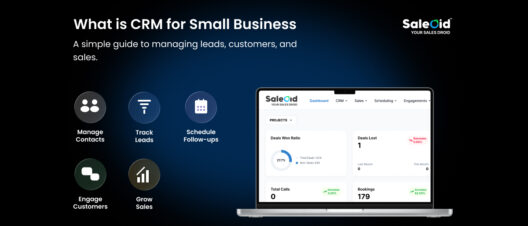
Start by defining the capabilities you actually need from a CRM for small businesses.
Questions to Ask Before Choosing an AI CRM
Before signing a contract, ask the vendor to confirm the following points in writing:
- What is included in the quoted price?
Confirm whether the price covers individual users, the entire account, contacts, locations and the AI capabilities your team needs.
- How is AI usage calculated and controlled?
Ask whether usage is measured through credits, tokens, sessions, responses or completed outcomes. Confirm what happens to unused allowances, how overages work, and whether administrators can set alerts or hard spending limits.
- Which additional charges should we expect?
Identify separate costs for email, SMS, WhatsApp, calls, phone numbers, API access, integrations, onboarding, migration, training, technical support and consulting.
- How could the subscription price change?
Confirm the regular price after introductory discounts, the contract and renewal terms, automatic upgrade rules, and whether seats, contacts or other allowances can be reduced during the contract.
- What administrative and approval controls are available?
Check whether administrators can monitor consumption by employee, department, location or client account, and whether human approval can be required before AI agents send messages or update CRM records.
- How is business and customer data handled?
Ask whether information is used to train third-party AI models, whether confidential fields can be excluded from AI processing, and what records, notes, files and activity history can be exported after cancellation.
A reliable AI CRM vendor should be able to explain these costs and controls without requiring buyers to interpret multiple pricing pages or estimate important charges themselves.
Compare the Workload, Not Just the Starting Price
The right CRM is not the one with the lowest number on its pricing page. It is the one that supports your daily workflows without turning routine usage into unpredictable charges.
Compare the advertised price, the lowest usable plan, and the realistic monthly cost before committing. A first-year estimate and 3-year CRM total cost of ownership can reveal expenses that short trials and promotional rates often hide.
Want to see how specific platforms stack up for your team and budget? Head back to our AI CRM comparison guide to find the right fit.
Disclaimer: Prices, plan limits, promotional offers, and included features were checked against available information at the time of publication, but vendors may revise them without notice. Confirm the latest details on each provider’s official website before subscribing. All brand names and trademarks remain the property of their respective owners. This article is intended for general information and should not be treated as financial or purchasing advice.
Frequently Asked Questions
Not necessarily anymore. A few years ago the AI layer meant a real premium, but competition has pushed entry prices way down, you can now get an AI CRM built for small businesses for around $5/month. If the AI saves your team meaningful hours each week, it often costs less in practice than a cheaper tool that makes everyone work harder.
At the time of writing, Saleoid is about the most affordable, starting at $5/month on its custom plan with AI built in and extra apps at $1 each. It’s aimed squarely at freelancers, consultants, agencies, and startups. As always, run the true-cost math before deciding, since the cheapest sticker and the cheapest bill aren’t always the same tool.
Sort of, that’s a limited-time promotional rate for new customers, discounted from the $20/seat list price. It’s a real offer, but it reverts to full price when the promo ends, so don’t build a long-term budget around it.
Often, yes. On many platforms the AI capabilities are an add-on or gated to a higher tier, or metered through a credit system, rather than included in the base price. Always confirm before buying.
Anywhere from free (DIY or one-click onboarding on simpler platforms) to several thousand dollars for guided enterprise onboarding, HubSpot’s Professional and Enterprise onboarding fees run roughly $1,500 to $7,000. For small teams, look for tools that don’t charge for setup at all.