

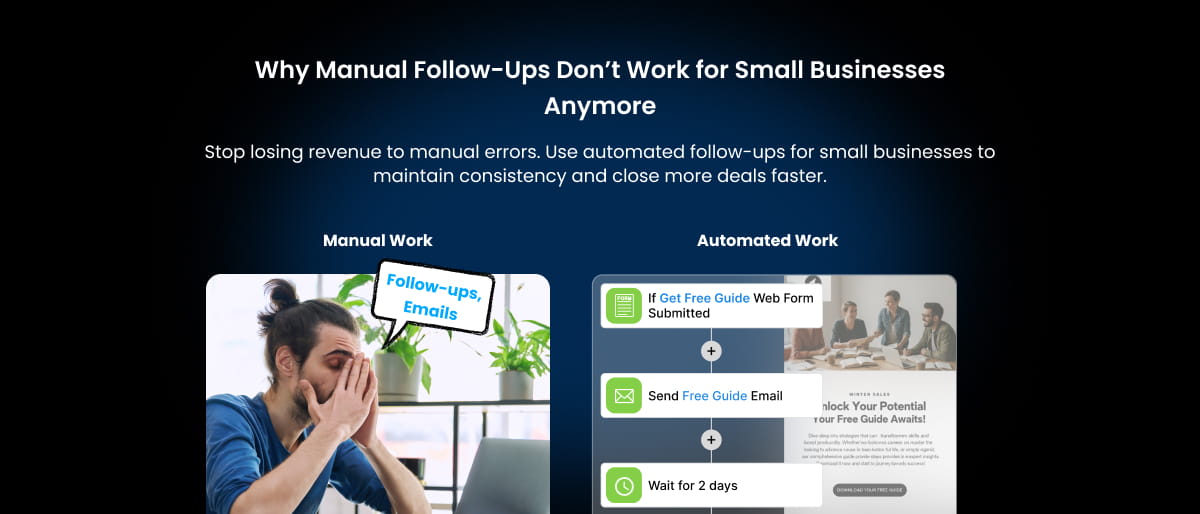

Most small businesses don’t lose clients because of poor products or weak sales conversations. They lose them quietly, somewhere between “I’ll follow up tomorrow” and a day that gets too busy.
At first, manual follow-ups feel manageable. A reminder in your head, a note in Excel, a message saved in WhatsApp, or a calendar alert seems enough. But as more leads come in and daily work piles up, that system slowly starts breaking down. Follow-ups get delayed, conversations lose context, and interested prospects move on without saying anything.
This is where many businesses begin to realize that their follow-up process hasn’t kept pace with growth, and they need structured sales CRM software to manage client communication properly.
Research often shows that most sales require multiple touchpoints before a decision is made, yet many businesses stop after one or two attempts simply because staying consistent is hard without a system. That’s why more businesses are turning to automated follow-ups for small businesses to maintain consistency without increasing their daily workload.
In this blog, we’ll explore why manual follow-ups no longer work the way they once did, how they quietly affect revenue, and how modern client follow-up automation helps small teams stay organized without adding more work to their day.
What Manual Follow-Ups Actually Look Like in Small Businesses
A new inquiry arrives, and someone quickly notes it down. A reminder is saved somewhere. A message is left unread intentionally so it can be answered later. Nothing seems wrong at this stage.
Let’s see what manual follow-ups often look like in real day-to-day operations:
- Sticky notes and spreadsheets used to track leads and conversations
- WhatsApp messages saved as reminders to respond later
- Calendar alarms set between meetings to avoid forgetting callbacks
- Email threads searched repeatedly to recall past discussions
- The founder remembering everything mentally, acting as the central system
At first, this approach works surprisingly well. With only a few clients, memory feels reliable and communication feels personal. Many business owners even believe this hands-on method helps them stay closer to customers.
The problem appears slowly. As leads increase, information starts spreading across multiple places like emails, notes, chats, and calendars. Team members begin asking questions like:
- “Did we already follow up with this client?”
- “Who last spoke to them?”
- “When were we supposed to call again?”
These are early signs of common manual follow-up problems, even though the business may still feel in control.
Nothing breaks immediately. Deals still happen, reminders still work occasionally, and daily operations continue. But behind the scenes, gaps begin forming – delayed responses, missed opportunities, and conversations losing context.
Manual follow-ups feel normal in the early stages because effort replaces structure. But as the business grows, relying on memory and scattered tools makes consistency harder to maintain, and the same process that once worked starts holding the business back.
Why Manual Follow-Ups Start Failing as Businesses Grow

Manual follow-ups rarely stop working overnight. What actually happens is – the business grows, conversations increase, and the system that once felt manageable slowly starts slipping. Nothing looks broken at first, yet responses get delayed, reminders are missed, and opportunities begin disappearing without a clear reason.
This is exactly why manual follow-ups fail as businesses move beyond their early stage. Growth adds volume, but manual processes don’t scale with it.
Let’s look at what really changes.
- More Leads, Less Mental Capacity
In the beginning, remembering client conversations feels easy. You know who asked for pricing, who needs a callback, and who is close to making a decision. But as inquiries increase, mental tracking reaches its limit.
Every new lead adds another conversation to remember:
- different timelines
- different requirements
- different follow-up dates
At some point, memory stops being reliable. Important follow-ups blend into daily noise, and even highly interested prospects wait longer than they should. This is often the first stage where missed follow-ups cost businesses because human memory simply can’t scale.
- Follow-Ups Compete With Daily Work
Small business owners and small teams rarely focus on sales alone. A typical day includes client calls, service delivery, invoices, operations, and problem-solving. Follow-ups become just one task among many.
When the day gets busy, follow-ups are usually the first thing pushed to “later.”
A delayed response by a few hours turns into a day. A planned callback moves to next week. Meanwhile, the client continues researching and often connects with someone who replies faster.
Manual systems depend on available time, and growing businesses rarely have enough of it.
- No Visibility Across the Team
As soon as more than one person handles clients, manual tracking creates confusion. Information sits in personal inboxes, private chats, or individual notes. There’s no shared view of what’s happening.
Common situations start appearing:
- Two team members contact the same client unknowingly
- Nobody follows up because everyone assumes someone else did
- Conversations lose context when ownership changes
Without shared visibility, follow-ups stop being a process and become guesswork. This lack of clarity is a major reason why manual follow-ups fail in growing teams.
- Inconsistent Communication
Consistency matters more than businesses realize. Some clients receive quick responses, while others wait days simply because reminders were missed or messages were buried under new tasks.
From the client’s perspective, this feels like disorganization, even if the business is working hard behind the scenes. Inconsistent communication leads to:
- reduced trust
- slower decision-making
- lower response rates
Over time, these small gaps add up. Businesses don’t always notice the lost opportunities because prospects rarely say they left due to delayed follow-ups, as they simply stop replying.
The Hidden Cost of Missed Follow-Ups

Most businesses notice obvious expenses like salaries, marketing spend, software subscriptions. What often goes unnoticed are the opportunities that quietly disappear because nobody followed up at the right time.
Missed follow-ups rarely feel like a direct loss. There’s no notification saying a deal was lost or revenue slipped away. Instead, conversations slowly fade, replies stop coming, and potential clients move forward with someone else.
The impact builds in ways that are easy to overlook but costly over time.
- Hot Leads Slowly Go Cold
Interest has a short window. When someone reaches out, they are actively looking for a solution. A delayed follow-up changes momentum. What was once urgency becomes hesitation.
A prospect who was ready to talk this week may lose interest by next week simply because communication slowed down. By the time the follow-up happens, the decision may already be made elsewhere.
- Revenue Loss That Isn’t Immediately Visible
One of the biggest challenges with manual processes is that lost opportunities don’t appear in reports. Businesses rarely track the leads that never responded after a delayed reply.
This creates a false sense of stability. Sales continue to happen occasionally, so the system feels acceptable. But in reality, small gaps in follow-ups compound over time, creating revenue loss that goes unnoticed.
This is why many teams shift toward sales follow-up automation and adopt a sales pipeline CRM to prevent silent leaks in the pipeline.
- Slower Deal Cycles
Consistent follow-ups keep conversations moving forward. When communication becomes irregular, decisions take longer.
Clients may wait for clarification, reminders, or next steps. Without structured follow-ups, deals remain stuck in the middle stages longer than necessary, reducing overall sales efficiency and delaying cash flow.
- Poor Customer Experience
From inside the business, delays may seem minor. From the client’s perspective, they signal disorganization.
When responses vary, fast one day, delayed the next, clients begin to question reliability. Even interested prospects may hesitate if communication feels inconsistent. A smooth follow-up experience often matters as much as the product or service itself.
- Long-Term Brand Perception Damage
Clients remember how easy it was to work with you. Repeated delays, forgotten conversations, or requests for information already shared create friction that affects how the brand is perceived.
Over time, inconsistent follow-ups can quietly shape reputation, especially in competitive markets where responsiveness influences trust.
Studies frequently show that around 80% of sales require multiple follow-ups before a decision is made. Yet many businesses stop after one or two attempts simply because managing follow-ups manually becomes difficult as workloads increase.
This is exactly why automated follow-ups for small businesses are becoming essential rather than optional.
How Automated Follow-Ups for Small Businesses Improve Sales Consistency

Once businesses recognize the limits of manual tracking, the next question becomes clear: what should a modern follow-up process actually look like?
Today, an effective follow-up system for small businesses is no longer based on memory, scattered reminders, or individual effort. Instead, it relies on structured workflows that help teams stay consistent without adding more work to their day. The goal is to make sure no conversation is forgotten.
Businesses now need more than reminders; they need a connected customer engagement platform that keeps conversations consistent across channels. People expect timely responses, clear communication, and continuity across every interaction. Businesses that manage follow-ups efficiently often stand out simply because they respond at the right moment.
Let’s see what a reliable system typically includes.
- Centralized Customer History
Every interaction with a client should live in one place. Calls, emails, notes, documents, and past conversations need to be easily accessible so anyone in the team can understand the full context instantly.
When customer information is centralized, businesses avoid repeated questions like, “Can you share that again?” or “What did we discuss last time?” A shared history improves communication and prevents confusion, especially as teams grow.
- Automated Reminders That Remove Guesswork
Instead of relying on memory or manual calendar entries, modern systems use automated reminders to ensure follow-ups happen on time. Whether it’s a callback scheduled for next week or a proposal review reminder, the system prompts action automatically.
This is where client follow-up automation becomes valuable. It reduces the mental load on business owners while maintaining consistent engagement with prospects and clients.
- Multi-Channel Communication
Clients communicate through different channels, such as email, messaging apps, calls, or forms. An effective follow-up system brings these touchpoints together rather than spreading conversations across multiple tools.
When communication is connected, businesses can continue conversations seamlessly regardless of where they started. This improves response speed and creates a smoother client experience.
- Workflow-Based Follow-Ups
Modern follow-ups are not random actions; they follow a process. For example:
- A new inquiry triggers an automatic acknowledgment message
- A reminder is scheduled if there’s no response after a few days
- A follow-up task appears after a meeting or proposal
- Payment or appointment reminders are sent automatically
Workflow-based follow-ups ensure consistency without requiring constant manual effort. Instead of reacting to every situation individually, businesses create a repeatable process that supports growth.
An effective follow-up system doesn’t make communication feel robotic but ensures reliability.
How Saleoid Helps Small Businesses Automate Client Follow-Ups
Once businesses understand why manual follow-ups fail, the next step is building a system that handles consistency automatically. The goal isn’t to send more messages or overwhelm clients. It’s to make sure the right follow-up happens at the right time without depending on memory.
This is where client follow-up automation software becomes practical. Instead of managing reminders across emails, calendars, and chat apps, platforms like Saleoid bring follow-ups into one connected workflow. Every interaction, reminder, and next step is tracked inside the CRM, allowing businesses to stay responsive even during busy days.
Let’s find out how businesses can implement automated follow-ups for small businesses in real, everyday scenarios using the best CRM for small businesses.
- Automated Email Follow-Up Sequences
Many leads don’t respond immediately, and that’s normal. With Saleoid, businesses can create automated email sequences that continue the conversation after an inquiry, proposal, or meeting.
For example:
- A welcome email after a new inquiry
- A reminder a few days later if there’s no reply
- Helpful information or updates sent automatically
This makes sure that there’s consistent communication without manually drafting every follow-up. It’s one of the easiest ways to learn how to automate client follow-ups while keeping communication personal.
- Appointment and Meeting Reminders
Missed meetings often happen because reminders rely on manual scheduling. Saleoid automatically sends appointment confirmations and reminders to clients before scheduled calls or visits.
This reduces no-shows and removes the need for teams to manually message clients before every meeting.
- WhatsApp and SMS Follow-Ups
Not every client responds to email. Saleoid allows businesses to follow up through WhatsApp or SMS, helping conversations continue on channels clients actively use.
Automatic reminders, confirmations, and follow-ups can be triggered based on actions, such as inquiry submissions or upcoming appointments for timely communication without extra effort.
- Task and Internal Follow-Up Reminders
Follow-ups aren’t only client-facing. Teams also need internal reminders to take action. Saleoid automatically creates tasks after specific events, such as:
- sending an estimate
- completing a meeting
- receiving a new lead
Instead of relying on personal to-do lists, the system prompts the next step automatically so that teams avoid missed opportunities.
- Lead Nurturing Workflows
Some prospects need time before making a decision. Saleoid allows businesses to build nurturing workflows that stay in touch with leads through scheduled messages, updates, or check-ins.
This keeps the business visible without requiring manual outreach every time. This turns inconsistent follow-ups into a structured engagement process.
- Invoice and Payment Follow-Ups
Payment reminders are another area where manual follow-ups often feel uncomfortable or are delayed. Saleoid automates invoice notifications and payment reminders. This helps businesses maintain professionalism while improving cash flow consistency.
How Saleoid Keeps Everything Connected
What makes automation effective is the context. Saleoid tracks every interaction inside one system, creating a complete customer history. Our CRM software automatically:
- logs conversations and activities
- schedules reminders based on actions
- builds workflow-driven follow-ups
- keeps communication history accessible to the entire team
This means businesses no longer need to search emails or chats to understand where a conversation stands. Follow-ups happen as part of the workflow, not as separate tasks to remember.
Instead of adding more tools or complexity, Saleoid turns follow-ups into a structured process that runs in the background. Businesses stay consistent, clients receive timely communication, and opportunities move forward, all without increasing daily workload.
Manual follow-ups may work in the early stages, but they don’t scale. Automated follow-ups for small businesses create consistency, improve response time, and prevent revenue leaks. With the right system in place, follow-ups become part of your growth process rather than a daily struggle.
By combining automation with a centralized system, CRM for automated follow-ups shifts follow-ups from a memory-based effort to a reliable process that supports growth.
FAQs on Manual Follow-ups
1. Why are follow-ups important in sales?
Follow-ups are important because most customers do not make decisions after the first interaction. Consistent follow-ups keep conversations active, build trust, and remind prospects about your offer.
2. How many follow-ups should businesses send?
According to studies, sales require 5–8 follow-ups before a decision is made. Businesses should space follow-ups thoughtfully to provide value each time rather than sending repeated reminders. A structured follow-up process helps maintain consistency without overwhelming clients.
3. What is client follow-up automation?
Client follow-up automation is the process of using software or a CRM system to automatically send reminders, messages, or tasks based on customer actions or timelines. Instead of relying on memory, the CRM system, like Saleoid, schedules follow-ups, tracks interactions, and makes sure no lead or client is forgotten.
4. Can small businesses automate follow-ups?
Yes, small businesses can easily automate follow-ups using modern CRM tools. Automation helps send appointment reminders, email sequences, payment notifications, and task alerts automatically. This allows small teams to stay consistent with communication without increasing workload.
5. What tools help automate follow-ups?
CRM platforms with automation features are the most effective tools for managing follow-ups. These systems combine contact management, reminders, workflows, and communication tracking in one place. Tools like Saleoid offer business automation that keeps all interactions organized.