


Is Zoho CRM really worth it? Zoho CRM makes a strong first impression. There is a free plan, the paid tiers look modest on a pricing page, and the feature list runs long. For a business owner who is tired of juggling spreadsheets, that combination is hard to ignore.
The trouble tends to show up later. A free plan stays free only until your team, your contact list, or your sales process outgrows it. After that, the bill is calculated per person, per month, per tier. The features you actually need often sit one tier above the one you are paying for, so growth quietly turns into a chain of upgrades.
So, is Zoho CRM worth it for a small business in 2026? For some teams, yes. A more useful question, though, is how much of what you pay for you will ever touch. That is where Saleoid takes a different route. It starts at $5 per month and adds only the apps you want, at $1 per app. No forced upgrades, no bundles stuffed with features you never asked for.
Is Zoho CRM Worth It for Small Businesses?
Zoho CRM makes sense for businesses that have someone to administer it, sales workflows complex enough to need heavy customization, and a budget that can absorb per-user tier jumps as the team grows. For most small teams, a lighter CRM that grows one app at a time is an easier fit, because the monthly cost stays predictable and nobody pays for capabilities they will not use.
| Business situation | Zoho CRM | Saleoid |
| Solo owner who needs contacts and follow-ups | Often more CRM than the job requires | Strong fit: a $5 per month plan designed for a single user |
| 2 to 3 person team leaving spreadsheets | Free plan works at first, then costs step up sharply | Good fit: begin small and add an app only when a real need appears |
| 5 to 15 person sales team | Capable, but per-user tier pricing multiplies fast | Worth comparing: app-based pricing avoids paying for a whole higher tier |
| Business already running on Zoho apps | Very strong consolidation potential | Saleoid apps connect billing, marketing and appointments inside one system |
| Team wanting simplicity from day one | Weak to moderate: heavy configuration | Strong: smaller setup, fewer screens to maintain |
| Business needing billing or bookings alongside CRM | Usually means adding further paid Zoho products | Add the billing, appointment or booking app at $1 each |
| Business with no dedicated CRM admin | Risky: setup and upkeep get neglected | Lower risk: less to configure and maintain |
If you are still weighing platforms, our guide to the CRM for small businesses covers the wider set of options available to small teams.
Zoho CRM Pricing in 2026: What a Small Business Really Pays
Zoho prices differ by country and billing cycle. This review uses U.S. annual billing as its benchmark, so check the live price for your region and any applicable taxes before you commit. For a deeper look at what these numbers mean in practice, read our breakdown of zoho crm pricing.
- Free: $0 for up to three users, with 5,000 records and trimmed-down customization, analytics and automation.
- Standard: $14 per user per month on annual billing.
- Professional: $23 per user per month on annual billing.
- Enterprise: $40 per user per month on annual billing.
- Ultimate: $52 per user per month on annual billing.
Pay monthly instead and the rates climb to $20 (Standard), $35 (Professional), $50 (Enterprise) and $65 (Ultimate) per user. Those are license fees only. Extra storage, data capacity, training, implementation help, premium support, integrations and communication usage all sit on top.
The free plan is a starting line, not the finish
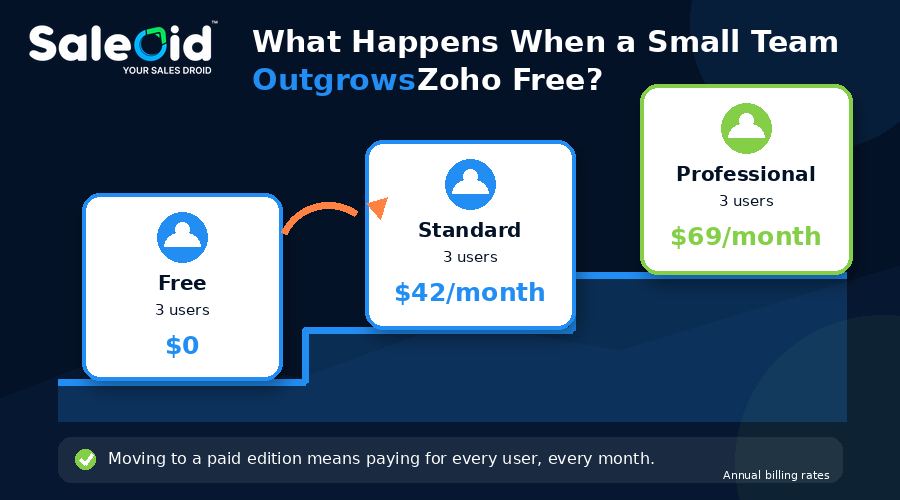
Free plans are designed to get you in the door. Zoho’s does that well, and it is a perfectly reasonable way to test whether a CRM helps at all. The catch is what happens the day you need more users, more records, custom modules or stronger automation.
Take a three-person team. On the Free plan they pay nothing. Move to Standard and the same team pays $42 per month, or $504 per year. Need Professional features? That is $69 per month, or $828 per year. The jump from $0 to a real bill happens all at once, and it happens per seat. If you are torn between starting free and starting small, our $5 CRM vs Free CRM comparison walks through where each choice leads.
| Three users, monthly | Zoho CRM (annual billing) | What changes |
| Free | $0 | Capped users, records and features |
| Standard | $42 | Every user is charged, every month |
| Professional | $69 | Higher tier for every user, even those who need less |
Three years, one user: a side-by-side view
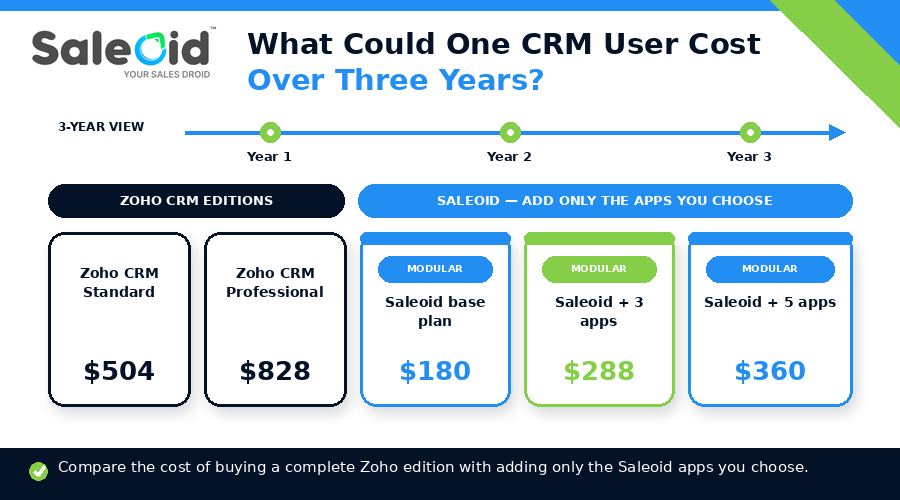
To keep the comparison fair, here is what a single user pays over 36 months at listed rates, before taxes. Saleoid figures use the $5 base plan plus $1 per app per month.
| Option | Monthly | Over 3 years |
| Zoho CRM Standard | $14 | $504 |
| Zoho CRM Professional | $23 | $828 |
| Saleoid base plan | $5 | $180 |
| Saleoid + 3 apps | $8 | $288 |
| Saleoid + 5 apps | $10 | $360 |
Even with 5 apps switched on, the Saleoid total stays below Zoho’s entry paid tier for a single user, and you chose every dollar of it.
Which Zoho CRM Plan Gives a Small Business the Best Value?
Each Zoho tier solves a specific problem and charges you for the whole bundle around it. Here is how they stack up, and how Saleoid handles the same moment in your growth.
Free: fine for a trial run
Free covers leads, contacts, deals, activities, reminders, basic workflows, reports and mobile access for up to three users. Once you need more capacity or customization, the only way forward is a paid seat for each person. Saleoid’s answer is a low entry price of $5 per month that already includes 2,500 contacts, five automations and mobile app access, so you begin on a paid, supported footing instead of a temporary one.
Standard: useful, but priced per head
Standard unlocks email integration, multiple pipelines, forecasting, custom modules and better lead assignment. Those are real gains, but you buy them for every user. With Saleoid, you look at what you are missing and add just that app for $1.
Professional: powerful, and a big step up
Professional adds process management, inventory, CPQ, portals, predictive intelligence and AI agents. If your operation truly runs on those, the price can be justified. If you only needed one or two of them, you are still paying for the rest. That is precisely the situation Saleoid was built to avoid.
Enterprise and Ultimate: for defined governance needs
Territory management, reporting hierarchies, sandboxes and high usage limits matter to larger organizations. A small business should not be pushed toward them just because growth is expected. Upgrade when a concrete requirement shows up, not before.
What Zoho CRM Does Well, and How Saleoid Answers It
Lead, contact and deal management
A shared home for leads, contacts, stages and next steps stops good enquiries from slipping away, and Zoho handles this competently. So does Saleoid. Its core CRM includes customer and company records, lead scoring, activity tracking, tasks, notifications and dashboards, all available from the $5 starting plan without a per-tier surcharge. If you are still living in a spreadsheet, this crm vs excel comparison shows when it is time to move.
Automation and customization
Zoho’s customization is deep, and for very unusual sales processes that depth can matter. For most small teams, though, it means hours of configuration before the first useful result. Saleoid includes five automations from the start and keeps setup lean, so your team spends its time selling. Automated sales follow ups are a good place to begin.
Reporting and visibility
Managers do need to know which deals are moving and which have stalled. Zoho offers forecasting and analytics that grow with each edition. Saleoid gives you dashboards and activity tracking in the base CRM, which is usually enough for a small team to see pipeline health at a glance. Our guide to pipeline tracking software explains what to look for.
AI features
Zoho now offers AI agents and predictive intelligence, though the details depend on the edition, and the more advanced pieces sit in higher-priced tiers. Many small teams get more from clean data, consistent follow-ups and lead scoring than from an AI layer they have to pay extra to unlock. To see how the field compares, read our roundup of the best ai crm for small businesses.
Ecosystem
Zoho’s wider suite is a real advantage if you already use Zoho Books, Campaigns or Desk, although each connection still needs its own setup and data mapping. Saleoid builds its ecosystem differently: marketing, billing, appointments, engagement and online bookings are apps you switch on inside the same system, one dollar at a time, with no separate product to install or reconcile.
Hidden Costs and Disadvantages of Zoho CRM
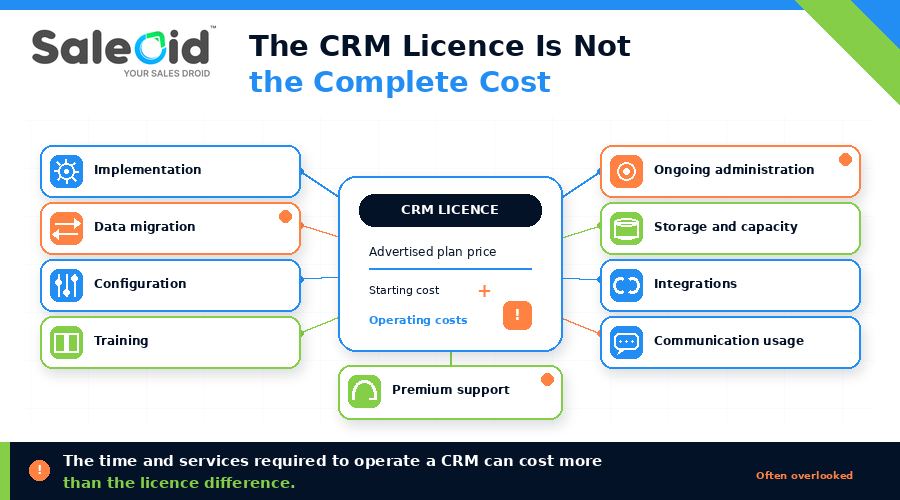
The license price is rarely the whole story. Zoho tends to cost more to run than its pricing page suggests, and the extra comes from several directions.
Implementation and administration
Data cleanup, pipeline design, workflow setup, integrations, training and ongoing admin all take time or paid help. For a very small business, first-year setup can outweigh the price gap between competing tools. If you are moving from another system, a structured crm migration plan helps limit the damage. With Saleoid there is simply less to build, so there is less to migrate, configure and maintain.
Feature overload
A CRM that can do everything can also overwhelm a team that wants contacts, one pipeline and reminders. More settings mean a steeper learning curve, and people who find a tool confusing stop updating it. Saleoid’s pay-for-what-you-need structure keeps the workspace focused on the tasks you chose.
Add-ons, capacity and outside services
Storage, data limits, messaging, calling, third-party integrations and premium support can all raise the total. Saleoid’s model is straightforward: base plan plus the apps you pick. Email sending is usage based, and everything else is a flat $1 per app.
Support tiers
Zoho paid plans include Classic Support, while faster response times come with Premium and Enterprise Support, which are subject to eligibility. Faster help is an additional purchase.
Zoho CRM vs Saleoid: A Quick Comparison
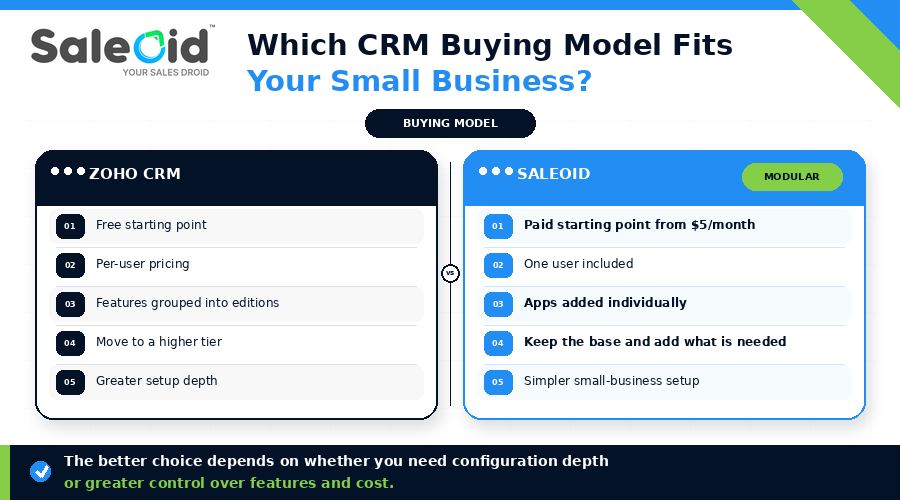
| Area | Zoho CRM | Saleoid |
| Entry price | Free (3 users), then $14 per user per month | $5 per month |
| How you grow | Move up a tier, for every user | Add single apps at $1 each |
| Forced bundles | Yes: features arrive in tier packages | No: pay only for what you use |
| Setup effort | Higher, given the customization depth | Lower, with a small-business focus |
| Automations at entry | Limited on Free, expanded in paid tiers | 5 included from $5 per month |
| Mobile app | Available | Included in the base plan |
| Best for | Complex, admin-heavy sales operations | Small teams wanting cost control and simplicity |
Saleoid: Pay Only for What You Need
Saleoid’s CRM pricing starts at $5 per month. That single plan includes:
| Included at $5 per month | Allowance |
| Businesses / accounts | 1 |
| Users | 1 |
| Contacts | 2,500 |
| Emails per month | Usage based |
| Automations | 5 |
| Mobile app access | Included |
When your business grows, you add the apps that match the growth, each at $1 per app per month. That could be marketing, billing, appointments, engagement or online bookings. You never have to buy a bundle that includes features you will not touch, and you never have to leap to a pricier plan just to unlock one capability.
Saleoid also offers a 15 day free trial, so you can test the workflow with your own data before paying anything.
Consider Zoho CRM if you need:
- Very deep, custom module-level configuration
- A dedicated administrator to run the system
- An existing Zoho product stack you want to connect
Choose Saleoid if you want:
- A low, predictable starting cost from $5 per month
- The freedom to add apps one at a time at $1 each
- No forced upgrades and no unused bundled features
- A simple, small-business-focused setup your team will actually use
- Sales, billing, bookings and marketing tools connected in one place
Running a client-facing business? See our guide to Zoho alternatives for agencies for options suited to agency workflows.
You can also explore Saleoid as a Zoho Alternative to see how the two approaches compare in detail. Want a wider view? Our roundup of the best Zoho alternatives covers more options side by side.
Final Verdict
Zoho CRM can be a good investment for businesses that will use its depth, have someone to maintain it, and accept per-user tier pricing as they grow. It is not the natural fit for a small team that wants a working CRM without a long setup or a rising bill.
The free plan is a helpful way to test the idea, but it is not where you will stay. Once you need more, the upgrade cost arrives in one large step. Saleoid removes that step. You begin at $5 per month, add apps at $1 each when your needs change, and keep your costs tied to the features you really use.
The deciding question is simple: will you use enough of Zoho’s bundled flexibility to justify what it costs to buy and maintain? If the answer is no, Saleoid is likely the better fit. Take a closer look at Saleoid’s sales crm software to see what the core CRM offers.
FAQs
It can be, particularly for teams with complex processes and someone to manage the system. For businesses that value simplicity and predictable pricing, Saleoid’s $5 per month starting plan and $1 apps are usually easier to adopt and to afford.
Zoho offers a Free edition for up to three users, but it limits records, customization, automation and reporting. As soon as you need more, you move to a per-user paid plan. Saleoid takes the opposite approach: a low-cost paid start, then $1 apps as you need them.
Daily use gets easier once the system is configured, but setup, customization and administration take real effort. Teams that want faster onboarding often prefer Saleoid’s lighter setup.
The biggest drawbacks are setup time, configuration complexity, ongoing administration, integration effort and costs that grow beyond the license fee. Per-user tier pricing also means expenses rise steadily as your team expands.
The base plan starts at $5 per month and includes one business account, one user, 2,500 contacts, five automations, usage-based emails and mobile app access. Additional apps cost $1 per app per month, so you pay only for the functionality you choose.
No, Saleoid does not push businesses into forced upgrades or bundle plans. You add the apps you need, when you need them, and skip the rest.