


Zoho CRM starts at a reasonable per-user price, but the entry price does not show what a growing small business may ultimately pay.
The Free edition supports up to three users, and paid Zoho CRM pricing starts at $14 per user per month with annual billing. The number looks affordable on its own, but costs rise with every full user and can increase again when the business needs a higher edition, more storage, calling credits, marketing capacity, support, or additional Zoho products.
The useful question is not simply, ‘What does Zoho CRM start at?’ It is, ‘What will the complete workflow cost for the number of people who need it?’ That calculation should include licenses, plan upgrades, usage charges, connected applications, setup, training, and administration.
The price on the plan card is only the starting number. Reviewing what a CRM for small businesses should include can help you decide which capabilities are actually worth paying for.
This guide explains what Zoho CRM could actually cost in 2026 and where Saleoid may offer a simpler, lower-cost alternative for small businesses that need CRM, communication, appointments, automation, and billing in one connected system. For a wider shortlist before making a decision, review the best Zoho alternatives based on total workflow cost rather than entry price alone.
How Much Does Zoho CRM Cost in 2026?
Zoho CRM uses per-user pricing for its paid editions, while the Free edition supports up to three users. Your total monthly cost depends on the edition, the number and type of licenses, and whether you pay monthly or annually. This makes headcount a direct cost driver even when your feature requirements stay unchanged.
| Plan | Annual Billing | Monthly Billing | Most Likely Fit |
| Free | $0 for up to 3 users | $0 | Basic CRM testing for up to 3 users |
| Standard | $14/user/month | $20/user/month | Teams that specifically need Zoho’s core paid CRM tools |
| Professional | $23/user/month | $35/user/month | Teams that need process management, CPQ, inventory or deeper AI |
| Enterprise | $40/user/month | $50/user/month | Mature sales organizations requiring governance and customization |
| Ultimate | $52/user/month | $65/user/month | Large, highly customized deployments reaching Enterprise limits |
The annual rates shown above are monthly equivalents based on an annual commitment. Zoho also states that local taxes may be added. Saleoid’s advertised $5 CRM rate also requires a longer two-year billing term, so compare both the effective monthly price and the total commitment rather than comparing headline figures alone.
The Zoho subscription may not be the complete CRM bill. Extra storage, calling usage, marketing tools, connected apps, implementation, and support can increase total cost. Zoho offers a 15-day trial of its paid editions. Saleoid also offers a 15-day trial, which lets a small team test its CRM foundation and add only the business apps required for the actual workflow. An AI CRM Pricing Guide can also help you separate base access, AI add-ons, and usage charges before subscribing.
When comparing plans, identify the first feature or limit your business cannot operate without. With Zoho, that requirement often determines the edition purchased for every regular user. With Saleoid, many small-business functions can be added as individual apps, which may avoid an account-wide tier upgrade.
Zoho CRM Plans Explained and When You Need to Upgrade
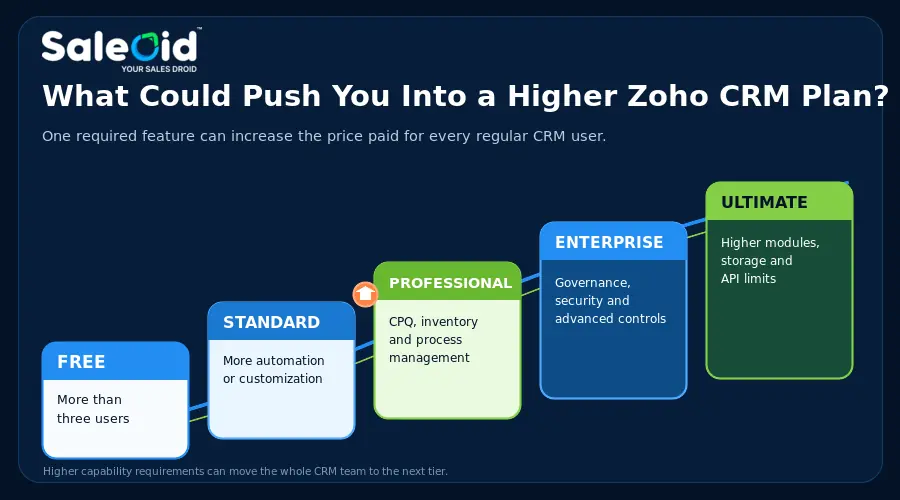
Zoho CRM plans become easier to compare when you focus on what would force the account to move up a tier. The lowest workable edition matters because one missing capability can increase the price of every regular user. Saleoid takes a different approach: a small business can begin with the CRM foundation and add selected apps instead of moving the entire team through four feature tiers.
Understanding the essential sales CRM features for small businesses can help you separate genuine requirements from features that do not justify a higher plan.
Zoho CRM Free
Zoho CRM Free may suit a founder or a team of up to three people that needs basic contact and deal tracking without an immediate subscription. Its main advantage is the $0 price, but it should be treated as a limited starting point rather than proof that Zoho will remain the lowest-cost option once the team needs broader automation, communication, scheduling, billing, or more than three users.
You will usually need to upgrade when:
- You need more than three regular CRM users
- Your required automation, email, customization, or collaboration features exceed the Free edition
- You need Team Modules or Team Users, which are available from Standard onward
Free can be sufficient for a very simple sales process, but team size alone should not determine the decision. Saleoid is not free, yet its $5 CRM foundation includes one user, 2,500 contacts and companies, five automations, lead scoring, roles and permissions, engagement tools, and three accounts. A comparison of the best affordable CRM options can reveal whether a small paid plan offers more usable value than a free plan the business will quickly outgrow.
Zoho CRM Standard
At $14 per user per month with annual billing or $20 with monthly billing, Standard is the first paid Zoho tier. The price applies to each regular user, so a five-person team pays $70 per month equivalent on annual billing before add-ons, taxes, or other Zoho apps.
It includes the core capabilities many growing sales teams look for, including:
- Email integration and mass email
- Built-in calling
- Sales forecasting
- Custom modules
- Forms for lead capture
- Workflow automation and assignment rules
Standard adds useful sales tools, but the decision should turn on whether its automation, customization, communication, and usage limits fit the complete workflow. Saleoid’s core plan already includes lead scoring, engagement tools, permissions, dashboards, and five automations; forms, appointments, invoicing, agreements, and other apps can be added selectively from $1 per month. Exact feature depth differs, so compare the workflow rather than the length of each vendor’s feature list.
Zoho’s Team User license is cheaper than a regular license, but it is deliberately restricted. Team Users cannot perform several activities available to full users, including owning organization-module records, working with reports and dashboards, initiating calls or meetings, managing organization-level automation, or using Zia features. Saleoid’s additional users start at $6 on the Custom plan, making it worth comparing actual permissions rather than assuming Zoho’s lower-access seat is automatically the better value.
Zoho may require Professional or a higher edition once your process, customization, analytics, inventory, CPQ, portal, or module requirements exceed Standard. Before upgrading every regular user, check whether the missing requirement can be covered more economically through a focused Saleoid app or a prebuilt Saleoid bundle.
If you are still defining your baseline requirements, review what sales CRM software should cover before deciding whether Standard is sufficient. If your shortlist includes another pipeline-led platform, the Pipedrive vs Zoho CRM comparison provides useful context on price, usability, and sales workflow differences.
Zoho CRM Professional
Professional costs $23 per user per month with annual billing or $35 with monthly billing. For 10 regular users, that is $230 per month equivalent on annual billing before other costs. The upgrade makes sense only when its process management, inventory, CPQ, portal, reporting, or predictive capabilities are genuinely required.
Compared with Standard, Professional adds capabilities such as:
- Process management
- Inventory management
- CPQ
- Custom portals
- Unlimited reports
- Predictive intelligence
- Zia Agents
Zoho now promotes AI agents in Standard, while Professional adds deeper AI and process capabilities such as predictive intelligence and email intelligence. This is a meaningful improvement, but buyers should check which AI functions are available in the selected edition and whether they solve a real task. Saleoid connects AI-assisted lead handling and follow-up with the wider customer workflow, while its AI Chatbot can be added to the Custom plan as a low-cost app. Businesses prioritizing automation across the customer journey should also compare AI CRM Software built specifically for small businesses.
The annual Zoho CRM cost per user rises by $9 when you move from Standard to Professional. For a 10-user team, that adds $1,080 to the annual license budget.
Before upgrading, name the exact capability that justifies the additional $9 per user per month. Zoho Professional may be appropriate for businesses that truly need its deeper process, CPQ, inventory, portal, or analytics tools. A typical small business that mainly needs leads, follow-ups, appointments, communication, estimates, invoices, and payments may obtain a more complete day-to-day workflow through Saleoid without buying a higher CRM edition for every user.
Zoho CRM Enterprise
Enterprise costs $40 per user per month with annual billing or $50 with monthly billing. It is aimed at mature sales organizations that need deeper customization, governance, security, development controls, territories, and extended AI. These are substantial capabilities, but many small businesses would be paying for an enterprise operating model they do not use.
Key additions over Professional include:
- Developer sandbox
- Custom buttons and functions
- Field-level encryption
- Reporting hierarchy
- Account-Based Marketing
- Extended AI capabilities
- More advanced approval and organizational controls
The defensible reason to choose Enterprise is an essential capability that Professional cannot provide, such as field-level encryption, sandbox testing, reporting hierarchy, advanced approvals, or controls across regions and business units. Saleoid is not positioned as a replacement for highly governed enterprise deployments. It is the stronger alternative when a small business wants a connected customer workflow without enterprise-level complexity and per-user cost.
The price difference is $17 per regular user per month with annual billing. For 10 users, moving from Professional to Enterprise adds $2,040 a year before add-ons. If the requirement applies to only one process or department, compare that account-wide increase with Saleoid’s modular approach before assuming the entire team needs an Enterprise license.
Zoho CRM Ultimate
Ultimate costs $52 per user per month with annual billing or $65 with monthly billing. It is relevant mainly to large or highly customized deployments that are reaching Enterprise limits for modules, fields, storage, APIs, reporting, or data preparation. It is difficult to justify for an ordinary small business whose priority is simply managing customers and everyday operations.
Some of the higher limits include:
- Up to 500 custom and Team Modules combined
- Up to 500 custom fields per module
- Higher API credit allowances
- Greater data storage allocation for larger organizations
- Higher limits across selected reporting and CRM for Everyone capabilities
Ask which Ultimate-only capability or higher limit makes the extra $12 per user per month worthwhile. If there is no precise answer, the plan is likely oversized. Saleoid should be evaluated instead when the business needs practical sales and operational tools rather than hundreds of custom modules or enterprise-scale limits.
For 25 users, moving from Enterprise to Ultimate adds $3,600 to the annual license cost. That comparison also shows why smaller teams should resist choosing a plan for hypothetical future needs. Saleoid’s Custom plan and bundled plans let a business begin closer to its current workflow and expand when the requirement becomes real.
Zoho CRM Cost by Number of Users
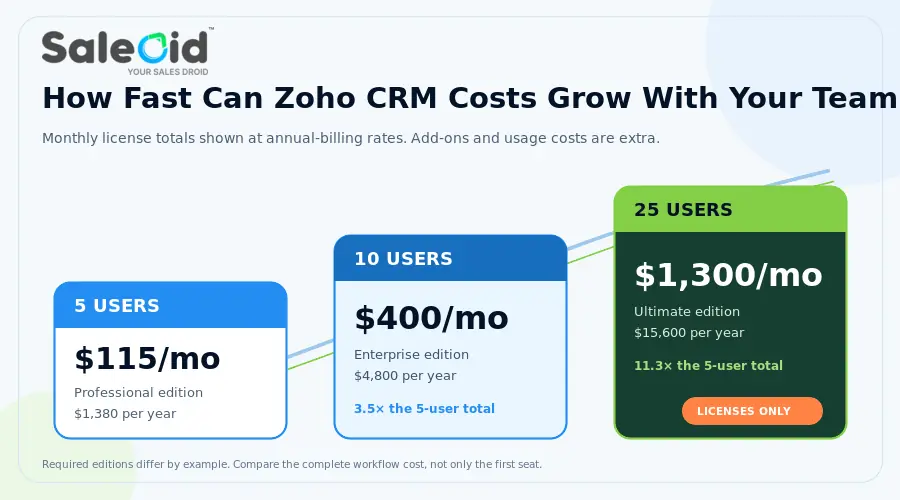
The Zoho CRM cost per user becomes more useful once you translate it into the amount your whole team will pay. The table below shows the monthly equivalent license cost when you choose annual billing. Zoho’s current US pricing lists Standard at $14, Professional at $23, Enterprise at $40, and Ultimate at $52 per user per month with annual billing. A broader CRM pricing comparison can help you judge these totals against other licensing models before choosing a vendor.
| Users | Standard | Professional | Enterprise | Ultimate |
| 3 | $42/month | $69/month | $120/month | $156/month |
| 5 | $70/month | $115/month | $200/month | $260/month |
| 10 | $140/month | $230/month | $400/month | $520/month |
| 25 | $350/month | $575/month | $1,000/month | $1,300/month |
| 50 | $700/month | $1,150/month | $2,000/month | $2,600/month |
Saleoid Cost Context for Small Teams
Saleoid’s bundled pricing does not map feature-for-feature to a Zoho edition, but it shows why small teams should compare the cost of the complete workflow, not only the first Zoho seat.
| Team size | Zoho Standard | Zoho Professional | Saleoid plan |
|---|---|---|---|
| 3 users | $42/month | $69/month | Custom: $5/month* |
| 10 users | $140/month | $230/month | Growth: $29.40/month* |
| 15 users | $280/month | $460/month | 119.40/month |
Pricing basis: Zoho figures are monthly equivalents with annual billing. Saleoid figures use two-year billing. Saleoid Starter, Growth, and Unlimited include up to 3, 10, and 20 users respectively; ‘Unlimited’ does not mean unlimited users. Confirm current regional pricing, taxes, limits, apps, and usage charges before purchasing.
These figures cover Zoho CRM licenses only. Add-ons, usage charges, taxes, storage, implementation, support, and connected applications are separate. The Saleoid comparison below uses its two-year billed bundle rates, so the commitment period and included features are different; it is intended to show the scale of the pricing gap, not claim that the products are identical.
5 Users on Professional
With annual billing, 5 Professional licenses cost $115 per month equivalent, or $1,380 for the year.
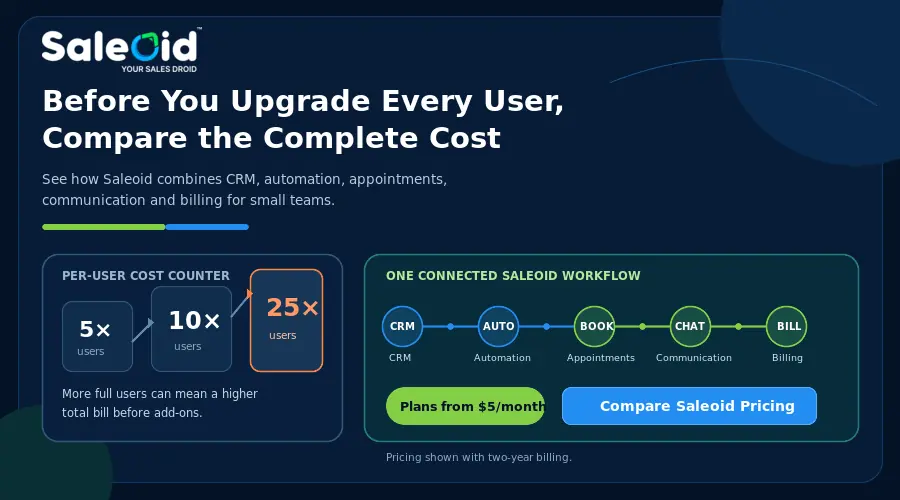
Paying monthly raises the cost to $175 per month, or $2,100 across 12 months. Annual billing saves $720, but five Professional seats still cost $1,380 a year before extras. By comparison, Saleoid’s Growth bundle supports up to 10 users for $25 per month on two-year billing and includes a wider set of small-business apps. The billing term is longer, but the team-level price can be substantially lower.
10 Users on Enterprise
Ten Enterprise users cost $400 per month equivalent with annual billing, bringing the annual commitment to $4,800.
Monthly billing costs $500 per month. Over 12 months, that reaches $6,000, which is $1,200 more than annual billing. A 10-user small business that does not need Zoho’s Enterprise governance should compare this with Saleoid Growth at $25 per month on two-year billing before accepting enterprise pricing as the cost of a connected workflow.
25 Users on Ultimate
For 25 Ultimate users, annual billing works out to $1,300 per month equivalent and $15,600 for the year.
Monthly billing costs $1,625 per month, or $19,500 across 12 months. The difference is $3,900 a year. Saleoid’s published bundles currently include up to 20 users, so it is not a direct 25-user equivalent; however, this example demonstrates how quickly Zoho’s per-user, high-tier pricing can become a five-figure annual commitment.
Zoho CRM Annual vs Monthly Pricing
Annual billing lowers the effective subscription cost across every paid Zoho CRM edition, but it does not change the underlying per-user model. As the team grows, the bill rises even if the chosen features and workflows remain the same.
| Plan | 12 Months on Monthly Billing | Annual Billing Cost | Yearly Difference Per User |
| Standard | $240 | $168 | $72 |
| Professional | $420 | $276 | $144 |
| Enterprise | $600 | $480 | $120 |
| Ultimate | $780 | $624 | $156 |
For larger teams, the difference becomes more significant. 10 Professional users save $1,440 per year with annual billing. At 25 users, the saving reaches $3,600 on Professional and $3,900 on Ultimate.
Annual billing is the cheaper option when you are confident about the edition and expected user count. Monthly billing gives you more flexibility while testing adoption, changing team structure, or deciding whether a higher plan is actually necessary. Teams considering another broad CRM suite can use this HubSpot vs Zoho CRM comparison to evaluate how pricing and packaged functionality differ before making an annual commitment.
The lower annual rate can reduce Zoho CRM pricing, but flexibility may be more valuable while requirements are changing. Saleoid’s lowest rates require two-year billing, so it should be judged by the same rule: test the workflow first and compare the full commitment, not only the monthly equivalent.
Zoho CRM Add Ons and Costs You Could Overlook
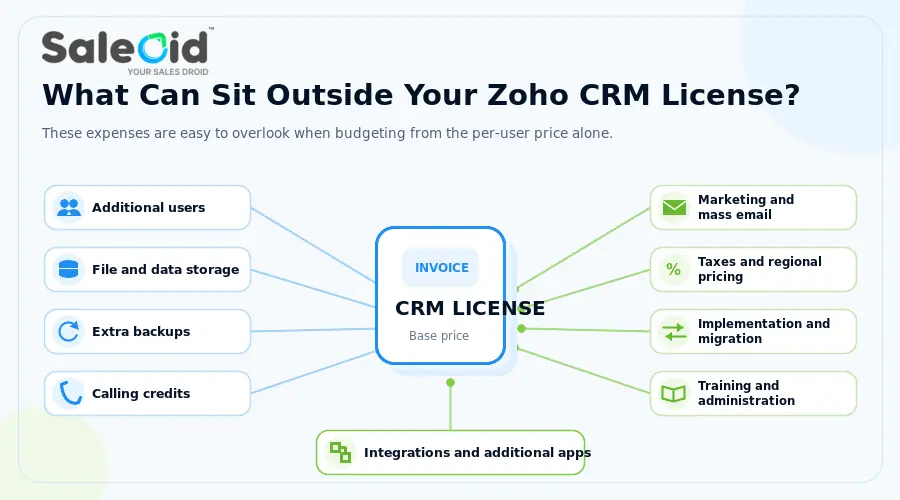
Zoho’s so-called hidden costs are not necessarily secret charges. Most are documented, but they are easy to miss when a buyer budgets from the regular user price alone. The practical problem is fragmentation: a low seat price can become a larger stack once storage, calling, campaigns, support, implementation, and additional apps are included.
The following expenses can sit outside your standard CRM licenses.
Team User Licenses
Team Users give employees full access within assigned Team Modules while restricting what they can do across wider organization modules. They cost $9 per user per month with annual billing or $11 with monthly billing.
They can suit legal, finance, support, consultants, and other employees who need CRM context without the permissions of a regular sales user.
For example, consider a company with 12 Enterprise sales users and 8 employees whose work fits Team User access.
- 20 Enterprise users would cost $800 per month
- 12 Enterprise users cost $480 per month
- 8 Team Users cost $72 per month
- Combined cost is $552 per month
- Potential difference is $248 per month, or $2,976 per year
A Team User license saves money only when its restrictions genuinely match the role. Someone who needs normal organization-module access, reporting, calling, meetings, automation, AI, or regular CRM permissions may still need a full license. Saleoid’s additional users start at $6 on the Custom plan, while its Growth and Unlimited bundles include 10 and 20 users respectively at published two-year rates.
Additional File Storage
File storage covers uploaded content such as record attachments, documents, templates, images, and related files. Zoho is moving CRM file storage toward WorkDrive, so the allowance can depend on the storage setup attached to your organization.
If uploaded files are becoming a larger part of your workflow, reviewing document management software for small businesses can help you decide whether CRM storage should carry that workload.
For organizations still using the earlier CRM storage model, Zoho documents:
- Standard and Professional with 1 GB per organization plus 512 MB per user
- Enterprise with 1 GB plus 1 GB per user
- Ultimate with 5 GB plus 1 GB per user
Additional file storage is available on paid editions in 5 GB increments for $4 per month, up to 100 GB under that storage model. The unit price is modest, but it is another variable outside the seat price. Saleoid includes document-related capabilities within its connected app structure, so teams should compare the actual storage allowances and document workflow they need rather than treating either CRM as unlimited storage.
Additional CRM Data Storage
Data storage is different from file storage. It covers CRM records and the components stored within those records rather than uploaded attachments and documents.
Zoho currently documents additional data storage at $4 per 100 MB per month under the applicable storage model. It describes 100 MB as approximately 50,000 records, but that figure is only an estimate because individual records can consume different amounts of space.
Businesses with large contact databases or record-heavy workflows should monitor data storage separately from file usage. Saleoid’s $5 Custom plan publishes a 2,500 contact-and-company allowance, while its bundles increase that allowance. Neither model should be treated as limitless; the difference is that Saleoid displays its core contact limits alongside the plan, making them easier to include in the initial calculation.
Additional Data Backups
Zoho includes scheduled backup allowances according to edition. Standard, Professional, and Enterprise include two backups per month, while Ultimate includes four. Zoho also documents additional backup requests at $12 each.
This is an occasional cost rather than a recurring charge for every customer. Companies with stricter backup schedules should compare the required frequency with the included allowance. If advanced backup governance is not a business requirement, it should not become a reason to buy a higher Zoho edition; a simpler platform such as Saleoid may reduce the amount of CRM administration involved.
Built In Telephony and Calling Credits
Built in calling does not mean unlimited calls are included with the CRM subscription. Zoho’s built in telephony uses credits, with one credit equal to US $1. Credits pay for phone number maintenance, incoming and outgoing call activity, and additional call recording storage.
Each organization receives 1,000 minutes of recording storage. Additional recording capacity currently costs:
- 50,000 minutes for 25 credits per month
- 200,000 minutes for 50 credits per month
- 1,000,000 minutes for 75 credits per month
Call and phone-number charges vary by country, number type, and usage, making telephony a variable expense rather than part of a fixed CRM license. Saleoid also supports connected communication, including email, SMS, WhatsApp, and in-app calling, but usage-based channel charges may still apply. Compare message and calling volumes on both platforms rather than assuming ‘built in’ means unlimited.
Mass Email and Marketing Costs
Zoho CRM limits daily mass emails by edition. Standard allows 250 per day, Professional 500, Enterprise 1,000, and Ultimate 2,000. Mass email is not included in the Free edition.
If marketing needs exceed these limits, Zoho users may need Zoho Campaigns, another marketing platform, or a higher CRM edition. Moving every regular user to a higher edition only for email capacity can be inefficient. Saleoid offers email marketing as a connected app and includes marketing automation in its bundles, giving small teams another way to add campaign capability without upgrading every CRM seat.
If the boundary between sales emails and campaigns is unclear, comparing CRM vs marketing automation can help you decide where that work should live.
Taxes and Regional Pricing
Local taxes can be charged in addition to its advertised CRM prices. Businesses purchasing outside the US may see different regional prices, currencies, VAT, GST, or other applicable taxes. Use the Zoho pricing page for your billing region when preparing the final subscription budget.
Costs That Are Not Technically Zoho CRM Fees
A realistic Zoho pricing 2026 calculation must include expenses beyond the CRM invoice. Implementation, migration, training, administration, support, and connected software affect total cost of ownership even when the work is completed internally. Saleoid’s simpler, small-business-focused setup can reduce this burden, although migration quality and workflow complexity still determine the actual effort.
CRM Implementation and Configuration
Zoho implementation may involve pipelines, fields, modules, workflows, permissions, reports, dashboards, custom functions, and integrations. The cost depends on complexity and whether consultants are required. Saleoid’s guided setup and modular app selection are better aligned with small teams that want to start quickly, but any business with messy data or heavily customized processes should still budget time for setup and testing.
Data Migration and Cleanup
Moving data into Zoho CRM can require exporting records, removing duplicates, correcting data, mapping fields, preserving histories, testing imports, and confirming ownership. Separate any crm migration expense from the employee or consultant time required to prepare and validate the data.
Training and Ongoing Administration
Complex CRM environments may require ongoing administration for automations, modules, reports, integrations, and permissions. Training and adoption time also belong in TCO. Zoho’s depth can be valuable to a mature sales organization, but it can become overhead for a small team. Saleoid is the better fit when the priority is a connected daily workflow that staff can understand without dedicated CRM administration.
Integrations and Additional Zoho Apps
Zoho CRM may still need separate Zoho products or third-party tools for accounting, support, marketing, projects, scheduling, billing, or communication. Saleoid’s main advantage is that many of these everyday customer-facing functions are available as connected apps or bundles within the same system. Zoho remains stronger for businesses that need the breadth of its wider ecosystem, but that breadth does not automatically make it more economical or easier to manage.
Zoho CRM vs CRM Plus vs Zoho One: Which Costs Less for Your Stack?
The answer depends on how many Zoho products the business actually needs. A bundle can appear economical per app while still costing more overall if staff use only a small part of it. Saleoid reverses that buying logic by allowing a business to start with CRM and add selected apps, with prebuilt bundles available when the broader set becomes more economical.
A modular CRM vs multiple tools comparison can also help you decide whether bundling creates meaningful savings or simply adds software your team will not use.
Standalone Zoho CRM
Standalone Zoho CRM may be the lowest-cost Zoho option when the requirement is limited to sales CRM. It is not necessarily the lowest-cost CRM option: Saleoid starts at $5 per month on two-year billing, includes one user, and lets the business add operational apps individually rather than purchasing separate products.
Zoho CRM Plus
Zoho CRM Plus bundles CRM with customer-facing tools for marketing, support, live chat, projects, surveys, and analytics. The broader coverage can reduce separate subscriptions, but it also creates a per-user suite cost and may include tools a small business does not need. Saleoid’s bundles focus on connected small-business workflows at lower published team-level prices, while the Custom plan remains available for selective app purchases. Service providers with client-specific workflows may also benefit from comparing Zoho alternatives for agencies before choosing a suite.
Zoho One
Zoho One pricing follows All Employee and Flexible User models. All Employee licensing covers the wider workforce, while Flexible User pricing applies selected licenses, making direct comparisons with individual CRM seats potentially misleading.
Compare required CRM seats and additional Zoho products against the applicable Zoho One licensing model. Zoho One can make sense for an organization committed to using many Zoho applications across its workforce. Saleoid is usually the clearer alternative for a smaller business that wants CRM, communication, automation, appointments, agreements, billing, and related tools without adopting a broad enterprise software ecosystem.
Why Saleoid Can Be a Better Zoho CRM Alternative for Small Businesses
For many small businesses, Saleoid is the more practical default because it connects customer management, lead capture, follow-ups, communication, appointments, agreements, estimates, invoices, subscriptions, and payments without forcing the business into enterprise CRM tiers. As a Zoho Alternative, it is designed for businesses that value a connected daily workflow and modular pricing. Zoho remains the stronger choice when its deeper customization, governance, territorial structure, or wider application ecosystem is a genuine requirement.
What Saleoid Offers
Saleoid is designed around the work a small business performs before and after a sale, not only the sales pipeline. It keeps customer records connected with communication, scheduling, documents, billing, and automation.
Key capabilities include:
- Lead and contact management
- Sales pipelines
- Forms and landing pages
- Automated follow-ups and lead scoring
- Workflow automation
- Email, SMS, and WhatsApp communication
- Unified customer conversations
- Appointment scheduling and calendar synchronization
- Reminders and routing
- AI chatbot
- Quotes and estimates
- Invoicing and recurring billing
- Payment reminders
- Reports and analytics
The AI chatbot can also capture leads, answer customer questions, schedule meetings, and create estimates while keeping those interactions connected with CRM records.
How Saleoid Pricing Differs From Zoho CRM
Saleoid uses a modular pricing model. The CRM foundation starts at $5 per month when billed every two years. That is a $120 base commitment for the two-year term and includes:
- 1 user
- 2,500 contacts and companies
- 5 automations
- 3 accounts, including the main account and two sub-accounts
- Additional users from $6 per user
- Additional apps from $1 per month
A 15-day free trial is also available. You can review our CRM pricing to compare the CRM foundation and optional apps directly.
Zoho increases functionality through Standard, Professional, Enterprise, and Ultimate editions, with most regular users sharing the account’s edition. Saleoid lets a small business begin with the CRM foundation and add selected applications as the workflow requires. Its prebuilt bundles become more economical as user count and app requirements grow.
This model is especially suitable for teams that need CRM, follow-ups, appointments, communication, invoicing, agreements, and automation but do not need hundreds of custom modules, territory management, developer sandboxes, or enterprise governance.
Who Should Consider Saleoid Instead of Zoho CRM?
Saleoid should be the first alternative considered by a small or growing business that wants CRM, lead capture, follow-ups, scheduling, invoicing, communication, and automation connected within one customer workflow.
It may be a better fit when you:
- Prefer adding applications according to your requirements
- Want fewer separate tools for everyday customer management
- Need operational features alongside CRM
- Do not require deeper enterprise governance, extensive customization, or the broader Zoho CRM ecosystem
The balanced conclusion is straightforward: Zoho CRM is capable, but its low entry price can become misleading once seats, tiers, add-ons, apps, and administration are included. Saleoid is generally the better-value alternative for small teams that want a connected operational CRM. Zoho is easier to justify when the business can name a specific enterprise capability or ecosystem requirement that Saleoid is not designed to replace. Test Saleoid for 15 days and compare the complete workflow before committing to either platform.
FAQs
Yes, although most are documented rather than concealed. Storage, telephony usage, backups, additional applications, implementation, migration, training, integrations, paid support, and taxes can all increase the final spend. Saleoid’s modular pricing makes many small-business additions easier to price individually, but buyers should still check users, contacts, apps, usage, and billing term.
Team Users are lower cost licenses for employees who need full access to assigned Team Modules but limited access across wider organization modules. They cost $9 monthly with annual billing or $11 with monthly billing.
Regular CRM users within the same organization generally use the edition purchased for that account rather than choosing separate editions individually. Team User licenses can provide a different restricted access model for employees who do not need full CRM permissions.
Yes, Zoho CRM allows customers to upgrade, downgrade, or cancel their service. Before moving down an edition, check whether workflows, customizations, Team Users, storage, or other features depend on limits unavailable in the lower plan.
No, the listed CRM prices do not automatically include local taxes. VAT, GST, and other applicable taxes can be added separately, so businesses outside the US should budget using the pricing and tax rules for their billing region.
Saleoid is a strong lower-cost Zoho CRM alternative for small businesses. Its CRM foundation starts at $5 per month with two-year billing, additional users start at $6, optional apps start at $1 per month, and a 15-day free trial is available. Zoho may still be preferable for advanced enterprise governance or deep ecosystem requirements, but Saleoid is usually the more economical choice for a connected small-business workflow.