



For an agency, a CRM should reduce coordination work, not become another system your team has to manage.
Zoho gives agencies plenty of tools to work with. The challenge can appear when your setup grows beyond a straightforward sales pipeline. Automations need attention, integrations multiply, and different Zoho apps begin supporting different parts of the customer journey. If you also manage systems for clients, the software structure matters even more.
Before exploring Zoho alternatives for agencies, decide what you actually want to replace. Moving from Zoho CRM alone is a much smaller decision than rebuilding workflows that currently depend on several Zoho products.
And because Zoho offers considerable functionality for the price, an alternative needs to earn its place.
We compared 7 platforms to find where agencies can gain something meaningful enough to make switching worthwhile.
Best Zoho Alternatives for Agencies: Quick Comparison
The right alternative depends heavily on whether you need software for your own agency pipeline or a system that will also support client accounts. The table below compares seven options based on the capabilities most likely to matter when choosing a best CRM for agencies.
| Platform | Best for | CRM | Automation strength | Starting useful price | Main limitation |
| Saleoid | Smaller agencies wanting affordable CRM and automation | Strong | Strong for smaller teams | From $5/month with two-year billing | Entry plan includes 1 user, 2,500 contacts and 5 automations |
| HighLevel | Agencies running marketing and CRM systems for clients | Strong | Excellent | $97/month for up to 3 subaccounts; $297/month for unlimited subaccounts | Additional usage charges and a more involved setup |
| HubSpot | Inbound, content and RevOps agencies | Excellent | Excellent on Professional plans | From $890/month for Marketing Hub Professional when advanced marketing automation is required | Advanced marketing functionality can become expensive |
| ActiveCampaign | Agencies focused heavily on lifecycle marketing | Good with Enhanced CRM | Excellent | Depends on contact volume, package and required CRM add ons | Client account management is not as central to the platform as it is in HighLevel |
| Pipedrive | Agencies wanting a straightforward internal sales CRM | Excellent | Strong from Growth | $39 per seat/month for Growth with annual billing | Better suited to sales pipeline management than a complete agency marketing stack |
| monday CRM | Agencies connecting sales activity with broader client operations | Strong | Strong | $17 per seat/month for Standard with annual billing | Automation allowances and workspace limits vary by plan |
| Close | Lead generation and outbound sales agencies | Excellent | Strong from Growth | $99 per seat/month for Growth with annual billing | Built primarily around sales communication rather than broad marketing operations |
Why Agencies Look for Zoho Alternatives
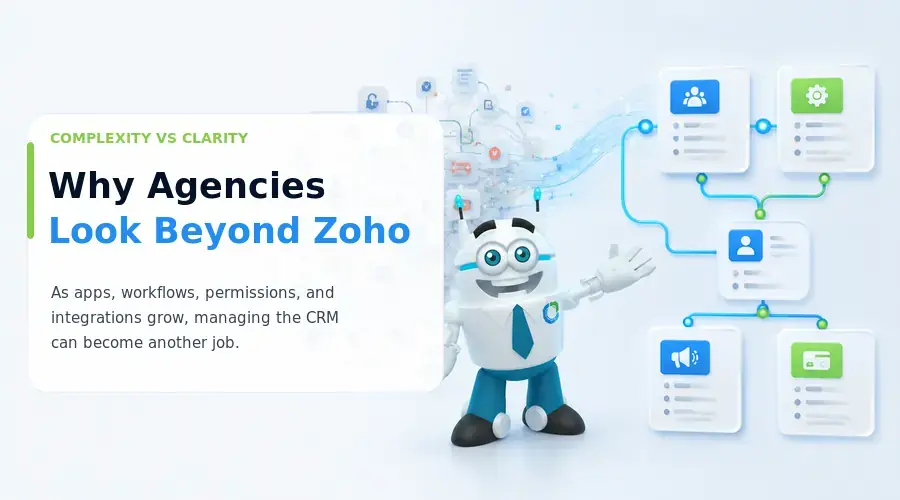
Zoho offers powerful CRM and automation capabilities, but agencies may find larger setups harder to manage as more apps, workflows, permissions, and integrations are added.
Common reasons agencies explore alternatives include:
- Sales teams want faster, simpler CRM updates.
- Administrators need easier automation setup and troubleshooting.
- Client work may require separate accounts, controlled access, and reusable workflows.
- Marketing teams may prefer stronger email, SMS, nurture, and campaign automation in one place.
- Lower administration or integration costs may matter more than subscription price alone.
The right alternative depends on why your agency wants to leave Zoho, not on feature count alone. That distinction is explored further in our AI CRM vs traditional CRM comparison.
7 Best Zoho Alternatives for Agencies That Need CRM and Automation
1. Saleoid
Saleoid is a good match for smaller agencies that want their sales, marketing, scheduling, and billing workflows in one system without adopting a larger business suite, and it is often mentioned among the best CRM software for small businesses.
Pricing
The Custom CRM pricing plan starts at $5 per month with two-year billing, or $15 per month with monthly billing. It includes one user, 2,500 contacts and companies, and five workflow automations. Confirm the three-account allowance and $1-per-month optional app pricing before publishing. Saleoid’s currently confirmed main pricing plans are Custom, Growth, and Premium, with two-year monthly equivalents of $5, $29.40, and $119.40, respectively.
Key Features
For agencies that want a CRM with invoicing, Saleoid can manage contacts, pipelines, lead scoring, appointments, email engagement, automated follow-ups, billing, and subscriptions Higher plans expand the toolkit with project management, client portal features, SMS marketing, API access, AI tools, and additional permissions.
Limitations
Saleoid has a smaller integration ecosystem than Zoho, while the Custom plan also places limits on users, contacts, and automations. It is best suited to value-conscious agencies that want simpler agency CRM automation for their own operations rather than highly complex client CRM deployments. Its lower cost also makes it a common mention among the best AI CRM for small businesses and a workable CRM for startups.
2. HighLevel
HighLevel is built around agency operations, making it especially relevant when you manage CRM and marketing systems for several clients rather than only your own sales pipeline.
Pricing
Starter costs $97 per month and supports three subaccounts. Unlimited costs $297 and removes that limit, making it the more practical tier for established agencies. Agency Pro costs $497 and adds SaaS Mode, automated subaccount creation, and usage rebilling with markup.
Key Features
Each client can have a separate workspace for contacts, pipelines, calendars, campaigns, forms, workflows, email, SMS, calling, payments, funnels, and reputation management. Branding changes the client experience, while SaaS Mode lets agencies package and resell the platform as software.
Limitations
HighLevel can become complex once workflows and client setups multiply. Email, phone, premium workflow actions, and some AI tools also create additional usage charges. Compared with Zoho, it offers stronger client separation for a CRM for agencies, while Zoho remains broader in general business applications and customization. Agencies still comparing costs can also review the gohighlevel 60 day trial details before committing to a paid tier.
3. HubSpot
HubSpot is a strong choice for SEO, content, inbound, and B2B agencies that want marketing and sales activity connected to the same customer record. It is also a common reference point for teams researching an AI CRM for consultants handling inbound-heavy pipelines.
Pricing
Sales Hub Professional starts at $90 per seat per month with annual billing and requires a $1,500 onboarding fee. For agencies needing advanced marketing automation, Marketing Hub Professional starts at $800 per month annually, or $890 with monthly billing, plus $3,000 onboarding.
Key Features
HubSpot combines Smart CRM, lifecycle stages, forms, email marketing, lead scoring, workflows, sales sequences, dashboards, and attribution reporting. Its main advantage over Zoho is how closely inbound marketing, sales activity, and revenue reporting can work together across one customer journey.
Limitations
The free CRM can create the wrong impression about cost when an agency needs sophisticated automation. Expenses can rise through paid seats, marketing contacts, additional Hubs, HubSpot Credits, and onboarding. It suits agencies that value mature marketing and RevOps capability more than keeping software costs low. For a closer look, see our hubspot vs zoho crm and hubspot vs pipedrive comparisons.
4. ActiveCampaign
When an agency cares more about what happens after a lead enters the database than about managing dozens of separate client workspaces, ActiveCampaign becomes especially relevant. This kind of structured nurturing is central to how to turn leads into customers consistently rather than by chance.
Pricing
ActiveCampaign pricing currently starts at $15 per month for smaller contact databases, but the real cost depends on contact volume, plan level, and add-ons. Enhanced CRM, SMS, transactional email, and custom reporting can increase the total.
Key Features
Its strength lies in multi step journeys built around behavior. A prospect can download a guide, visit a service page, enter a nurture sequence, gain score through engagement, and trigger a sales task once intent reaches a defined level. Segmentation, CRM actions, SMS, webhooks, and integrations can make this type of marketing automation software useful for detailed lifecycle journeys.
Limitations
ActiveCampaign is less suited to agencies needing fully isolated CRM environments for many clients. Project management, invoicing, portals, and broader operational tools may also require separate software. Compared with Zoho, its advantage is easier marketing journey orchestration rather than greater overall business functionality.
5. Pipedrive
For agencies that mainly want to track their own opportunities from enquiry to close, Pipedrive keeps the sales process visually simple. A typical pipeline can move through qualification, discovery, proposal, negotiation, and won or lost stages without requiring a broader business suite.
Pricing
Growth costs $39 per user per month with annual billing and is the first plan that makes sense here because it adds full email sync, automations, nurturing sequences, forecasting, and meeting scheduling. Premium costs $59 and adds lead routing, custom scoring, deeper customization, and contract tools. Campaigns remains a paid add-on.
Key Features
Pipedrive covers pipelines, deal tracking, contact history, email activity, automated sales follow-ups, workflow automation, scheduling, and forecasts. Its focused sales interface may feel easier to manage than Zoho when your agency does not need a wider suite, and it remains a popular pipeline tracking software pick for that reason.
Limitations
Pipedrive is not designed for isolated client CRM environments, white-label software, or extensive marketing automation. It works best when sales management is the priority rather than full agency operations.
You can also check our Pipedrive vs zoho crm guide.
6. monday CRM
Winning a client is only the first stage for many agencies. The account then moves into onboarding, briefs, production, approvals, deadlines, and renewals. monday CRM is useful when you want sales activity to stay closely connected with that wider operational work.
Pricing
Basic costs $12 per seat per month annually, Standard $17, and Pro $28. For automation heavy teams, Standard includes 250 custom automations per month and supports 10,000 active contacts and deals. Pro raises those limits considerably, with 25,000 automations per month and support for up to 100,000 active contacts and deals.
Key Features
You get deal pipelines, contact management, centralized communication, email sequences, dashboards, automations, workspaces, and guest access. Agencies already using monday for project management can also create a smoother handoff from sales into client delivery.
Limitations
Automation allowances can become restrictive as workflow volume grows. monday CRM also lacks the dedicated client account architecture and white-label model offered by agency-focused platforms. Compared with Zoho, its appeal is stronger visual workflow management rather than a broader native business app ecosystem.
7. Close
Close takes a narrower approach than Zoho. For appointment setting and lead generation teams, that can be useful because calling, email, SMS, pipeline activity, and follow-up workflows sit around the sales process rather than a wider business suite.
Pricing
Annual pricing starts at $9 per user for Solo, $35 for Essentials, $99 for Growth, and $139 for Scale. Growth is the more relevant tier for automation because workflows are only included on Growth and Scale.
Key Features
A rep can import a prospect, call directly from the CRM, trigger email or SMS follow-ups, book a meeting, move the opportunity through the pipeline, and generate the next sales task automatically. Close also combines contact records, pipelines, calling, email, SMS, and automated workflows in one interface.
Limitations
Calling and SMS are billed separately based on usage. Close is also far less comprehensive than Zoho for marketing, project management, and broader client delivery, so it works best for agencies centered on outbound selling rather than full business operations.
Zoho Alternatives by Agency Use Case
| Agency requirement | Best option | Why |
| Affordable CRM plus business automation | Saleoid | Combines CRM, automation, appointments, marketing, and billing at a lower entry cost |
| Managing CRM systems for several clients | HighLevel | Separate subaccounts make client data and workflows easier to isolate |
| Inbound marketing and RevOps | HubSpot | Connects lifecycle management, attribution, marketing, sales, and reporting |
| Advanced nurture automation | ActiveCampaign | Strong behavioral triggers, segmentation, scoring, and lifecycle journeys |
| Simple internal sales management | Pipedrive | Keeps pipelines, follow ups, communication, and forecasting focused on selling |
| Sales connected with agency delivery | monday CRM | Links CRM activity with project and operational workflows |
| Outbound sales and appointment setting | Close | Builds calling, email, SMS, and sales workflows around prospecting |
Disclaimer: Pricing, plan features, usage limits, and product availability may change over time. Always check each provider’s official website for the latest information before making a purchasing or migration decision.
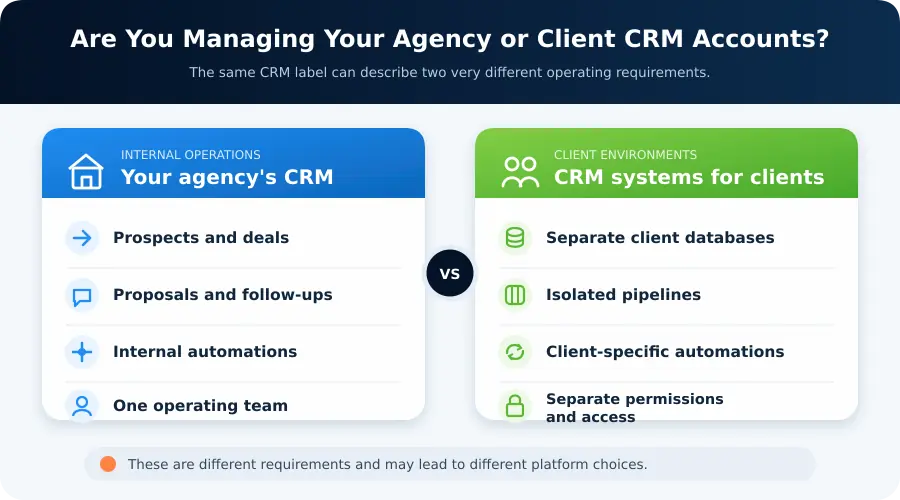
One distinction can narrow the choice quickly. A CRM for your own agency mainly tracks prospects, proposals, deals, and follow-ups. Managing CRM for clients is different because every client may need separate contacts, pipelines, permissions, and automations.
Platforms built around isolated client environments are usually better suited to the second model.
What to Compare Before Replacing Zoho
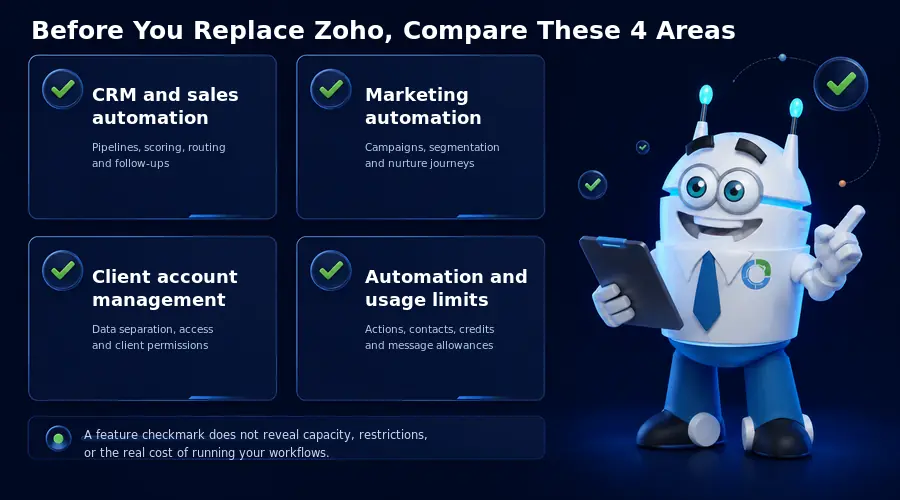
Before starting a CRM migration, compare the limits and workflow details behind each capability. A feature list can tell you what a CRM includes, but not whether it will support the way your agency actually works. Before migrating, compare the limits and workflow details behind each capability.
CRM and Sales Automation
Check whether the platform supports multiple pipelines, custom fields, lead routing, scoring, sequences, reporting, API access, webhooks, and automatic actions when deals change stage. These capabilities determine how much manual sales work you can remove.
Marketing Automation
Evaluate email campaigns, segmentation, behavioral triggers, nurture journeys, SMS, WhatsApp, forms, landing pages, and appointment reminders separately. Understanding crm vs marketing automation matters because the two solve different problems. Automatically assigning a new deal, for example, is very different from running a multi stage nurture journey based on customer behavior.
Client Account Management
If you manage systems for clients, distinguish between separate client accounts, data isolation, permissions, custom domains, branding removal, white label access, and SaaS resale. They are not interchangeable features. If client work also involves shared files, pairing your CRM with document management software for small businesses can keep records consistent across accounts.
Automation Limits
Finally, check what actually counts toward usage. Vendors may measure actions, workflow runs, contacts, credits, API calls, or messages. monday CRM illustrates the difference clearly: Standard currently allows 250 automation actions per month, while Pro increases the allowance to 25,000. A checkmark beside “automation” tells you very little about the volume your agency can realistically run. Our AI CRM pricing guide breaks down how several platforms structure these costs.
When Should You Stay With Zoho?
Replacing Zoho is not automatically an upgrade. If your team already works comfortably in the system and your workflows run reliably, migration can create more cost and disruption than value.
Staying with Zoho often makes sense when:
- Your employees already know the platform well
- Several Zoho applications support your current processes
- Custom modules, functions, or integrations would be expensive to rebuild
- Subscription cost remains important
- You do not need separate CRM environments for clients
- Most frustrations come from configuration or adoption issues rather than missing capability
Zoho already supports workflow rules, webhooks, tasks, field updates, and custom functions, so moving purely to gain “more automation” may not solve the underlying problem.
A stronger reason to switch appears when another platform fits your agency’s operating model more naturally and removes a specific source of complexity.
Choose a Zoho Alternative Based on How Your Agency Works
The right replacement becomes clearer once you identify what Zoho is making harder for your agency.
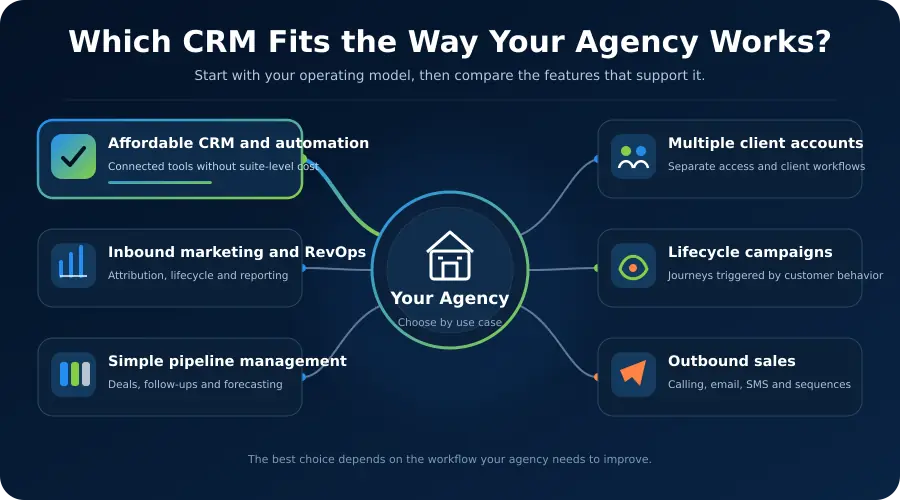
Saleoid fits smaller teams that want affordable CRM and connected business automation. HighLevel is better equipped for multiple client CRM environments, while HubSpot and ActiveCampaign suit agencies prioritizing inbound RevOps or lifecycle marketing. Pipedrive keeps internal sales simple, monday CRM connects sales with operational work, and Close focuses heavily on outbound selling.
Changing platforms should solve a specific operational problem, reduce software overlap, or lower the overall cost of managing your stack.
For smaller teams comparing the best affordable crm, the bigger question is whether the lower price still covers the workflows they actually need.
For smaller agencies, Saleoid can bring sales CRM, marketing automation, appointments, and billing into one system. You can start with the CRM foundation and add applications as your requirements grow.
Its 15-day free trial also gives you a practical way to rebuild one existing Zoho workflow and test the experience before committing.
FAQs
The best Zoho alternatives for agencies depend on the use case. Saleoid suits smaller agencies wanting affordable CRM and automation, HighLevel is stronger for multiple client accounts, HubSpot fits inbound and RevOps teams, while Pipedrive works well for straightforward internal sales management.
Saleoid is worth considering if you want CRM plus automation, appointments, and billing in a more compact setup. Pipedrive is the simpler choice when your main requirement is pipeline management, follow-ups, and sales activity rather than broader business operations.
HubSpot can be better for agencies prioritizing inbound marketing, lifecycle reporting, and sales alignment. Zoho remains attractive for customization and pricing. The better option depends on whether you value a tightly connected marketing ecosystem or broader flexibility at a lower cost.
Zoho is already competitively priced, so headline price alone is not enough. Saleoid currently advertises a CRM foundation from $5 per month with two-year billing, but you should compare users, automation limits, contacts, and required apps before deciding which platform is actually cheaper.