


Zoho can make perfect sense when you first set it up. Then your business changes. Perhaps your team only touches a fraction of what you have configured, important work is spread across several Zoho apps, or new employees need more guidance than you expected just to follow the sales process.
None of that makes Zoho CRM a poor choice. It remains competitively priced, including a free edition for three users and paid plans designed for small teams. But it can be a reason to see what else fits. After all, 91% of companies with 10 or more employees use a CRM system, so the question isn’t whether you need one, but whether your current tool still aligns with how you work.
The best Zoho alternatives for small business depend heavily on what you are replacing. A company that needs a straightforward sales CRM should not compare products the same way as one that also depends on invoicing, scheduling, projects, campaigns, and customer conversations.
So, which alternatives actually make sense once you look beyond the feature list? We narrowed the field to 6 worth considering.
Zoho Alternatives for Small Business at a Glance
Looking at the best CRM for small businesses more broadly can also help you establish which capabilities matter before narrowing the search to direct Zoho replacements
| Alternative | Best For | Starting Price | Main Limitation |
| Saleoid | All-in-one small business operations | From $5 per month | Smaller ecosystem than Zoho |
| Pipedrive | Visual sales pipelines | From $14 per seat per month | Mainly sales-focused |
| Freshsales | Affordable sales CRM | From $9 per user per month | Advanced features need higher plans |
| HubSpot | Easy adoption and business growth | Free plan available | Advanced plans can get expensive |
| monday CRM | Customizable visual workflows | From $12 per seat per month | Requires more setup |
| Less Annoying CRM | Simple CRM for very small teams | $15 per user per month | Limited broader business tools |
Zoho CRM vs Zoho One: Know What You Actually Need to Replace
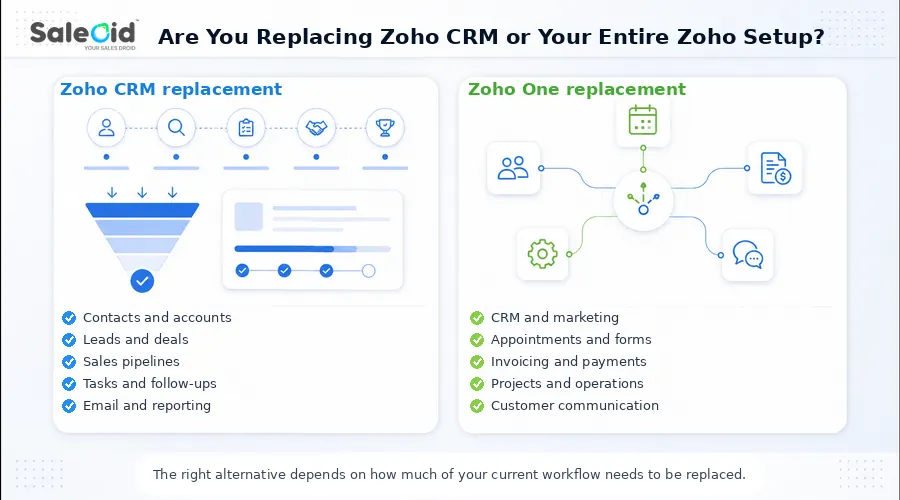
Before comparing Zoho alternatives for small business, identify what you currently depend on. Zoho CRM is a dedicated CRM product, while Zoho One combines more than 45 applications across sales, marketing, finance, service, HR, and operations. Treating them as the same product can lead you toward the wrong replacement.
If You Only Need to Replace Zoho CRM
Your comparison can stay focused on core sales functions such as contact and account management, leads, pipelines, deals, tasks, email integration, scoring, automation, and reporting.
If those are your main requirements, compare sales CRM software before evaluating broader business suites.
In this case, Pipedrive, Freshsales, Less Annoying CRM, monday CRM, and HubSpot Sales Hub are reasonable products to compare at the CRM level. The more important question is whether the plan you are considering includes the particular automation, email, reporting, and pipeline capabilities your team uses today.
If You Are Replacing Multiple Zoho Apps
The comparison becomes broader if Zoho also handles work outside your sales pipeline.
You may need a replacement that covers marketing automation, appointment scheduling, forms, invoicing, payments, project management, electronic signatures, customer communication, or customer portals alongside CRM.
At that point, comparing CRM prices alone becomes misleading. You need to compare the complete software stack required to recreate your existing workflow.
If campaigns and lead nurturing are important parts of your current setup, compare the replacement’s marketing automation software capabilities alongside its CRM
6 Best Zoho Alternatives for Small Business
1. Saleoid: Best All-in-One Zoho Alternative for Small Business
Best for: Small service businesses and growing teams that want CRM plus operational tools in one platform.
Pricing
Saleoid’s Custom CRM starts at $5 per month with two-year billing, or $15 per month with monthly billing. Its other currently confirmed plans are Growth at $29.40 per month and Premium at $119.40 per month with two-year billing. Growth includes up to five users, while Premium includes up to 15.
Key Features
- CRM and sales pipelines
- Marketing and billing automation
- Appointments and online booking
- Project management on Growth
- WhatsApp marketing and electronic agreements
- Client portal and subscription management
- API, SMS, AI, and custom roles on Unlimited
Where Saleoid Has an Advantage Over Zoho
Saleoid suits businesses wanting fewer separate applications. A lead can move from form submission to appointment, follow up, billing, and customer communication within one connected system. This connected process can also help businesses understand how to turn leads into customers more effectively.
Where Zoho Is Stronger
Zoho offers a much larger ecosystem, deeper customization, more integrations, and a more established developer community.
Limitations
- Smaller ecosystem than Zoho
- Specialist integrations may be limited
- API access requires Unlimited
2. Pipedrive: Best for Small Sales Teams That Want a Visual Pipeline
Best for: Small businesses that mainly need to organize leads, deals, rep activity, and follow ups.
Pricing
Pipedrive costs $14 per seat per month for Lite, $39 for Growth, $59 for Premium, and $79 for Ultimate with annual billing.
For many Zoho competitors for small teams, entry pricing tells only part of the story. Growth is the more relevant comparison if you need full email sync, tracking, automations, nurturing sequences, forecasting, and meeting scheduling.
Key Features
- Custom sales pipelines
- Lead and activity management
- Email sync and tracking
- Forecasting and scheduling
- More than 500 integrations
Where It Has an Advantage Over Zoho
Pipedrive keeps the experience centered on moving deals through a visual sales process. Teams that do not need a broad business suite may find it quicker to configure and easier to keep focused on sales activity.
Where Zoho Is Stronger
Zoho offers a wider business ecosystem and stronger connections between CRM, finance, marketing, projects, and service tools from the same vendor. See our Pipedrive vs Zoho CRM comparison for a closer look.
Limitations
- Email automation starts with Growth
- Broader operational needs may require extra apps
- Several capabilities are sold as add ons
3. Freshsales: Best Value for Sales CRM Fundamentals
Best for: Small teams that want an affordable CRM like Zoho with sales communication built into the platform.
Pricing
Freshsales offers a free plan for up to 3 users. Growth costs $9 per user per month, Pro $39, and Enterprise $59 with annual billing. Growth covers email, phone, chat, custom fields, lifecycle stages, templates, and basic workflows. Pro is the better benchmark if you need scoring, sales sequences, deal insights, or territory management.
Key Features
- Pipeline and contact management
- Built-in email, phone, and chat
- Workflow automation
- Lifecycle stages
- Email templates
- Scoring and sequences on Pro
- Freddy AI capabilities
Where It Has an Advantage Over Zoho
Freshsales gives sales teams a focused workspace where communication and pipeline activity sit closely together.
Where Zoho Is Stronger
Zoho provides broader customization and a much larger ecosystem for finance, projects, support, and marketing.
Limitations
- Advanced sales features require Pro
- Freddy AI usage can involve extra charges
- Wider business needs may require additional Freshworks products
4. HubSpot: Best for Easy Adoption and an Integrated Growth Ecosystem
Best for: Small businesses that value ease of use and want sales, marketing, service, and content tools connected around shared customer data.
Pricing
HubSpot offers free CRM tools for up to 2 users. Starter pricing can include temporary discounts, so it is not the best benchmark for long term cost. Sales Hub Professional starts at $90 per user per month annually and carries a $1,500 onboarding fee.
Key Features
- Contact and deal management
- Email and sales automation
- Sequences and forecasting
- Reporting tools
- Sales enablement features
- Large integration ecosystem
Where It Has an Advantage Over Zoho
Among simple Zoho alternative for small business, HubSpot stands out for an approachable interface and close alignment between sales and marketing activity.
Where Zoho Is Stronger
Zoho delivers advanced CRM functionality at considerably lower pricing and offers strong customization without requiring a comparable Professional-level investment.
Limitations
- Professional pricing rises quickly
- Required onboarding increases first-year cost
- Some AI features consume HubSpot Credits
- Promotional Starter pricing can change
See our full guide on HubSpot alternatives for small business. For a direct HubSpot vs Zoho CRM comparison.
5. monday CRM: Best for Customizable Visual Workflows
Best for: Small businesses that prefer visual boards and want to shape CRM workflows around their own processes.
Pricing
With annual billing, Basic costs $12 per seat per month, Standard $17, and Pro $28. Ultimate uses custom pricing. Basic supports 1,000 active contacts and deals, one dashboard, and 20 quotes or invoices monthly. Standard raises those limits to 10,000 records, five dashboards, 50 quotes or invoices, and 250 custom automations each month.
Key Features
- Customizable pipelines and boards
- Workflow automation
- Email sequences
- Centralized communication
- Quotes and invoices
Where It Has an Advantage Over Zoho
monday CRM works well for teams with nontraditional sales processes because boards can be adapted around different stages, responsibilities, and workflows.
Where Zoho Is Stronger
Zoho provides deeper CRM functionality, more mature business applications, and a broader ecosystem for complex sales operations.
Limitations
- Usage limits change significantly by plan
- Automations require Standard or above
- Flexible setups can require substantial configuration
6. Less Annoying CRM: Best for Very Small Businesses That Want Simplicity
Best for: Solopreneurs and small teams that need straightforward contact management, pipelines, tasks, calendars, and follow-ups.
Pricing
Less Annoying CRM charges $15 per user per month on a single plan. There are no contracts, setup fees, or higher tiers, and the full CRM is available during a 30 day free trial. The appeal is predictability because you do not need to upgrade just to unlock another core CRM feature.
Key Features
- Contacts and companies
- Customizable pipelines
- Unlimited custom fields
- Tasks and calendar
- Email logging
- Mobile access
Where It Has an Advantage Over Zoho
Its simplicity makes purchasing and day-to-day administration easier for very small teams that only need essential CRM functions.
Where Zoho Is Stronger
Zoho offers far more automation, analytics, AI, integrations, marketing tools, and advanced customization.
Limitations
- Narrower product scope
- Not a full Zoho One replacement
- Growing operational needs may require additional software
Which Zoho Alternative Is Best for Your Small Business?
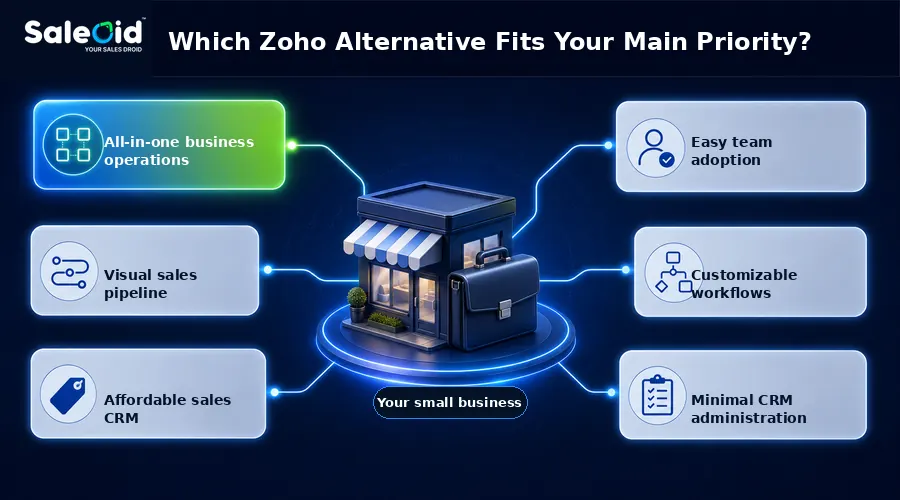
| If Your Priority Is… | Best Fit | Why |
| CRM, appointments, billing, and marketing | Saleoid | Combines several small business functions |
| Clear visual sales pipeline | Pipedrive | Keeps sales activity focused |
| Affordable sales CRM | Freshsales | Strong features at lower tiers |
| Easy adoption and marketing ecosystem | HubSpot | Connects sales and marketing closely |
| Flexible visual workflows | monday CRM | Adapts well to custom processes |
| Minimal CRM administration | Less Annoying CRM | One simple plan with core CRM tools |
3 to 5 Person Sales Team
If your team needs pipeline management, email sync, sequences, follow ups, lead handling, and reporting, compare plans that actually include those functions. Pipedrive Growth and Freshsales Pro are more meaningful benchmarks than judging either platform solely by its lowest advertised price.
Small Service Business
A service company often needs more than deal tracking. Lead capture may need to connect with booking, customer follow-up, billing, projects, and ongoing communication.
In that situation, Saleoid can reduce the need to combine several separate subscriptions because those functions are available within the wider platform rather than treating CRM as an isolated tool.
What to Check Before Switching From Zoho
Moving away from Zoho involves more than exporting contacts and choosing another CRM. You need to confirm that the replacement can reproduce the workflows your team already depends on.
Required Feature vs Available Tier
Create a list of essential functions first, then identify the exact plan that includes each one. Check email sync, workflows, sequences, lead scoring, WhatsApp, SMS, appointments, invoicing, API access, and reporting.
This prevents a low entry price from looking attractive when several required features actually sit on a higher tier.
Pay particular attention to automated sales follow ups, since some CRMs reserve the workflows or sequences needed for them for higher plans
Pricing Structure
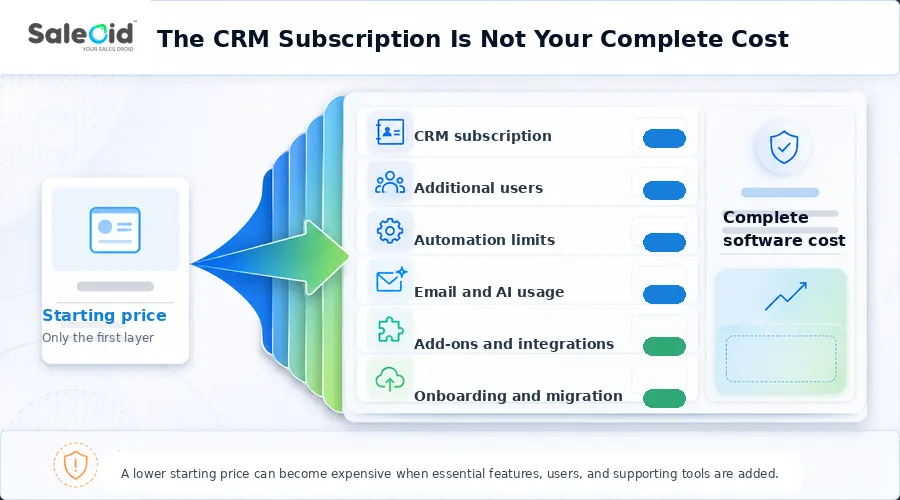
Compare the complete cost rather than the advertised monthly rate. Include:
- Per-user charges
- Included users
- Contact and automation limits
- Email allowances
- AI credits
- Add-ons
- Billing commitments
- Required onboarding
Reviewing CRM pricing in this way makes it easier to separate the base subscription from user limits, paid features, and other costs.
Software Consolidation
Map everything currently connected to your Zoho setup:
CRM + scheduling + invoicing + forms + email marketing + projects + electronic signatures + SMS or WhatsApp
Then compare the cost and complexity of your current stack with the complete replacement stack. A cheaper CRM can still increase overall spending if several additional tools are required.
The modular crm vs multiple tools comparison can help you decide whether consolidation or a connected set of specialist applications will be easier to maintain
Administration Requirements
Migration also creates ongoing ownership work. Decide who will configure pipelines, rebuild automations, maintain integrations, control permissions, clean data, and train users.
Do not overlook the data itself. Zoho CRM provides module exports and complete backups, but complete backups can contain records and attachments separately, while some information such as email content and integration-sourced data is not included in the standard backup. Field and module mapping also matters when records move between systems.
For a small business without a dedicated CRM administrator, the easier system to maintain may ultimately be more valuable than the one with the longest feature list.
How to Migrate From Zoho CRM Without Losing Important Data
A successful CRM migration starts with knowing exactly what must survive the move. Zoho lets you export module data, notes, tags, and full backups, but some information requires separate handling. Email content and email attachments, for example, are not included in a standard CRM backup.
A structured CRM migration plan becomes especially important when historical records, custom fields, and automations all need to move together.
Before Exporting
Create a field map for contacts, accounts, leads, deals, products, pipeline stages, record owners, tags, and custom fields. Preserve unique identifiers where possible so related records can be matched correctly after import.
Check Historical Records
Confirm whether your new CRM can import and retain:
- Notes
- Activities
- Emails
- Call history
- Attachments
Do not assume a basic contact export contains this history. Zoho, for example, supports notes as a separate export and stores attachments separately within full backup files.
Rebuild CRM Logic
Document workflows, assignment rules, scoring models, templates, automations, dashboards, and reports before switching systems.
These settings represent how your CRM operates, not just the records inside it, so a standard CSV import will not recreate them automatically.
Validate After Migration
Once the data is imported, compare record totals, check for duplicates, confirm record ownership, review custom fields and pipelines, test automations, reconnect email and calendars, and have actual users complete common tasks.
Do not close your Zoho account until those checks are complete and you have retained a secure copy of the original export.
Choosing the Right Zoho Alternative for Small Business
The best replacement depends less on which CRM has the longest feature list and more on what you want to simplify after leaving Zoho.
If sales pipeline management is your main priority, a focused sales CRM may be enough. Businesses that care most about easy adoption and minimal administration may prefer a simpler platform. But if the bigger problem is managing several separate tools around your CRM, an all-in-one system becomes more relevant.
For small businesses that want CRM, marketing automation, appointments, billing, bookings, and customer engagement in one place, Saleoid is worth considering. Its bundled plans are built to cover more of the customer journey without requiring a separate application for every operational task.
If connecting lead management with campaigns is a major priority, comparing the best CRM with marketing automation options can help you decide whether one platform can replace separate tools
Explore Saleoid CRM for small business to see whether bringing your CRM and supporting tools into one platform could make your setup easier to manage and more cost-effective.
FAQs
There is no single best option for every small business. Saleoid, one of the best Zoho alternatives for agencies and small businesses, suits those who CRM plus wider operational tools, while Pipedrive works well for pipeline-focused sales teams. Freshsales offers affordable sales CRM functionality, and Less Annoying CRM makes sense when simplicity and minimal administration matter most.
Yes, but the lowest advertised price can give the wrong impression. Zoho CRM Standard currently costs $14 per user per month with annual billing. Some competitors start below that, but compare the plan containing your required features, team size, supporting software, and add ons before deciding which option is genuinely cheaper.
Saleoid is a strong option when both functions need to sit alongside CRM. Its Starter bundle currently includes appointments, online bookings, billing automation, marketing automation, CRM, engagement, and products and services management, making it suitable for small businesses that want more than a standalone sales system. For businesses comparing a CRM with invoicing alongside appointments, this combination can be especially useful.
It can, although subscription price alone does not determine the outcome. Calculate the required replacement tier, number of users, additional applications, integrations, migration work, training, setup, and ongoing administration. A cheaper CRM may cost more overall if your business must add several separate tools to restore its existing workflow. A detailed CRM pricing comparison report can also help you evaluate the full cost before switching.
Disclaimer: Pricing, plan limits, features, and included capabilities are based on information available from official provider websites at the time of writing. CRM vendors may change pricing, features, usage limits, or billing terms, so review the current plan details before making a purchase or migration decision.