



Zoho vs Freshsales is a useful comparison if you need a CRM to organize leads, manage deals and improve follow-ups. But the starting price only tells part of the story. Your team may also need appointments, estimates, client work and billing, and those needs can change which plan is affordable.
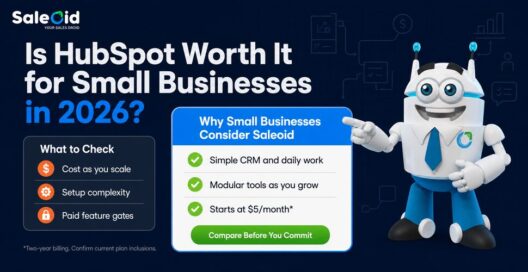
For a small business with limited time and no dedicated CRM administrator, another seat charge or disconnected application can be harder to absorb than a missing advanced feature. Zoho CRM and Freshsales both have useful sales tools, but their upgrade paths deserve closer attention than their entry prices. If you want sales, appointments, projects and billing connected, Saleoid offers a practical alternative worth comparing before you commit. Explore Saleoid’s CRM for small businesses to see how a connected setup could fit your daily work.
Zoho vs Freshsales: The short answer
Zoho CRM and Freshsales handle contacts and deals, but paid seats, higher-tier automation and work across separate apps can make them less practical for small businesses. Saleoid Growth is our recommended alternative for five-person teams needing sales, appointments, projects and billing together, provided its features fit. Its lower published monthly equivalent requires two-year billing.
How did we compare Zoho CRM, Freshsales and Saleoid?
We compared published pricing, included users, automation access, setup requirements and the steps from lead capture to client payment. Official pricing pages and product documentation support the feature claims. Ease-of-use observations are editorial assessments of product scope, rather than scores from first-hand testing.
The cost examples use the stated seat price multiplied by the team size. They exclude optional services and usage charges unless explicitly included. Zoho CRM and Freshsales examples use annual billing; Saleoid’s discounted examples use two-year billing. That distinction matters because a lower monthly equivalent can still require a larger upfront payment.
The Freshsales vs Zoho CRM decision should also account for your existing tools. If scheduling, invoicing and delivery already work well, replacing them may add little value. If people repeatedly copy customer details between systems, a broader option such as Saleoid may address more of the problem.
Zoho vs Freshsales: Where can each fall short for small businesses?
Zoho CRM can ask a small team to choose between editions and configure a larger sales system. Freshsales can look inexpensive until the team needs Pro features across several seats. Both can handle sales activity, but neither entry price should be treated as the price of your complete client workflow.
For an owner who also handles sales, customer service and invoicing, these are meaningful limitations. A cheaper contact database does little for a missed estimate follow-up or a customer asking for an invoice that lives elsewhere. Saleoid Growth addresses a different need by including five users and applications for sales and client work in one bundle.
| Buying question | Zoho CRM | Freshsales | Saleoid option to check |
| Free entry | Free edition for up to 3 users | Free tier for up to 3 users shown on plan comparison | No free-forever plan shown; paid Custom starts at $5/month on two-year billing |
| First paid price used here | Standard: $14/user/month, billed annually | Growth: $9/user/month, billed annually | Growth: $29.40/month, billed every 2 years, with 5 users |
| Higher sales tier | Professional: $23/user/month, billed annually | Pro: $39/user/month, billed annually | Premium: $119.40/month, billed every 2 years, with 15 users and 5 accounts |
| Main pricing question | Which edition unlocks the needed process? | How many seats need Pro capabilities? | Which apps, allowances and contract length fit the workflow? |
The free plans deserve a brief mention because they affect the initial price comparison. They are not a long-term cost plan for a business that expects more users or needs capabilities outside the free edition. An agency that books discovery calls, sends estimates and invoices clients should assess those steps before building its business around a free CRM.
Saleoid is the more relevant alternative to investigate when the problem extends beyond storing contacts. Its value comes from bringing the work around a sale into the same product, with the apps and allowances confirmed for the chosen plan.
How much do Zoho CRM and Freshsales cost in 2026?
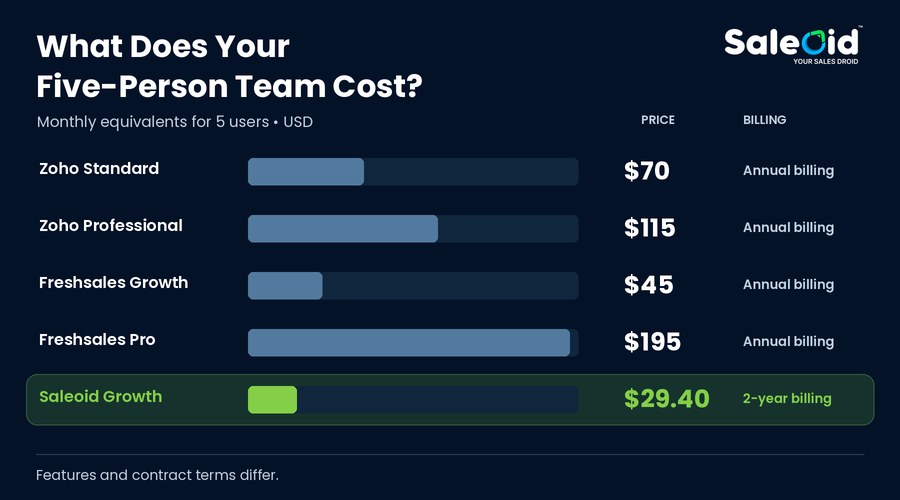
Freshsales Growth starts at $9 per user per month with annual billing, compared with $14 for Zoho CRM Standard. Five users therefore cost $45 or $70 per month before relevant extras. Saleoid Growth lists five included users at a $29.40 monthly equivalent on two-year billing, so its team subscription is lower in this specific comparison.
What does each CRM cost for five users?
For a five-user team, the difference between $9 and $14 per user looks small. The difference between an entry tier and the tier containing the capability you need can be much larger. Calculate with the plan you would actually buy, then add any other products, usage charges or implementation work required for your process. Use our CRM pricing comparison to review the whole team bill rather than the starting seat price.
| Published plan | Billing basis | 1 user, monthly equivalent | 5 users, monthly equivalent | 5 users, annual commitment at that rate |
| Zoho CRM Standard | $14/user/month, billed annually | $14 | $70 | $840 |
| Zoho CRM Professional | $23/user/month, billed annually | $23 | $115 | $1,380 |
| Freshsales Growth | $9/user/month, billed annually | $9 | $45 | $540 |
| Freshsales Pro | $39/user/month, billed annually | $39 | $195 | $2,340 |
| Saleoid Growth | $29.40/month, billed every 2 years; includes 5 users | Not a single-seat price | $29.40 | $352.80 equivalent; $705.60 over 2 years |
When do paid upgrades and add-ons increase the cost?
Freshsales Growth includes basic workflows, chat, email and phone in its published plan summary. Sales sequences, contact scoring and territory management appear under Pro. If your five salespeople need sequences, using Growth’s $45 figure to make the purchase decision understates the cost. The same Freshsales page lists branded documents at $19 per user per month and a Freddy AI Agent add-on at $49 per 100 sessions. Check whether either applies to your proposed setup before approving a budget.
Zoho Standard has workflows, assignment rules, cadences and reporting in the current plan description. Professional adds process automation through Blueprint, CPQ and inventory management. Enterprise lists further controls such as territory management, custom functions and customer portals. A team that needs one of those later features cannot assume the Standard seat price covers it.
How does Saleoid pricing compare with per-user plans?
For a five-person team, Saleoid Growth is $15.60 less per month than five Freshsales Growth seats and $40.60 less than five Zoho Standard seats at the billing terms shown. That is a comparison of published subscription rates, with different feature sets and commitments. The broader value is that Growth also lists appointments, projects, estimates and invoicing. A business using those applications can assess savings across its whole setup rather than just its contact database.
Saleoid Growth is also listed at $49 with monthly billing. That option is useful if a startup wants flexibility, although it is higher than Freshsales Growth’s five-seat annual-billing monthly equivalent. Compare like-for-like contract terms before deciding.
For a freelancer who needs a smaller setup, Saleoid Custom starts at $5 per month on two-year billing, with one user, 2,500 contacts and companies, five automations and usage-based email. Optional app choices affect the final bill; the detailed feature table marks CRM as an add-on. Confirm the configured price rather than assuming every feature is covered by the starting rate.

Does a free CRM actually save money?
A free CRM saves the subscription fee, but it can still leave costs for other tools and manual work. Zoho CRM and Freshsales both publish free tiers for up to three users. For a business that needs more seats, advanced sales functions or a connected client workflow, that allowance is a starting limit rather than evidence of long-term affordability.
The cost appears when a team designs its work around tools it later has to upgrade to use. For example, consider a hypothetical team with a founder, an account manager and a sales rep. They fit within three free seats today. Once a fourth person needs access, or the team needs a feature reserved for a paid edition, the decision changes. The sensible calculation includes both the next plan and the time spent rebuilding the process.
Free can also leave separate costs for scheduling, proposals, invoicing and client communication. If people keep copying the same customer details between systems, the business still pays through staff time and app subscriptions. This is where a paid option such as Saleoid becomes a practical alternative: choose the apps your workflow needs, or compare the Growth bundle when several people share that work. For a closer look at the paid-versus-free decision, read $5 CRM vs Free CRM.
Zoho CRM vs Freshsales: Which offers better sales automation?
Zoho CRM offers workflows in Standard and guided process automation in Professional. Freshsales puts basic workflows in Growth and sales sequences in Pro. The limitation for a small team is paying for a higher edition, or configuring more process than it has time to maintain, just to stop leads and customer tasks being missed.
A workflow is a rule that runs after an event. For example, when a website inquiry becomes a lead, the CRM assigns an owner and creates a follow-up task. A sales sequence is a planned series of outreach steps. Guided process management adds rules around how a person moves a deal through stages. These terms overlap in marketing copy, but they solve different problems.
What automation does Zoho CRM include?
Zoho’s published Standard tier includes workflows and assignment rules, while Professional adds Blueprint for step-by-step process automation. Its workflow documentation describes actions such as email alerts, task assignments and field updates. Those functions support a structured sales process, but the team still has to decide stages, owners, exceptions and permissions. If the founder is also the person maintaining the CRM, that configuration competes with customer work. Before choosing Zoho, check whether a simpler workflow in Saleoid would cover the required follow-up and client handoff.
What automation does Freshsales include?
Freshsales Growth lists basic workflows, while Pro adds sales sequences and contact scoring. That means a five-person team needing those Pro functions moves from $45 to $195 per month on annual billing, an additional $150 per month or $1,800 per year. The jump is difficult to justify if most of your work involves a small number of personal follow-ups and client projects.
Freshsales Pro can be appropriate for frequent outbound sales, but a consultancy or small service agency should check whether it is paying for sales capabilities while still needing separate delivery and billing tools. Saleoid is a more relevant alternative to test when connecting those steps is the bigger problem.
Can Saleoid connect sales automation with client work?
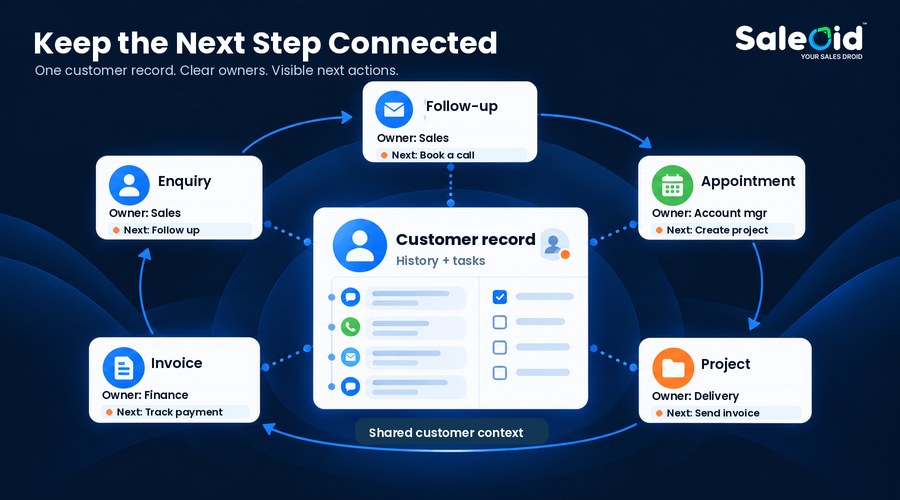
Saleoid approaches automation as part of a broader client workflow. Its pricing page lists five automations in Custom and includes appointments, project management, estimates and invoicing in Growth. A small agency could capture an inquiry, set a follow-up, book a meeting and then move into client delivery without buying every step as a separate system. The benefit for a small business is having the applications around the handoff available within the same product. Test the exact triggers and connected actions you need, rather than assuming an included app means every possible workflow is automated. If you are comparing AI CRM for small businesses, test the specific tasks you want AI to support alongside the rest of your client workflow.
Where can automation become a burden?
The danger is automating the wrong handoff. If a lead can enter through a form, phone call and referral, an assignment rule that covers only the form will leave two sources unmanaged. If a deal closes but the delivery team works in another tool, a polished sales sequence will not create the project or invoice.
Before paying for a higher tier, map one real lead from first contact through payment. Mark every point where someone copies data, chases an update or wonders who owns the next action. Then build only the automations that remove those gaps. This test is more useful than comparing the number of automation labels on three pricing pages.
Zoho or Freshsales: Which is easier for a small team to use?
Neither product should be judged only by how quickly you can update a deal. Zoho CRM adds decisions about modules, fields and rules. Freshsales focuses on sales activity, which may still leave a services business arranging delivery and billing elsewhere. For a small team, the friction between those tasks can matter more than a tidy sales screen. These are editorial assessments of product scope, not results from a hands-on usability test.
How much CRM setup will your team need?
Ease of use has two parts. The first is how quickly someone can enter and update a deal. The second is how much work it takes for the business to finish a customer job. With Freshsales, check how often a staff member must switch from sales records to delivery or billing tools. With Zoho CRM, check how much configuration is required before each person sees the fields and tasks relevant to their job. For both, record the steps a new employee would need to learn. That gives you a practical reason to seek an alternative if the setup is more work than your team can sustain.
Does the CRM simplify work after the sale?
For a freelancer, the useful test is practical: can you see the last conversation, the next appointment, the agreed price and the unpaid invoice without searching several apps? For a five-person agency, ask whether the account manager and the person doing the work see the same customer context. A CRM with more customization is not automatically easier to run.
Saleoid is our preferred starting point for a workflow test when staff move between sales and service work. The Growth feature table includes appointments, project management, estimates, invoicing and personal email alongside CRM functions. That breadth could reduce handoffs for a small team. It also means you should set up one real workflow during the trial rather than assume every included feature will fit the way your business works.
What are the limitations of Zoho CRM for small businesses?
Zoho CRM can become less practical when the required process spans higher editions or separate applications, and nobody has time to maintain the setup. Its published plan differences make it important to price the full workflow before choosing.
1. Advanced processes can require a higher edition
Zoho CRM’s strengths can create a buying problem for a small business: the plan that handles leads may not be the plan that handles the whole process. Standard includes sales tools, but guided stages, inventory processes, territories and customer access require checking higher editions and their limits. A small team should treat that upgrade path as part of the buying decision, rather than discover it after importing contacts and building rules.
2. A larger app ecosystem still needs a complete cost calculation
The wider Zoho product family can solve other needs, but a family of products is not the same as one CRM subscription including all of them. Zoho’s page separately lists products such as Bookings, Projects-related work tools, Books and Invoice. A small firm should price the actual combination it will use, including setup, integrations and administration, before calling Zoho the cheapest solution. Compare the best Zoho alternatives before committing to a wider collection of applications.
3. Customization needs someone to maintain it
A sophisticated configuration is harder to justify when the founder has half an hour a week to maintain it. Someone still needs to check field changes, assignment rules and whether staff follow the process. A consultant or startup with no CRM administrator should consider that workload before choosing a system mainly for its customization depth.
If you are comparing a lower-cost route, Zoho CRM pricing needs to be assessed against the steps after a deal closes. Saleoid Growth can be a more practical candidate when five people need sales, appointments, projects and billing together at a fixed team price. Test the actual workflow and compare contract commitments before switching. Compare Saleoid as a Zoho Alternative using the appointments, client work and billing your team needs.
What are the limitations of Freshsales for small businesses?
Freshsales can become expensive when a small team needs Pro features across several seats. Its sales focus also means a services business should check how estimates, delivery and billing fit into the proposed setup.
1. The jump from Growth to Pro increases the team bill
Freshsales starts at $9 per user per month on annual billing for a plan containing basic workflows and sales communication tools. Its pricing step to Pro is significant: $39 per user per month on annual billing. If your sales process needs sequences, contact scoring or territory management, the five-user example rises from $45 to $195 per month.
2. Optional documents and AI agents have separate prices
The plan summary also shows certain add-ons separately. Branded documents are listed at $19 per user per month, and Freddy AI Agent is priced by sessions after the included trial allocation. Neither charge necessarily applies to every buyer, but they show why a team should price its chosen capabilities rather than cite the Growth headline. Phone use and messaging can also carry usage or provider costs, so ask for a written estimate for your expected volume instead of assuming every communication is unlimited.
3. Sales features do not settle every client delivery requirement
Freshsales is centered on sales activity. If your team must prepare an estimate, secure approval, run a project, send an invoice and keep a client updated, check how those steps work in your proposed Freshworks setup. If those steps require separate apps, the business must manage another set of handoffs. Repeated entry, scattered updates and uncertainty over the next action are practical reasons to look for a Freshsales alternative. They should be tested in the proposed setup rather than assumed to affect every customer.
For a small agency or consultancy, Saleoid Growth deserves a side-by-side workflow test. Its published bundle includes five users and lists project, appointment, estimate and invoice functions. For a services business, that is a more relevant comparison than the number of advanced sales features on a plan page. Test whether the bundle lets your team move from an inquiry to paid client work with fewer separate tools. You can also review the best Freshsales alternatives before choosing a replacement for your current setup.
When is Saleoid a better Zoho CRM and Freshsales alternative?
For a five-person business that needs sales, scheduling, projects and invoices together, Saleoid Growth is the alternative we recommend evaluating first. The Growth plan lists five users, 5,000 contacts, 10,000 emails per month and a $29.40 monthly equivalent on two-year billing. It also lists sales and business applications such as appointments, projects, estimates and invoicing. That combination addresses two common reasons to look beyond Zoho CRM and Freshsales: the cost of several paid seats and the work that remains outside a sales-focused CRM.
For freelancers and consultants who want a tailored setup
A solo consultant should not have to buy a large sales package simply to keep track of inquiries, meetings and the next follow-up. Saleoid Custom lets you build a setup around selected applications. Start with the published base price and add the apps you will use, then compare the complete quote with the Zoho or Freshsales edition covering the same work.
The practical advantage is flexibility. A freelancer whose main need is appointments and client billing can assess those functions without making enterprise sales features the focus of the purchase. Confirm the required CRM app and other selections in the Custom quote, as noted in the pricing section.
For startups and small teams sharing sales and billing work
A startup with five staff may find Growth easier to budget than five separate paid CRM seats, provided the team will actually use the included applications. The pricing benefit is concrete: five included seats at $29.40 per month on two-year billing, compared with $45 for five Freshsales Growth seats or $70 for five Zoho Standard seats on annual billing. Compare the actual features and upfront commitment before choosing.
For agencies managing multiple business accounts
An agency with several brands or clients should look at Premium, which lists five business accounts and 15 users. Its $119.40 monthly equivalent also requires two-year billing; monthly billing is listed at $199. Check account separation, permissions and the plan’s actual limits in a demo. Agencies can also review Zoho alternatives for agencies against their client and delivery requirements.
What should you confirm before choosing Saleoid?
Check your essential integrations, permissions, automation actions and usage allowances in a demo. Saleoid offers monthly billing as well as discounted two-year billing, so select a term that fits your cash flow. Its pricing page shows differing automation counts between the plan summary and detailed feature table; get the current limit confirmed in writing before buying.
Zoho CRM may still fit a business needing its specific customization capabilities, while Freshsales may suit a team heavily focused on outbound sequences. Those are narrower reasons to choose a competitor. For a small services team whose work includes scheduling, delivery and billing, Saleoid addresses more of the buying problem in one bundle.
Why should small businesses consider Saleoid instead of either CRM?

Consider Saleoid when the CRM purchase is meant to improve the whole customer relationship, from the first inquiry through completed work and payment. Zoho CRM and Freshsales have useful sales functions, but their seat costs and plan restrictions can leave a small business paying more while still coordinating work across applications.
| Your business | Limitation to check in Zoho CRM or Freshsales | Saleoid option to evaluate |
| Freelancer or solopreneur | Whether the selected CRM edition covers the appointments and billing you need | Custom with only the required apps, priced as a complete setup |
| Startup with up to five staff | Per-user costs and the edition required for follow-ups | Growth with five included users |
| Small agency or consultancy | Separate sales, project and invoice handoffs | Growth’s included project, estimate, appointment and invoice applications |
| Agency managing multiple operations | Account separation and permissions across the proposed setup | Premium, with five business accounts and 15 users |
| Small business moving beyond three free users | The first paid team bill and any additional tools | A configured Custom quote or an included-user bundle |
These Saleoid options and applications are listed on Saleoid’s CRM pricing page. Choose the plan according to the applications and access you need, rather than selecting a bundle only because its headline price is lower.
This is a CRM comparison for small business, so team time counts alongside subscription price. In a hypothetical team where two people each spend an hour a week transferring details between sales and billing, that is part of the decision even if the missing integration has no line item on an invoice. Measure your own process before assigning a dollar value. For a broader buying guide, review the best CRM for small businesses against the work your team needs to complete.
How do you compare Zoho CRM, Freshsales and Saleoid before buying?
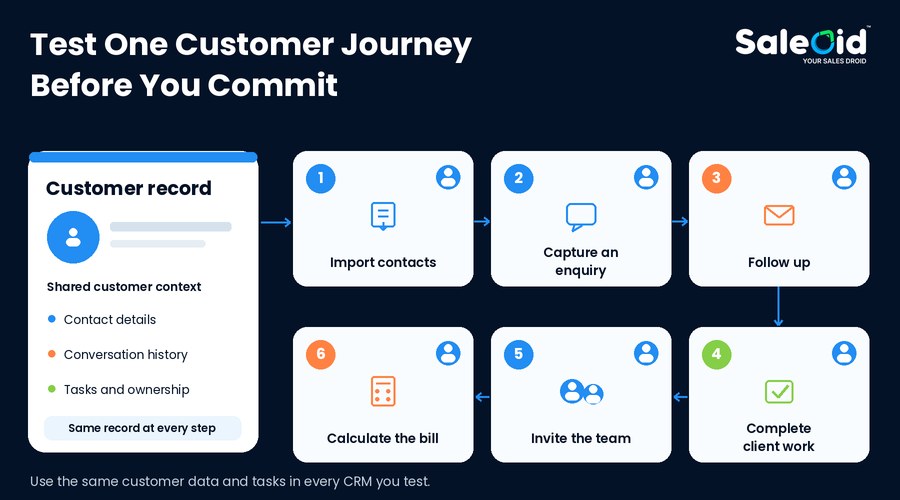
Use the same test data and the same tasks in every product. A pretty dashboard tells you little about the Tuesday afternoon when a client changes scope, wants a new estimate and asks who is handling the work.
- Bring in a small real sample. Import a few contacts, companies and open deals. Check duplicates, field mapping and whether past notes remain useful.
- Capture a new inquiry. Assign an owner, set a deadline and see what happens if nobody responds that day.
- Run a follow-up. Send an email, schedule the next step and confirm whether the activity appears on the customer record.
- Move beyond the sale. Book a call, prepare an estimate, create work and issue an invoice. Record every separate product or manual copy step.
- Invite the actual team. Give a salesperson, an owner and an account manager their normal roles. Check access and whether each can find the next action.
- Recalculate the bill. Price the edition, every user, relevant add-ons, message usage and the billing term. Ask the vendor to confirm anything the site does not clearly explain.
Run these steps in Zoho CRM, Freshsales and Saleoid if all three are on your shortlist. Saleoid offers a trial from its pricing page, while Freshsales describes a 21-day fully featured trial. Trial terms may change, so confirm them when signing up.
Zoho vs Freshsales: Should you choose Saleoid instead?
If your main requirement is a specific Zoho customization feature or a Freshsales outbound sequence, check the relevant competitor edition. But for a small services business, the choice should not end with those two names. Higher-tier automation, per-user subscriptions and separate client-work tools are good reasons to compare an alternative before committing.
For a five-person team needing sales, appointments, projects and billing together, Saleoid Growth is our recommended alternative to evaluate first. Its published $29.40 monthly equivalent on two-year billing is lower than five Zoho Standard or Freshsales Growth seats at their annual-billing rates. Its included business applications also make it relevant to the work your team does after winning a customer.
That is the commercial difference. Compare the subscription and the work it covers, then confirm the workflow and allowances. Freelancers can price a tailored Custom setup; agencies can assess Growth or Premium according to users and business accounts.
Explore Saleoid plans and request a demo. Bring one real inquiry, an appointment, a client task and an invoice. See whether Saleoid gives your team a more affordable, connected way to work before choosing a paid CRM.
FAQs
At the first paid annual-billing tier shown here, Freshsales Growth is $9 per user per month and Zoho CRM Standard is $14 per user per month. That makes Freshsales cheaper at entry. The result can reverse for a particular requirement: Freshsales Pro is $39 per user per month, while Zoho Professional is $23. Compare the plan containing your needed feature, not just the lowest advertised number.
Yes, Zoho CRM’s Free edition and the Freshsales plan comparison both state a limit of up to three users. The three-user limit and edition restrictions matter if your business expects to grow or needs more than contact tracking. Compare the first paid upgrade, required apps and team costs before building a permanent workflow around a free account.
Freshsales Growth is narrower in scope around sales activity, while Zoho CRM offers more configuration decisions. Neither comparison tells you how easy delivery and billing will be for your team. Test the complete customer workflow, including manual handoffs. Saleoid is worth testing alongside them when you want sales and client work together. This is editorial guidance, not a measured usability ranking.
Freshsales Growth lists basic workflows at $9 per user per month with annual billing. Sales sequences and contact scoring appear in Pro at $39 per user per month with annual billing. If your process requires a planned series of outbound follow-ups, verify the Pro features in a trial and calculate the price for every user who needs them.
Zoho CRM Professional lists inventory management, including invoices, sales orders, products and vendors. Zoho also offers separate business applications. Do not assume the CRM edition alone includes every appointment, project, client portal and accounting workflow your team needs. Map each step, confirm the relevant Zoho product and edition, and request a complete price for your planned setup.
Saleoid Growth lists 5 users for $29.40 per month with billing every two years. Five Zoho Standard seats total $70 per month on annual billing, and five Freshsales Growth seats total $45 per month on annual billing. Saleoid’s published team price is lower in those examples, but plans differ in features and contract length. Check app access, allowances and usage before deciding.
The $5 monthly equivalent is a starting price with two-year billing, one user, 2,500 contacts and companies, and five automations. Saleoid lists $15 with monthly billing and marks its CRM application as an add-on in the detailed Custom feature table. It can be a way to build a tailored setup, but request the total for your selected apps before comparing it with a paid Zoho or Freshsales edition.
An agency should test client separation, team permissions, appointments, delivery work and billing before choosing. Saleoid Premium is our suggested alternative to evaluate for several operations because it lists five business accounts and 15 users. Check it against the separate apps and seat costs your proposed Zoho CRM or Freshsales setup would require. Confirm the account model and the $119.40 two-year-billing monthly equivalent against your requirements.
Editorial disclosure:This comparison is written on behalf of Saleoid, which offers an alternative to Zoho CRM and Freshsales. Recommendations reflect the needs of small businesses and use published product documentation. This article does not claim hands-on testing or measured customer results.